<?xml version="1.0" encoding="utf-8"?><feed xmlns="http://www.w3.org/2005/Atom" ><generator uri="https://jekyllrb.com/" version="3.9.5">Jekyll</generator><link href="http://www.forevolve.com/feed.xml" rel="self" type="application/atom+xml" /><link href="http://www.forevolve.com/" rel="alternate" type="text/html" /><updated>2024-04-10T06:41:27+00:00</updated><id>http://www.forevolve.com/feed.xml</id><title type="html">ForEvolve</title><subtitle>A piece of mind</subtitle><entry xml:lang="en"><title type="html">Potential const issue in a plugin-based system</title><link href="http://www.forevolve.com/en/articles/2024/04/10/const-issue-with-a-plugin-based-design/" rel="alternate" type="text/html" title="Potential const issue in a plugin-based system" /><published>2024-04-10T05:00:00+00:00</published><updated>2024-04-10T05:00:00+00:00</updated><id>http://www.forevolve.com/en/articles/2024/04/10/const-issue-with-a-plugin-based-design</id><content type="html" xml:base="http://www.forevolve.com/en/articles/2024/04/10/const-issue-with-a-plugin-based-design/"><![CDATA[<p>In this article, I&#8217;m following up on my comment on Dave Callan&#8217;s post about the difference between <code class="language-plaintext highlighter-rouge">const</code> and <code class="language-plaintext highlighter-rouge">readonly</code> in C# (embedded at the end).
By simplifying my thoughts for a LinkedIn comment, I realized I was not clear enough, so I took the time to write this blog and showcase a complete working scenario, which is more complex and real-life-like than what I initially wrote.</p>

<p>Consider this setup:<!--more--></p>

<ul>
  <li>We have the Shared assembly, which defines a constant (<code class="language-plaintext highlighter-rouge">const</code>).</li>
  <li>We have a Plugin assembly that utilizes a constant from the Shared assembly. We could reference the Shared assembly using a NuGet package, which is not the case in the code sample we explore here to keep it simple.</li>
  <li>A Host Program dynamically loads plugins at runtime, including the Plugin Assembly. It also uses the same constant as the Plugin assembly from the Shared assembly, which we could also load through a NuGet package (not the case to keep it simple).</li>
</ul>

<p>Here lies the issue: if the constant in the Shared assembly changes and the dependent assemblies are not recompiled, there will be a mismatch between the new value and what the assemblies will use. For example, if the Host Program is recompiled but not the Plugin assembly, then there will be a mismatch when the Host Program utilizes it.</p>

<h2 id="code-sample">Code sample</h2>

<p>To illustrate the scenario with minimal code, we must create three separate projects: <code class="language-plaintext highlighter-rouge">Shared</code> class library, <code class="language-plaintext highlighter-rouge">Plugin</code> class library, and the <code class="language-plaintext highlighter-rouge">HostProgram</code> ASP.NET Core application. Each is as straightforward as possible while retaining a real-life-like structure.</p>

<p>Here are a few technical details:</p>

<ul>
  <li>The <code class="language-plaintext highlighter-rouge">HostProgram</code> loads plugins from the <code class="language-plaintext highlighter-rouge">Plugins</code> directory.</li>
  <li>A plugin must implement the <code class="language-plaintext highlighter-rouge">IPlugin</code> interface from the <code class="language-plaintext highlighter-rouge">Shared</code> library.</li>
  <li>Two solutions are in the directory: one for the plugin and one for the host.</li>
  <li>The <code class="language-plaintext highlighter-rouge">HostProgram</code> and the <code class="language-plaintext highlighter-rouge">Plugin</code> use the <code class="language-plaintext highlighter-rouge">MY_CONST</code> constant.</li>
  <li>When compiling the plugin using the <code class="language-plaintext highlighter-rouge">INITIAL_VALUE</code> build configuration, the <code class="language-plaintext highlighter-rouge">INITIAL_VALUE</code> symbol is used to simulate an old <code class="language-plaintext highlighter-rouge">Shared</code> assembly compilation.</li>
  <li>The <code class="language-plaintext highlighter-rouge">HostProgram/Plugins/Plugin.dll</code> file was compiled using the <code class="language-plaintext highlighter-rouge">INITIAL_VALUE</code> build configuration.</li>
</ul>

<p>Here&#8217;s a diagram that represents this setup:</p>

<figure>
    <img src="//cdn.forevolve.com/blog/images/2024/2024-04-ConstantPluginDiagramDark.png" />
    <figcaption>
        A C4 component diagram representing the relationship between the projects.
    </figcaption>
</figure>

<blockquote>
  <p>The source code is available on GitHub: <a href="https://github.com/Carl-Hugo/LinkedIn-Code/tree/main/2024-Q2/ConstantPlugin">https://github.com/Carl-Hugo/LinkedIn-Code/tree/main/2024-Q2/ConstantPlugin</a>.</p>
</blockquote>

<h3 id="shared-assembly">Shared Assembly</h3>

<p>The Shared project contains the plugin interface:</p>

<div class="language-csharp highlighter-rouge"><div class="highlight"><pre class="highlight"><code><span class="k">using</span> <span class="nn">Microsoft.Extensions.Logging</span><span class="p">;</span>

<span class="k">namespace</span> <span class="nn">Shared</span><span class="p">;</span>

<span class="k">public</span> <span class="k">interface</span> <span class="nc">IPlugin</span>
<span class="p">{</span>
    <span class="k">void</span> <span class="nf">Execute</span><span class="p">(</span><span class="n">ILogger</span> <span class="n">logger</span><span class="p">);</span>
<span class="p">}</span>
</code></pre></div></div>

<p>It also contains the <code class="language-plaintext highlighter-rouge">Constants</code> class:</p>

<div class="language-csharp highlighter-rouge"><div class="highlight"><pre class="highlight"><code><span class="k">namespace</span> <span class="nn">Shared</span><span class="p">;</span>

<span class="k">public</span> <span class="k">static</span> <span class="k">class</span> <span class="nc">Constants</span>
<span class="p">{</span>
<span class="cp">#if INITIAL_VALUE
</span>    <span class="k">public</span> <span class="k">const</span> <span class="kt">string</span> <span class="n">MY_CONST</span> <span class="p">=</span> <span class="s">"InitialValue"</span><span class="p">;</span>
<span class="cp">#else
</span>    <span class="k">public</span> <span class="k">const</span> <span class="kt">string</span> <span class="n">MY_CONST</span> <span class="p">=</span> <span class="s">"UpdatedValue"</span><span class="p">;</span>
<span class="cp">#endif
</span><span class="p">}</span>
</code></pre></div></div>

<p>The preceding code defines a constant.
The <code class="language-plaintext highlighter-rouge">INITIAL_VALUE</code> symbol is used to simulate the compilation of multiple DLLs.
Unless defined, the <code class="language-plaintext highlighter-rouge">INITIAL_VALUE</code> symbol is equal to <code class="language-plaintext highlighter-rouge">false</code>.</p>

<h3 id="plugin-assembly">Plugin Assembly</h3>

<p>The Plugin project references the Shared Assembly to implement the <code class="language-plaintext highlighter-rouge">IPlugin</code> interface.
It contains only the <code class="language-plaintext highlighter-rouge">MyPlugin</code> class:</p>

<div class="language-csharp highlighter-rouge"><div class="highlight"><pre class="highlight"><code><span class="k">using</span> <span class="nn">Microsoft.Extensions.Logging</span><span class="p">;</span>
<span class="k">using</span> <span class="nn">Shared</span><span class="p">;</span>

<span class="k">namespace</span> <span class="nn">Plugin</span><span class="p">;</span>

<span class="k">public</span> <span class="k">class</span> <span class="nc">MyPlugin</span> <span class="p">:</span> <span class="n">IPlugin</span>
<span class="p">{</span>
    <span class="k">public</span> <span class="k">void</span> <span class="nf">Execute</span><span class="p">(</span><span class="n">ILogger</span> <span class="n">logger</span><span class="p">)</span>
    <span class="p">{</span>
        <span class="n">logger</span><span class="p">.</span><span class="nf">LogInformation</span><span class="p">(</span><span class="s">"Plugin using const: {const}"</span><span class="p">,</span> <span class="n">Constants</span><span class="p">.</span><span class="n">MY_CONST</span><span class="p">);</span>
        <span class="n">logger</span><span class="p">.</span><span class="nf">LogInformation</span><span class="p">(</span><span class="s">"Plugin using readonly: {readonly}"</span><span class="p">,</span> <span class="n">Constants</span><span class="p">.</span><span class="n">MY_READONLY</span><span class="p">);</span>
    <span class="p">}</span>
<span class="p">}</span>
</code></pre></div></div>

<p>The preceding code implements the <code class="language-plaintext highlighter-rouge">IPlugin</code> interface from the Shared assembly and uses the <code class="language-plaintext highlighter-rouge">MY_CONST</code> constant and the <code class="language-plaintext highlighter-rouge">MY_READONLY</code> member.
We leverage this to test the issue later.</p>

<h3 id="host-program">Host Program</h3>

<p>The Host Program is an ASP.NET Core minimal API project that dynamically loads plugins that implement the <code class="language-plaintext highlighter-rouge">IPlugin</code> interface from the <code class="language-plaintext highlighter-rouge">Plugins</code> folder. It simulates a real-life scenario where plugins could be loaded from assemblies at runtime.</p>

<p>The host only contains the following <code class="language-plaintext highlighter-rouge">Program.cs</code> file:</p>

<div class="language-csharp highlighter-rouge"><div class="highlight"><pre class="highlight"><code><span class="k">using</span> <span class="nn">Shared</span><span class="p">;</span>
<span class="k">using</span> <span class="nn">System.Reflection</span><span class="p">;</span>

<span class="kt">var</span> <span class="n">builder</span> <span class="p">=</span> <span class="n">WebApplication</span><span class="p">.</span><span class="nf">CreateBuilder</span><span class="p">(</span><span class="n">args</span><span class="p">);</span>

<span class="kt">var</span> <span class="n">app</span> <span class="p">=</span> <span class="n">builder</span><span class="p">.</span><span class="nf">Build</span><span class="p">();</span>
<span class="n">app</span><span class="p">.</span><span class="nf">MapGet</span><span class="p">(</span><span class="s">"/load-plugins"</span><span class="p">,</span> <span class="p">(</span><span class="n">IWebHostEnvironment</span> <span class="n">hostingEnvironment</span><span class="p">,</span> <span class="n">ILoggerFactory</span> <span class="n">loggerFactory</span><span class="p">)</span> <span class="p">=&gt;</span>
<span class="p">{</span>
    <span class="kt">var</span> <span class="n">pluginsDirectory</span> <span class="p">=</span> <span class="n">Path</span><span class="p">.</span><span class="nf">Combine</span><span class="p">(</span><span class="n">hostingEnvironment</span><span class="p">.</span><span class="n">ContentRootPath</span><span class="p">,</span> <span class="s">"Plugins"</span><span class="p">);</span>
    <span class="kt">var</span> <span class="n">pluginAssemblies</span> <span class="p">=</span> <span class="n">Directory</span><span class="p">.</span><span class="nf">GetFiles</span><span class="p">(</span><span class="n">pluginsDirectory</span><span class="p">,</span> <span class="s">"*.dll"</span><span class="p">);</span>
    <span class="kt">var</span> <span class="n">pluginType</span> <span class="p">=</span> <span class="k">typeof</span><span class="p">(</span><span class="n">IPlugin</span><span class="p">);</span>
    <span class="k">foreach</span> <span class="p">(</span><span class="kt">var</span> <span class="n">pluginPath</span> <span class="k">in</span> <span class="n">pluginAssemblies</span><span class="p">)</span>
    <span class="p">{</span>
        <span class="kt">var</span> <span class="n">pluginTypes</span> <span class="p">=</span> <span class="n">Assembly</span><span class="p">.</span><span class="nf">LoadFrom</span><span class="p">(</span><span class="n">pluginPath</span><span class="p">)</span>
            <span class="p">.</span><span class="nf">GetTypes</span><span class="p">()</span>
            <span class="p">.</span><span class="nf">Where</span><span class="p">(</span><span class="n">type</span> <span class="p">=&gt;</span> <span class="n">pluginType</span><span class="p">.</span><span class="nf">IsAssignableFrom</span><span class="p">(</span><span class="n">type</span><span class="p">)</span> <span class="p">&amp;&amp;</span> <span class="p">!</span><span class="n">type</span><span class="p">.</span><span class="n">IsInterface</span><span class="p">)</span>
        <span class="p">;</span>
        <span class="k">foreach</span> <span class="p">(</span><span class="kt">var</span> <span class="n">type</span> <span class="k">in</span> <span class="n">pluginTypes</span><span class="p">)</span>
        <span class="p">{</span>
            <span class="kt">var</span> <span class="n">logger</span> <span class="p">=</span> <span class="n">loggerFactory</span><span class="p">.</span><span class="nf">CreateLogger</span><span class="p">(</span><span class="n">type</span><span class="p">);</span>
            <span class="kt">var</span> <span class="n">plugin</span> <span class="p">=</span> <span class="n">Activator</span><span class="p">.</span><span class="nf">CreateInstance</span><span class="p">(</span><span class="n">type</span><span class="p">)</span> <span class="k">as</span> <span class="n">IPlugin</span><span class="p">;</span>
            <span class="n">plugin</span><span class="p">?.</span><span class="nf">Execute</span><span class="p">(</span><span class="n">logger</span><span class="p">);</span>
        <span class="p">}</span>
    <span class="p">}</span>
    <span class="kt">var</span> <span class="n">programLogger</span> <span class="p">=</span> <span class="n">loggerFactory</span><span class="p">.</span><span class="nf">CreateLogger</span><span class="p">(</span><span class="s">"Program"</span><span class="p">);</span>
    <span class="n">programLogger</span><span class="p">.</span><span class="nf">LogInformation</span><span class="p">(</span><span class="s">"Program using const: {const}"</span><span class="p">,</span> <span class="n">Constants</span><span class="p">.</span><span class="n">MY_CONST</span><span class="p">);</span>
    <span class="n">programLogger</span><span class="p">.</span><span class="nf">LogInformation</span><span class="p">(</span><span class="s">"Program using readonly: {readonly}"</span><span class="p">,</span> <span class="n">Constants</span><span class="p">.</span><span class="n">MY_READONLY</span><span class="p">);</span>
    <span class="k">return</span> <span class="n">Results</span><span class="p">.</span><span class="nf">Ok</span><span class="p">(</span><span class="s">$"Plugins loaded and executed. Current constant value: </span><span class="p">{</span><span class="n">Constants</span><span class="p">.</span><span class="n">MY_CONST</span><span class="p">}</span><span class="s">"</span><span class="p">);</span>
<span class="p">});</span>

<span class="n">app</span><span class="p">.</span><span class="nf">Run</span><span class="p">();</span>
</code></pre></div></div>

<p>The preceding code sets up a minimal ASP.NET Core application that listens for requests on the <code class="language-plaintext highlighter-rouge">/load-plugins</code> route. Upon receiving a request, it dynamically loads assemblies from the <code class="language-plaintext highlighter-rouge">Plugins</code> directory, searches for types that implement the <code class="language-plaintext highlighter-rouge">IPlugin</code> interface, and executes their <code class="language-plaintext highlighter-rouge">Execute</code> method. Remember the <code class="language-plaintext highlighter-rouge">Execute</code> method of the <code class="language-plaintext highlighter-rouge">MyPlugin</code> class logs the value of <code class="language-plaintext highlighter-rouge">MY_CONST</code> and <code class="language-plaintext highlighter-rouge">MY_READONLY</code> in the console. The endpoint also logs the value of <code class="language-plaintext highlighter-rouge">MY_CONST</code> and <code class="language-plaintext highlighter-rouge">MY_READONLY</code> in the console—as we can see above.</p>

<p>Now, if we execute the program and call the <code class="language-plaintext highlighter-rouge">/load-plugins</code> endpoint, the console will output something similar to the following:</p>

<div class="language-text highlighter-rouge"><div class="highlight"><pre class="highlight"><code>info: Plugin.MyPlugin[0]
      Plugin using const: InitialValue
info: Plugin.MyPlugin[0]
      Plugin using readonly: UpdatedValue
info: Program[0]
      Program using const: UpdatedValue
info: Program[0]
      Program using readonly: UpdatedValue
</code></pre></div></div>

<p>The preceding console outputs showcase that both loggers recorded their own version of the <code class="language-plaintext highlighter-rouge">const</code>—based on the time we compiled the assembly—but ended up using the same version of the <code class="language-plaintext highlighter-rouge">readonly</code> member:</p>

<ul>
  <li>The <code class="language-plaintext highlighter-rouge">Plugin.MyPlugin</code> logger wrote <code class="language-plaintext highlighter-rouge">InitialValue</code> for the constant (old compilation) and <code class="language-plaintext highlighter-rouge">UpdatedValue</code> for the <code class="language-plaintext highlighter-rouge">readonly</code> member (reference on the <code class="language-plaintext highlighter-rouge">Shared</code> assembly).</li>
  <li>The <code class="language-plaintext highlighter-rouge">Program</code> logger wrote <code class="language-plaintext highlighter-rouge">UpdatedValue</code> for the constant (new compilation) and <code class="language-plaintext highlighter-rouge">UpdatedValue</code> for the <code class="language-plaintext highlighter-rouge">readonly</code> member (reference on the <code class="language-plaintext highlighter-rouge">Shared</code> assembly).</li>
</ul>

<p>This example is a simplified setup showcasing a potential issue of using a <code class="language-plaintext highlighter-rouge">const</code> versus a <code class="language-plaintext highlighter-rouge">readonly</code> member.</p>

<h2 id="conclusion">Conclusion</h2>

<p>This example illustrates why it&#8217;s crucial to understand the implications of using <code class="language-plaintext highlighter-rouge">const</code> in a distributed or modular application architecture. The compile-time nature of <code class="language-plaintext highlighter-rouge">const</code> means that any change requires all dependent assemblies to be recompiled to use the updated value. This is effortless within a single solution where everything is compiled and deployed together but can become challenging when assemblies are distributed separately, such as through NuGet packages or as part of a plugin system.</p>

<p>In conclusion, I want to bolster my original point: choosing between <code class="language-plaintext highlighter-rouge">const</code> and <code class="language-plaintext highlighter-rouge">readonly</code> requires understanding their technical differences and their impact on application architecture and deployment strategies.</p>

<p>Please leave a comment if you found this instructive and follow me on<a href="https://www.linkedin.com/in/carl-hugo-marcotte" title="LinkedIn" rel="noopener" class="social-button-inline">
    <span class="fa-stack fa-lg">
        <i class="fa fa-circle fa-stack-2x"></i>
        <i class="fa fa-linkedin fa-stack-1x fa-inverse"></i>
    </span>
    <span class="hidden-xs">LinkedIn</span>
</a>for more insights into ASP.NET Core, .NET, C#, and software architecture.</p>

<iframe src="https://www.linkedin.com/embed/feed/update/urn:li:share:7179790135180328961" height="1562" width="504" frameborder="0" allowfullscreen="" title="Embedded post"></iframe>]]></content><author><name>Carl-Hugo Marcotte</name></author><category term="en/articles" /><category term=".NET" /><category term="C#" /><summary type="html"><![CDATA[In this article, I&#8217;m following up on my comment on Dave Callan&#8217;s post about the difference between const and readonly in C# (embedded at the end). By simplifying my thoughts for a LinkedIn comment, I realized I was not clear enough, so I took the time to write this blog and showcase a complete working scenario, which is more complex and real-life-like than what I initially wrote. Consider this setup:]]></summary></entry><entry xml:lang="en"><title type="html">Architecting ASP.NET Core Applications</title><link href="http://www.forevolve.com/en/articles/2024/03/12/an-atypical-asp-net-core-8-design-patterns-guide-third-edition-unveiling/" rel="alternate" type="text/html" title="Architecting ASP.NET Core Applications" /><published>2024-03-12T05:00:00+00:00</published><updated>2024-03-12T05:00:00+00:00</updated><id>http://www.forevolve.com/en/articles/2024/03/12/an-atypical-asp-net-core-8-design-patterns-guide-third-edition-unveiling</id><content type="html" xml:base="http://www.forevolve.com/en/articles/2024/03/12/an-atypical-asp-net-core-8-design-patterns-guide-third-edition-unveiling/"><![CDATA[<p>After hundreds of hours of work, a new team, and two new tech reviewers, I&#8217;m delighted to announce the release of the third edition of <strong>Architecting ASP.NET Core Applications</strong>, a unique guide for constructing resilient ASP.NET Core web applications.</p>

<p>But that was not the title of the first two editions?!? That&#8217;s correct. After thoughtful consideration, the book has a new title!
Why? All editions were never only about design patterns, which is even more true for the 3rd edition, which expands even more than before into architectural styles and application organization, offering diverse strategies for structuring ASP.NET Core applications.
Of course, I wanted to keep the essence of the first two editions, so here&#8217;s the subtitle that brings that continuity: <strong>An Atypical Design Patterns Guide for .NET 8, C# 12, and Beyond</strong>.</p>

<p>Have you noticed the <em>and Beyond</em> suffix? Well, that&#8217;s because the book is good not only for .NET 8 and C# 12, but you&#8217;ll also be able to leverage its content for future versions, and we wanted to clarify this.</p>

<p>Let&#8217;s start with the updated Table of Content:<!--more--></p>

<div class="language-text highlighter-rouge"><div class="highlight"><pre class="highlight"><code>Section 1: Principles and Methodologies
1. Introduction
2. Automated Testing
3. Architectural Principles
4. REST APIs

Section 2: Designing with ASP.NET Core
5. Minimal API
6. Model-View-Controller
7. Strategy, Abstract Factory, and Singleton Design Patterns
8. Dependency Injection
9. Application Configuration and the Options Pattern
10. Logging patterns

Section 3: Components Patterns
11. Structural Patterns
12. Behavioral Patterns
13. Operation Result Pattern

Section 4: Application Patterns
14. Layering and Clean Architecture
15. Object Mappers
16. Mediator and CQS Patterns
17. Vertical Slice Architecture
18. Request-EndPoint-Response (REPR)
19. Introduction to Microservices Architecture
20. Modular Monolith
</code></pre></div></div>

<p>Have you noticed? We removed the UI chapters and replaced them with more REST APIs and backend content!
Yes! This third edition is a testament to our commitment to relevancy and depth, which is now exclusively focused on developers striving for robust REST API and backend design knowledge.</p>

<aside>
    <header>Definition of some terms and acronyms</header>
    <p>
        If there are terms, acronyms, or concepts you are unsure about, I left a list at the end of the article under <a href="#definition-of-some-terms-and-acronyms">Definition of some terms and acronyms</a>.
    </p>
</aside>

<h2 id="backend-design-like-youve-never-seen-before">Backend Design Like You&#8217;ve Never Seen Before</h2>

<p><strong>Architecting ASP.NET Core Applications</strong> is your gateway to mastering REST API and backend designs. It gives you the know-how for building robust and maintainable apps grounded in Gang of Four (GoF) design patterns and well-known architectural principles like SOLID, DRY, and YAGNI. The book focuses on the technical architecture mindset. It is written as a journey where we improve code over time, rework and refactor examples, and more to ensure you understand the logic behind the techniques we are covering. At the end of the book, I want you to understand the choices that we made so you can apply a similar way of thinking to your real-world problems, which are not covered in any books because each challenge is unique in the real world!</p>

<p>This book is a deep dive into the architectural essence of building enduring ASP.NET Core applications. The third edition is here to quench your thirst for knowledge with an expanded section on Minimal APIs, more automated testing content, more architectural building blocks, more ways to organize your applications, and a closing chapter about building a modular monolith. We explore many application-building techniques, from layering to microservices.</p>

<aside>
    <header>What is a Modular Monolith?</header>
    <p>
        <strong>Modular Monolith</strong>: A modular monolith organizes code into modules within a single application, combining the simplicity of a monolith with modular flexibility, easing maintenance and deployment.
    </p>
    <figure>
        <img src="//cdn.forevolve.com/blog/images/2024/2024-02-Book3-release-modular-monolith-diagram.png" />
        <figcaption>
            Figure 20.2: A Modular Monolith, an aggregator, and three modules, each owning its own database schema
        </figcaption>
    </figure>
    <p>
        You can also read the following articles to learn more about <a href="https://www.forevolve.com/en/articles/2017/06/29/microservices-aggregation/">Microservices Aggregation</a> (Modular Monolith).
    </p>
</aside>

<h2 id="whats-new-in-the-third-edition">What&#8217;s new in the third edition?</h2>

<p>The sections are reimagined for a smoother learning journey, and the content has been revised to improve the clarity of each chapter. Chapters now prioritize REST API design and patterns, shedding extraneous UI code to concentrate on what truly matters in backend development.</p>

<p>Chapter 2 has been overhauled to cover testing approaches like black-box, white-box, and grey-box testing. The foundational architectural principles are rearranged, and the chapter is improved to establish the groundwork for modern application design even better than before. Two new chapters now focus on REST APIs and Minimal APIs, while a third chapter about building Web APIs using MVC was updated.</p>

<p>I improved and increased the number of real-world-like examples where numerous code projects have been updated or rewritten completely. The Dependency Injection chapter benefited from significant updates as well. I split the <em>options and logging</em> chapter in two, and improved the content.</p>

<p>Many other changes were applied, like improving the heading of chapters for easier navigation, and all chapters benefitted from content tweaks, diagram updates, code sample revamps, and more. On top of that, I added new content around open-source tools like Mapperly, MassTransit, and Refit.</p>

<p>Additionally, Chapter 18 is a new chapter dedicated to the Request-EndPoint-Response (REPR) pattern using Minimal APIs. I also listened to your feedback and added some code to the Microservices chapter. The new microservices project extends the REPR code sample to microservices architecture and introduces API layering with a Backend For Frontend (BFF) example. Finally, Chapter 20 is also new, discusses modular monolith architecture, and builds on top of Chapters 18 and 19&#8217;s new e-commerce examples. That last project, rebuilt in three flavors, is a larger implementation that combines more building blocks like a real app would while keeping it small enough to fit in a book.</p>

<aside>
    <header>What is Microservices Architecture?</header>
    <p>
        <strong>Microservices Architecture</strong> breaks down a large application into smaller, independent pieces, each performing a specific function. These microservices communicate with each other to form a scalable system, often deployed in the cloud as containerized or serverless applications, enhancing flexibility and scalability.
    </p>
    <figure>
        <img src="//cdn.forevolve.com/blog/images/2024/2024-02-Book3-release-microservices-diagram.png" />
        <figcaption>
            Figure 19.25: A diagram that represents the deployment topology and relationship between the different services
        </figcaption>
    </figure>
    <p>
        You can also read the following articles to learn more about <a href="https://www.forevolve.com/en/articles/2022/05/29/microservices-architecture-exerpt/">Implementing Microservices Architectures</a>.
    </p>
</aside>

<h2 id="your-aspnet-core-development-companion">Your ASP.NET Core Development Companion</h2>

<p>Once again, this release is crafted for intermediate ASP.NET Core developers eager to refine their knowledge of design patterns and application development. Software architects keen on revitalizing their theoretical and hands-on expertise will also find this third edition an invaluable ally. With comprehensive coverage of updated architectural patterns, RESTful design, SOLID principles, and a touch of microservices, this edition stands as a pillar of modern backend application design.</p>

<p>For the best experience, I recommend you read the book cover to cover first to ensure you understand the decisions behind the refactoring and improvements we make throughout. Of course, afterward, you can use it as a reference and browse it however you please.</p>

<h2 id="embrace-the-journey-of-backend-mastery">Embrace The Journey of Backend Mastery</h2>

<p>Join me on an exceptional learning path that will revolutionize your ASP.NET Core application architecture perspective. The third edition awaits you, promising a transformative encounter with REST API and backend design unlike anything you’ve experienced before.</p>

<h2 id="definition-of-some-terms-and-acronyms">Definition of some terms and acronyms</h2>

<p>Here is a reference to certain terms and acronyms from the article.
Hopefully, these definitions will help you out.</p>

<p><strong>REST API</strong>: REST (Representational State Transfer) API is a design style that uses HTTP requests to access and use data, allowing applications to communicate and exchange data in a standardized format, enhancing interoperability and simplicity in web services.</p>

<p><strong>RESTful</strong>: RESTful refers to web services that adhere to REST principles, enabling seamless and efficient interaction between clients and servers through standardized HTTP operations.</p>

<p><strong>Gang of Four (GoF) design patterns</strong>: These foundational patterns, identified by four authors, offer solutions to common design challenges, improving code reusability and maintainability.</p>

<p><strong>GoF Design Patterns (Strategy, Abstract Factory, Singleton)</strong>: Strategy enables selecting algorithms at runtime; Abstract Factory offers an interface for creating families of related objects; Singleton ensures a class has only one instance and provides a global point of access to it.</p>

<p><strong>SOLID, DRY, and YAGNI principles</strong>: SOLID represents five principles of object-oriented design that increase software maintainability; DRY (&#8220;Don&#8217;t Repeat Yourself&#8221;) emphasizes avoiding code duplication; YAGNI (&#8220;You Aren&#8217;t Gonna Need It&#8221;) advises against adding unnecessary functionality.</p>

<p><strong>Minimal API</strong>: ASP.NET Core Minimal APIs enable fast and efficient REST endpoint creation with minimal code, dependencies, and configuration, focusing on simplicity and performance while streamlining route and action declaration without needing traditional scaffolding or controllers.</p>

<p><strong>Model-View-Controller (MVC)</strong>: MVC is a design pattern that separates an application into three main components—Model, View, and Controller—to isolate business logic, user interface, and user input.</p>

<p><strong>Dependency Injection</strong>: This technique allows the creation of dependent objects outside of a class and provides those objects to the class, improving modularity and testability and breaking tight coupling.</p>

<p><strong>REPR (Request-EndPoint-Response) Pattern</strong>: This pattern promotes the simple routing and handling of HTTP requests by directly associating requests with their handling functions and responses, promoting clean and readable code.</p>

<p><strong>Microservices Architecture</strong>: This architecture style structures an application as a collection of small, autonomous services, improving modularity and scalability.</p>

<p><strong>Modular Monolith</strong>: A modular monolith organizes code into modules within a single application, combining the simplicity of a monolith with modular flexibility, easing maintenance and deployment.</p>]]></content><author><name>Carl-Hugo Marcotte</name></author><category term="en/articles" /><category term="Book" /><category term=".NET 8" /><category term="C#" /><category term="ASP.NET Core" /><summary type="html"><![CDATA[After hundreds of hours of work, a new team, and two new tech reviewers, I&#8217;m delighted to announce the release of the third edition of Architecting ASP.NET Core Applications, a unique guide for constructing resilient ASP.NET Core web applications. But that was not the title of the first two editions?!? That&#8217;s correct. After thoughtful consideration, the book has a new title! Why? All editions were never only about design patterns, which is even more true for the 3rd edition, which expands even more than before into architectural styles and application organization, offering diverse strategies for structuring ASP.NET Core applications. Of course, I wanted to keep the essence of the first two editions, so here&#8217;s the subtitle that brings that continuity: An Atypical Design Patterns Guide for .NET 8, C# 12, and Beyond. Have you noticed the and Beyond suffix? Well, that&#8217;s because the book is good not only for .NET 8 and C# 12, but you&#8217;ll also be able to leverage its content for future versions, and we wanted to clarify this. Let&#8217;s start with the updated Table of Content:]]></summary></entry><entry xml:lang="en"><title type="html">Introduction to C# variables</title><link href="http://www.forevolve.com/en/articles/2022/06/14/learn-coding-with-dot-net-6-part-2/" rel="alternate" type="text/html" title="Introduction to C# variables" /><published>2022-06-14T04:00:00+00:00</published><updated>2022-06-14T04:00:00+00:00</updated><id>http://www.forevolve.com/en/articles/2022/06/14/learn-coding-with-dot-net-6-part-2</id><content type="html" xml:base="http://www.forevolve.com/en/articles/2022/06/14/learn-coding-with-dot-net-6-part-2/"><![CDATA[<p>In this article, we explore variables.
What they are, how to create them, and how to use them.
Variables are one of the most important elements of a program, making it dynamic.
Of course, there is more to variables than what we can cover in a single article; this is only the beginning.</p>

<p>This article is part of a <strong>learn programming</strong> series where you need <strong>no prior knowledge of programming</strong>.
If you want to <strong>learn how to program</strong> and want to learn it <strong>using .NET/C#</strong>, this is the right place.
I suggest reading the whole series in order, starting with <a href="/en/articles/2022/06/13/learn-coding-with-dot-net-6-part-1/">Creating your first .NET/C# program</a>, but that&#8217;s not mandatory.
<!--more--></p>

<h2 id="definition-of-a-variable">Definition of a variable</h2>

<p>Before beginning, it is essential to know what we are aiming at.</p>

<p><strong>A variable is an identifier that we can use programmatically to access a value stored in memory.</strong></p>

<p>Let&#8217;s break that down, an <strong>identifier</strong> is a name, a way to identify your variable.
We then can use that identifier to read or write data into memory.
That memory is the <strong>random-access memory (RAM)</strong> of the computer executing the code.
But you don&#8217;t even have to worry about that because .NET manages most of it for you.
First, all you need to know is how to declare a variable and how to use it.</p>

<p>There are many different types of variables and ways to optimize memory usage. Still, the concept always remains similar to what we are covering now.</p>

<h2 id="creating-a-variable-using-the-var-keyword">Creating a variable using the <code class="language-plaintext highlighter-rouge">var</code> keyword</h2>

<p>C# offers many ways of creating variables.
The most straightforward one is to use the <code class="language-plaintext highlighter-rouge">var</code> keyword.
The syntax is as follow:</p>

<div class="language-csharp highlighter-rouge"><div class="highlight"><pre class="highlight"><code><span class="kt">var</span> <span class="n">identifier</span> <span class="p">=</span> <span class="n">initial_value</span><span class="p">;</span>
</code></pre></div></div>

<p>Next, let&#8217;s dissect this line of code.</p>

<h3 id="the-var-keyword">The <code class="language-plaintext highlighter-rouge">var</code> keyword</h3>

<p><code class="language-plaintext highlighter-rouge">var</code> is a keyword to create a variable.
It implicitly represents the <strong>type</strong> of that variable.
That type is inferred from the value of <code class="language-plaintext highlighter-rouge">initial_value</code>, the right-end part of the declaration statement.</p>

<p>C# is a <strong>strongly-typed</strong> language, so it requires each variable to be of a specific type.
The <strong>type of a variable cannot change after being declared</strong>, but its value can.
We will explore types more in-depth in future articles, but for now, think of the type as the <em>type of data</em> that we want to use, for example, a string (text) or a number.</p>

<p>An alternative way to declare a variable is to use C# 1.0 syntax and use the type of the variable directly instead of <code class="language-plaintext highlighter-rouge">var</code>.
Here are a few examples:</p>

<div class="language-csharp highlighter-rouge"><div class="highlight"><pre class="highlight"><code><span class="kt">var</span> <span class="n">identifier</span> <span class="p">=</span> <span class="s">"Hello C# Ninja!"</span><span class="p">;</span> <span class="c1">// This is the way we are exploring</span>
<span class="kt">string</span> <span class="n">identifier</span> <span class="p">=</span> <span class="s">"Hello C# Ninja!"</span><span class="p">;</span> <span class="c1">// This is the equivalent of the previous line</span>
<span class="kt">string</span> <span class="n">identifier</span><span class="p">;</span> <span class="c1">// We can do this because C# don't have to infer the type; it is specified explicitly.</span>
<span class="kt">var</span> <span class="n">identifier</span><span class="p">;</span> <span class="c1">// We cannot do this because C# don't know what type to use.</span>
</code></pre></div></div>

<p>I prefer the <code class="language-plaintext highlighter-rouge">var</code> keyword as I find it simplifies the declaration of variables.
It also makes all identifiers horizontally aligned on the screen.
For example:</p>

<div class="language-csharp highlighter-rouge"><div class="highlight"><pre class="highlight"><code><span class="c1">// C# 1.0</span>
<span class="kt">string</span> <span class="n">variable1</span> <span class="p">=</span> <span class="p">...;</span>
<span class="kt">int</span> <span class="n">variable2</span> <span class="p">=</span> <span class="p">...;</span>
<span class="n">List</span><span class="p">&lt;</span><span class="n">MyCustomType</span><span class="p">&gt;</span> <span class="n">variable3</span> <span class="p">=</span> <span class="p">...;</span>

<span class="c1">// Using the `var` keyword</span>
<span class="kt">var</span> <span class="n">variable1</span> <span class="p">=</span> <span class="p">...;</span>
<span class="kt">var</span> <span class="n">variable2</span> <span class="p">=</span> <span class="p">...;</span>
<span class="kt">var</span> <span class="n">variable3</span> <span class="p">=</span> <span class="p">...;</span>
</code></pre></div></div>

<blockquote>
  <p><strong>More info:</strong> some languages are weakly-typed.
That means you can change the type of data referenced by a variable implicitly, at any time.
These types of changes can lead to unintended or unforeseen consequences.
I recommend learning a strongly-typed language like C# to understand these concepts first.
Afterward, moving to a weakly-typed language is easier.
The learning curve of moving from weakly- to strongly-typed language is way more challenging.
Furthermore, typing errors are caught at compile-time when using a strongly-typed language instead of at runtime, which should lead to less-buggy products.</p>
</blockquote>

<p>Next, let&#8217;s explore the identifier part of our initial statement.</p>

<h3 id="identifier">Identifier</h3>

<p>The <code class="language-plaintext highlighter-rouge">identifier</code> represents the name of the variable and must be as specific as possible.
A variable&#8217;s name must describe what that variable is holding, so anyone reading your code knows without the need to investigate.</p>

<p>An identifier must start with either a letter or an <code class="language-plaintext highlighter-rouge">_</code>.
It can then be composed of different Unicode characters.
The identifier is case sensitive, meaning that <code class="language-plaintext highlighter-rouge">thisidentifier</code> is different from <code class="language-plaintext highlighter-rouge">thisIdentifier</code> (capital <code class="language-plaintext highlighter-rouge">i</code>).
I strongly suggest using only letters and numbers to keep names simple and universal.
Not everyone can easily make unusual characters like <code class="language-plaintext highlighter-rouge">è</code> or <code class="language-plaintext highlighter-rouge">ï</code> using their keyboard&#8217;s layout.</p>

<p>I will explain casing styles and code convention in one or more other articles.
For now, your goal is to write working code.
Not knowing every detail of every subject is ok. If you wait for that, you will never start.</p>

<p>Next, we explore another operator.
As a refresher, we learned about the <em>member access operators</em> in the first article of the series.</p>

<h3 id="assignment-operator">Assignment operator</h3>

<p>Now that we named our variable, it is time to assign it a value.
That value also defines the type of the variable when using the <code class="language-plaintext highlighter-rouge">var</code> keyword.</p>

<p>The <code class="language-plaintext highlighter-rouge">=</code> character is the assignment operator.
The assignment operator <strong>assigns the value of the right-hand operand to the left</strong> side.
For example, to assign the string value <code class="language-plaintext highlighter-rouge">"How are you?"</code> to a variable named <code class="language-plaintext highlighter-rouge">howAreYou</code> we could write the following code:</p>

<div class="language-csharp highlighter-rouge"><div class="highlight"><pre class="highlight"><code><span class="kt">var</span> <span class="n">howAreYou</span> <span class="p">=</span> <span class="s">"How are you?"</span><span class="p">;</span>
</code></pre></div></div>

<p>The <code class="language-plaintext highlighter-rouge">=</code> takes the right-hand value (<code class="language-plaintext highlighter-rouge">"How are you?"</code>) and assigns it to the variable named <code class="language-plaintext highlighter-rouge">howAreYou</code>.
We can now use and work with that variable using its identifier (<code class="language-plaintext highlighter-rouge">howAreYou</code>).
We could, for example, write its value to the console.</p>

<p>Next, let&#8217;s briefly recap on the <code class="language-plaintext highlighter-rouge">initial_value</code> of the initial statement.</p>

<h3 id="initial-value">Initial value</h3>

<p>We already talked about this while explaining the other parts of the statement, but I&#8217;ll make a quick recap.</p>

<p>The initial value could be pretty much anything: a string, an integer, or an instance of an object.
The initial value is what defines the type of a variable declared using the <code class="language-plaintext highlighter-rouge">var</code> keyword.
Here are a few examples:</p>

<div class="language-csharp highlighter-rouge"><div class="highlight"><pre class="highlight"><code><span class="kt">var</span> <span class="n">greetings</span> <span class="p">=</span> <span class="s">"Hello, John Doe!"</span><span class="p">;</span> <span class="c1">// type: string</span>
<span class="kt">var</span> <span class="n">age</span> <span class="p">=</span> <span class="m">25</span><span class="p">;</span> <span class="c1">// type: int</span>
<span class="kt">var</span> <span class="n">length</span> <span class="p">=</span> <span class="m">12.87</span><span class="p">;</span>  <span class="c1">// type: float</span>
<span class="kt">var</span> <span class="n">now</span> <span class="p">=</span> <span class="n">DateTime</span><span class="p">.</span><span class="n">Now</span><span class="p">;</span>  <span class="c1">// type: DateTime</span>
</code></pre></div></div>

<p>If you don&#8217;t know what <code class="language-plaintext highlighter-rouge">string</code>, <code class="language-plaintext highlighter-rouge">int</code>, <code class="language-plaintext highlighter-rouge">float</code>, and <code class="language-plaintext highlighter-rouge">DateTime</code> means, it&#8217;s ok.
They are types available in C# or .NET. As mentioned before, we are going to cover types in subsequent installments of this series.
For now, the important part is to understand the syntax.</p>

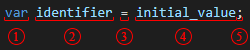
<p>By looking at the following image, we can see all the building blocks (below):</p>

<p><img src="//cdn.forevolve.com/blog/images/2021/2021-02-00-learn-to-code-variable.png" alt="Variable syntax" /></p>

<ol>
  <li>The <code class="language-plaintext highlighter-rouge">var</code> keyword inferring the variable type from its value (4).</li>
  <li>The <code class="language-plaintext highlighter-rouge">identifier</code> of the variable (its name).</li>
  <li>The assignment operator, assigning the value (4) to the variable (2).</li>
  <li>The variable&#8217;s initial value, defining its type when <code class="language-plaintext highlighter-rouge">var</code> (1) is used.</li>
  <li>The end of the statement.</li>
</ol>

<blockquote>
  <p><strong>Side note:</strong> Coding is very similar to playing LEGO<sup>&#174;</sup>.
Like LEGO<sup>&#174;</sup>, we assemble blocks&#8212;of text&#8212;together to build a computer program.</p>
</blockquote>

<p>Enough syntax and theory, let&#8217;s try this out next.</p>

<h2 id="adding-a-variable-to-our-program">Adding a variable to our program</h2>

<p>Let&#8217;s reuse the program we built in the first article of the series, which looked like this:</p>

<div class="language-csharp highlighter-rouge"><div class="highlight"><pre class="highlight"><code><span class="n">Console</span><span class="p">.</span><span class="nf">WriteLine</span><span class="p">(</span><span class="s">"Hello .NET Ninja!"</span><span class="p">);</span>
</code></pre></div></div>

<blockquote>
  <p><strong>Practice:</strong> You can also create a new program, which will make you practice the use of the .NET CLI, introduced in the
<a href="/en/articles/2022/06/13/learn-coding-with-dot-net-6-part-1/">Creating your first .NET/C# program</a> article.</p>
</blockquote>

<p>To prepare the program for more advanced use-cases, we want to extract the text <code class="language-plaintext highlighter-rouge">Hello .NET Ninja!</code> in a variable.
To do so, based on what we just explored, we can write the following:</p>

<div class="language-csharp highlighter-rouge"><div class="highlight"><pre class="highlight"><code><span class="kt">var</span> <span class="n">greetings</span> <span class="p">=</span> <span class="s">"Hello .NET Ninja!"</span><span class="p">;</span>
<span class="n">Console</span><span class="p">.</span><span class="nf">WriteLine</span><span class="p">(</span><span class="n">greetings</span><span class="p">);</span>
</code></pre></div></div>

<blockquote>
  <p><strong>Hint:</strong> One crucial detail in the preceding code is that we don&#8217;t wrap the <code class="language-plaintext highlighter-rouge">greetings</code> identifier with <code class="language-plaintext highlighter-rouge">"</code> when passing it as an argument of the <code class="language-plaintext highlighter-rouge">WriteLine</code> method.
We write it directly, like this: <code class="language-plaintext highlighter-rouge">Console.WriteLine(greetings);</code>, since we don&#8217;t want to pass the string <code class="language-plaintext highlighter-rouge">"greetings"</code> to the method, but the value referenced by the <code class="language-plaintext highlighter-rouge">greetings</code> variable.
In C#, <code class="language-plaintext highlighter-rouge">"</code> is the <strong>string delimiter</strong> character.
We will cover strings in more detail in a subsequent article.</p>
</blockquote>

<p>After executing the code above, we can see that we get the same result as before but using a variable instead of inputting text directly into the <code class="language-plaintext highlighter-rouge">Console.WriteLine</code> method.</p>

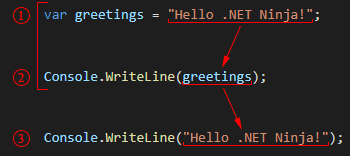
<p>What happened is the following:</p>

<p><img src="//cdn.forevolve.com/blog/images/2021/2021-02-00-learn-to-code-variable-2.png" alt="Variable syntax" /></p>

<ol>
  <li>We assigned the value <code class="language-plaintext highlighter-rouge">"Hello .NET Ninja!"</code> to the <code class="language-plaintext highlighter-rouge">greetings</code> variable.
    <ul>
      <li>The type of the <code class="language-plaintext highlighter-rouge">greetings</code> implicitly became <code class="language-plaintext highlighter-rouge">string</code>.</li>
    </ul>
  </li>
  <li>We wrote the value of the <code class="language-plaintext highlighter-rouge">greetings</code> variable to the console.
    <ul>
      <li>If we change the value of the <code class="language-plaintext highlighter-rouge">greetings</code> variable, the message written in the console would change.</li>
    </ul>
  </li>
  <li>This step represents the variable&#8217;s identifier substituted by its value, which dynamically became <code class="language-plaintext highlighter-rouge">Console.WriteLine("Hello .NET Ninja!");</code>.
This is the equivalent (a representation) of what is happening in the background at runtime.</li>
</ol>

<p>That may seem useless for now, but keep in mind that a variable&#8217;s value can be modified, assigned from user inputs, computed, and more.
We are only beginning and will explore and use variables in future articles, most likely in every single one of them.
Variables are foundational to programming.</p>

<p>Next, we look at how to make that variable&#8217;s value vary.</p>

<h2 id="updating-a-variables-value">Updating a variable&#8217;s value</h2>

<p>Now that we covered how to declare a variable and dissected the building blocks, let&#8217;s look at how to change the variable&#8217;s value.
We will reuse the assignment operator (<code class="language-plaintext highlighter-rouge">=</code>) to assign a new value to the same variable.
In the following micro-program, we assign the value <code class="language-plaintext highlighter-rouge">17</code> to the variable <code class="language-plaintext highlighter-rouge">age</code>, then we update its value to <code class="language-plaintext highlighter-rouge">18</code>:</p>

<div class="language-csharp highlighter-rouge"><div class="highlight"><pre class="highlight"><code><span class="kt">var</span> <span class="n">age</span> <span class="p">=</span> <span class="m">17</span><span class="p">;</span>
<span class="n">Console</span><span class="p">.</span><span class="nf">Write</span><span class="p">(</span><span class="s">"Age: "</span><span class="p">);</span>
<span class="n">Console</span><span class="p">.</span><span class="nf">WriteLine</span><span class="p">(</span><span class="n">age</span><span class="p">);</span>
<span class="n">age</span> <span class="p">=</span> <span class="m">18</span><span class="p">;</span>
<span class="n">Console</span><span class="p">.</span><span class="nf">Write</span><span class="p">(</span><span class="s">"Congratz, you are now "</span><span class="p">);</span>
<span class="n">Console</span><span class="p">.</span><span class="nf">Write</span><span class="p">(</span><span class="n">age</span><span class="p">);</span>
<span class="n">Console</span><span class="p">.</span><span class="nf">WriteLine</span><span class="p">(</span><span class="s">"!"</span><span class="p">);</span>
</code></pre></div></div>

<p>In the <code class="language-plaintext highlighter-rouge">age = 18;</code> statement of the preceding code, we only removed the <code class="language-plaintext highlighter-rouge">var</code> keyword if we compare it with the initial one (<code class="language-plaintext highlighter-rouge">var age = 17;</code>).
That&#8217;s because the <code class="language-plaintext highlighter-rouge">var</code> keyword&#8217;s objective is only to <strong>declare a new variable</strong>.</p>

<p>Quick recap.
To update the value of a variable, we must assemble the following building blocks (syntax): <code class="language-plaintext highlighter-rouge">identifier = new_value;</code>.</p>

<blockquote>
  <p><strong>Note:</strong> declaring a variable with the same identifier will cause an error. The name of a variable must be unique.
But don&#8217;t worry, there are ways to organize our code to limit naming conflicts, but that&#8217;s for another day.</p>
</blockquote>

<p>Executing the program will write the following in the console:</p>

<div class="language-text highlighter-rouge"><div class="highlight"><pre class="highlight"><code>Age: 17
Congratz, you are now 18!
</code></pre></div></div>

<blockquote>
  <p><strong>More info:</strong> the <code class="language-plaintext highlighter-rouge">Console.Write</code> method does the same thing as <code class="language-plaintext highlighter-rouge">Console.WriteLine</code>, without the &#8220;enter&#8221; at the end.</p>
</blockquote>

<p>That&#8217;s it; to change the value of a variable, you only have to <strong>assign</strong> it a new value using the <strong>assignment operator</strong> (<code class="language-plaintext highlighter-rouge">=</code>).
However, the type of that new value must be the same.</p>

<p>Next, it is your turn to try it out.</p>

<h2 id="exercise">Exercise</h2>

<p>Before moving on, to practice the use of C#, I&#8217;d like you to create a program that writes the following output to the console.</p>

<div class="language-text highlighter-rouge"><div class="highlight"><pre class="highlight"><code>------------------
What is your name?
------------------
</code></pre></div></div>
<details class="spoiler">
    <summary>Hint</summary>

    <p>Use a variable to handle the duplicate text.</p>
<details class="spoiler">
    <summary>Code Hint</summary>

    <div class="language-csharp highlighter-rouge"><div class="highlight"><pre class="highlight"><code><span class="kt">var</span> <span class="n">spacer</span> <span class="p">=</span> <span class="s">"------------------"</span><span class="p">;</span>

</code></pre></div></div>


</details>


</details>
<p>Once you are done, you can compare with the following solution.</p>
<details class="spoiler">
    <summary>My Solution</summary>

    <p><strong>Program.cs</strong></p>

<div class="language-csharp highlighter-rouge"><div class="highlight"><pre class="highlight"><code><span class="kt">var</span> <span class="n">spacer</span> <span class="p">=</span> <span class="s">"------------------"</span><span class="p">;</span>
<span class="n">Console</span><span class="p">.</span><span class="nf">WriteLine</span><span class="p">(</span><span class="n">spacer</span><span class="p">);</span>
<span class="n">Console</span><span class="p">.</span><span class="nf">WriteLine</span><span class="p">(</span><span class="s">"What is your name?"</span><span class="p">);</span>
<span class="n">Console</span><span class="p">.</span><span class="nf">WriteLine</span><span class="p">(</span><span class="n">spacer</span><span class="p">);</span>
</code></pre></div></div>

<p>Don&#8217;t worry if your solution is different than mine.
As long as you completed it, it means you understood the lesson or at least practiced.
Practicing is the key to success!</p>


</details>
<h2 id="conclusion">Conclusion</h2>

<p>In this article, we learned how to declare a variable and set its value.
We also dived into more syntax, explored the <code class="language-plaintext highlighter-rouge">var</code> keyword and the assignment operator.</p>

<p>The variable concept is essential.
Most importantly, you learned that a variable stores reusable data, accessible through its identifier (name).</p>

<p>This is a lot of theory and small details to take in, but the more you advance and the more you practice, the easier it will become.</p>

<h2 id="next-step">Next step</h2>

<p>It is now time to move to the next article:
<strong>Introduction to C# constants</strong> that&#8217;s coming soon. Stay tuned by following me:</p>
<div class="follow-me-list-horizontal article-next-social"><ul class="social-icons-list"><li><a href="https://twitter.com/CarlHugoM" title="Twitter" rel="noopener" class="">
    <span class="fa-stack fa-lg">
        <i class="fa fa-circle fa-stack-2x"></i>
        <i class="fa fa-twitter fa-stack-1x fa-inverse"></i>
    </span>
    <span class="hidden-xs">Twitter</span>
</a></li><li><a href="https://github.com/ForEvolve" title="GitHub (ForEvolve)" rel="noopener" class="">
    <span class="fa-stack fa-lg">
        <i class="fa fa-circle fa-stack-2x"></i>
        <i class="fa fa-github fa-stack-1x fa-inverse"></i>
    </span>
    <span class="hidden-xs">GitHub (ForEvolve)</span>
</a></li><li><a href="https://github.com/Carl-Hugo" title="My GitHub Account" rel="noopener" class="">
    <span class="fa-stack fa-lg">
        <i class="fa fa-circle fa-stack-2x"></i>
        <i class="fa fa-github fa-stack-1x fa-inverse"></i>
    </span>
    <span class="hidden-xs">My GitHub Account</span>
</a></li><li><a href="https://www.linkedin.com/in/carl-hugo-marcotte" title="LinkedIn" rel="noopener" class="">
    <span class="fa-stack fa-lg">
        <i class="fa fa-circle fa-stack-2x"></i>
        <i class="fa fa-linkedin fa-stack-1x fa-inverse"></i>
    </span>
    <span class="hidden-xs">LinkedIn</span>
</a></li><li><a href="https://carlhugom.medium.com/" title="Medium" rel="noopener" class="">
    <span class="fa-stack fa-lg">
        <i class="fa fa-circle fa-stack-2x"></i>
        <i class="fa fa-medium fa-stack-1x fa-inverse"></i>
    </span>
    <span class="hidden-xs">Medium</span>
</a></li><li><a href="https://dev.to/carlhugom" title="Dev.to" rel="noopener" class="">
    <span class="fa-stack fa-lg">
        <i class="fa fa-circle fa-stack-2x"></i>
        <i class="fa icomoon icon-dev-dot-to fa-stack-1x fa-inverse"></i>
    </span>
    <span class="hidden-xs">Dev.to</span>
</a></li><li><a href="https://dzone.com/users/4734071/carlhugom.html" title="DZone" rel="noopener" class="">
    <span class="fa-stack fa-lg">
        <i class="fa fa-circle fa-stack-2x"></i>
        <i class="fa fa-cube fa-stack-1x fa-inverse"></i>
    </span>
    <span class="hidden-xs">DZone</span>
</a></li><li><a href="/feed.xml" title="RSS Feed" rel="noopener" class="">
    <span class="fa-stack fa-lg">
        <i class="fa fa-circle fa-stack-2x"></i>
        <i class="fa fa-rss fa-stack-1x fa-inverse"></i>
    </span>
    <span class="hidden-xs">RSS Feed</span>
</a></li><li><a href="mailto:blog@forevolve.com" title="Email" rel="noopener" class="">
    <span class="fa-stack fa-lg">
        <i class="fa fa-circle fa-stack-2x"></i>
        <i class="fa fa-envelope fa-stack-1x fa-inverse"></i>
    </span>
    <span class="hidden-xs">Email</span>
</a></li></ul>
</div>

<h3 id="table-of-content">Table of content</h3>
<p>Now that you are done with this  article, please look at the series’ content.</p>
<table class="table table-striped table-hover table-toc">
    <thead class="thead-inverse">
        <tr>
            <th>Articles in this series</th>
        </tr>
    </thead>
    <tbody>


        <tr>
            <td class="">
                
                    
                        <a href="/en/articles/2022/06/13/learn-coding-with-dot-net-6-part-1/">Creating your first .NET/C# program</a>
                    
                
                <div class="small"><small>In this article, we are creating a small console application using the .NET CLI to get started with .NET 6+ and C#.</small></div>
            </td>
        </tr>


        <tr>
            <td class="bg-success text-success">
                
                    
                        <strong>
                            Introduction to C# variables
                            <span class="toc-you-are-here badge">You are here</span>
                        </strong>
                    
                
                <div class="small"><small>In this article, we explore variables. What they are, how to create them, and how to use them. Variables are essential elements of a program, making it dynamic.</small></div>
            </td>
        </tr>


        <tr>
            <td class="text-muted">
                
                    <strong>
                        Introduction to C# constants
                        
                            <span class="toc-expected-date badge">Expected on Summer 2022</span>
                        
                    </strong>
                
                <div class="small"><small>In this article, we explore constants. A constant is a special kind of variable.</small></div>
            </td>
        </tr>


        <tr>
            <td class="text-muted">
                
                    <strong>
                        Introduction to C# comments
                        
                            <span class="toc-expected-date badge">Expected on Summer 2022</span>
                        
                    </strong>
                
                <div class="small"><small>In this article, we explore single-line and multiline comments.</small></div>
            </td>
        </tr>


        <tr>
            <td class="text-muted">
                
                    <strong>
                        How to read user inputs from a console
                        
                            <span class="toc-expected-date badge">Expected on Summer 2022</span>
                        
                    </strong>
                
                <div class="small"><small>In this article, we explore how to retrieve simple user inputs from the console. This will help us make our programs more dynamic by interacting with the user.</small></div>
            </td>
        </tr>


        <tr>
            <td class="text-muted toc-grp toc-grp-three">
                
                    <strong>
                        Introduction to string concatenation
                        
                            <span class="toc-expected-date badge">Expected on Summer 2022</span>
                        
                    </strong>
                
                <div class="small"><small>In this article, we dig deeper into strings and explore string concatenation.</small></div>
            </td>
        </tr>


        <tr>
            <td class="text-muted toc-grp toc-grp-three">
                
                    <strong>
                        Introduction to string interpolation
                        
                            <span class="toc-expected-date badge">Expected on Summer 2022</span>
                        
                    </strong>
                
                <div class="small"><small>In this article, we explore string interpolation as another way to compose a string.</small></div>
            </td>
        </tr>


        <tr>
            <td class="text-muted toc-grp toc-grp-three">
                
                    <strong>
                        Escaping characters in C# strings
                        
                            <span class="toc-expected-date badge">Expected on Summer 2022</span>
                        
                    </strong>
                
                <div class="small"><small>In this article, we explore how to escape characters like quotes and how to write special character like tabs and new lines.</small></div>
            </td>
        </tr>


        <tr>
            <td class="text-muted toc-grp toc-grp-one">
                
                    <strong>
                        Introduction to Boolean algebra and logical operators
                        
                            <span class="toc-expected-date badge">Expected on Summer 2022</span>
                        
                    </strong>
                
                <div class="small"><small>This article introduces the mathematical branch of algebra that evaluates the value of a condition to true or false.</small></div>
            </td>
        </tr>


        <tr>
            <td class="text-muted toc-grp toc-grp-one">
                
                    <strong>
                        Using if-else selection statements to write conditional code blocks
                        
                            <span class="toc-expected-date badge">Expected on Summer 2022</span>
                        
                    </strong>
                
                <div class="small"><small>In this article, we explore how to write conditional code using Boolean algebra.</small></div>
            </td>
        </tr>


        <tr>
            <td class="text-muted toc-grp toc-grp-one">
                
                    <strong>
                        Using the switch selection statement to simplify conditional statements blocks
                        
                            <span class="toc-expected-date badge">Expected on Summer 2022</span>
                        
                    </strong>
                
                <div class="small"><small>In this article, we explore how to simplify certain conditional blocks by introducing the switch statement.</small></div>
            </td>
        </tr>


        <tr>
            <td class="text-muted toc-grp toc-grp-one">
                
                    <strong>
                        Boolean algebra laws
                        
                            <span class="toc-expected-date badge">Expected on Summer 2022</span>
                        
                    </strong>
                
                <div class="small"><small>This article explores multiple Boolean algebra laws in a programmer-oriented way, leaving the mathematic notation aside.</small></div>
            </td>
        </tr>


        <tr>
            <td class="text-muted">
                
                    <strong>
                        More to come
                        
                            <span class="toc-coming-soon badge">Somewhere in 2022</span>
                        
                    </strong>
                
                <div class="small"><small></small></div>
            </td>
        </tr>
        
    
    </tbody>
</table>]]></content><author><name>Carl-Hugo Marcotte</name></author><category term="en/articles" /><category term=".NET 6" /><category term=".NET Core" /><category term="C#" /><category term="Learn Programming" /><summary type="html"><![CDATA[In this article, we explore variables. What they are, how to create them, and how to use them. Variables are one of the most important elements of a program, making it dynamic. Of course, there is more to variables than what we can cover in a single article; this is only the beginning. This article is part of a learn programming series where you need no prior knowledge of programming. If you want to learn how to program and want to learn it using .NET/C#, this is the right place. I suggest reading the whole series in order, starting with Creating your first .NET/C# program, but that&#8217;s not mandatory.]]></summary></entry><entry xml:lang="en"><title type="html">Creating your first .NET/C# program</title><link href="http://www.forevolve.com/en/articles/2022/06/13/learn-coding-with-dot-net-6-part-1/" rel="alternate" type="text/html" title="Creating your first .NET/C# program" /><published>2022-06-13T05:00:00+00:00</published><updated>2022-06-13T05:00:00+00:00</updated><id>http://www.forevolve.com/en/articles/2022/06/13/learn-coding-with-dot-net-6-part-1</id><content type="html" xml:base="http://www.forevolve.com/en/articles/2022/06/13/learn-coding-with-dot-net-6-part-1/"><![CDATA[<p>This article is the first of a <strong>learn programming</strong> series where you need <strong>no prior knowledge of programming</strong>.
If you want to <strong>learn how to program</strong> and want to learn it <strong>using .NET/C#</strong>, this is the right place.</p>

<p>The first step of coding is to <strong>create a program</strong>.
The program could be a simple console or a more complex application (web, mobile, game, etc.).
To get started, we create a console application, which is the simplest type of program that we can make.
The good news is that most of the topics covered in this series are reusable across all types of programs.</p>

<p>Furthermore, .NET and C# allow you to create a wide variety of programs and target most markets, from web to mobile to smart TVs.
I believe this is a good choice of technology to start with.</p>

<p>Beforehand, let&#8217;s look at the prerequisites.<!--more--></p>

<h3 id="prerequisites">Prerequisites</h3>

<p>If you have not already installed the .NET <strong>Software Development Kit (SDK)</strong>, you can download it from <a href="https://dotnet.microsoft.com/download">https://dotnet.microsoft.com/download</a>.
Make sure you install the <strong>.NET 6 (or later)</strong> SDK.</p>

<blockquote>
  <p><strong>Hint:</strong> Make sure you install the .NET SDK, not the runtime.
The runtime is used and optimized to run .NET apps.
The SDK contains the runtime and all the necessary tools to develop new programs.</p>
</blockquote>

<p>Another good idea would be to install an <strong>Integrated Development Environment (IDE)</strong> or a <strong>code editor</strong>.
To get started, I suggest a simple, free, yet powerful code editor named <a href="https://code.visualstudio.com/">Visual Studio Code (VS Code)</a>.</p>

<blockquote>
  <p><strong>Hint:</strong> For more complex programs, especially if you are developing on Windows, I suggest Visual Studio (VS).
VS is a full-fledged IDE, more complex than VS Code, but extremely powerful to create and maintain large .NET applications.
VS also offers a free Community Edition, so you can learn and get started with it.</p>
</blockquote>

<p>Next, let&#8217;s get started with our console.</p>

<h2 id="getting-started-with-the-net-cli">Getting started with the .NET CLI</h2>

<p>With .NET, the easiest way of creating a new cross-platform project is through the .NET <strong>Command-line interface (CLI)</strong>.
The CLI is part of the .NET SDK.
It is a program that we can use to execute and automate tasks, like creating new projects.</p>

<blockquote>
  <p>Hint: cross-platform means targeting multiple platforms like Windows, Linux, and Android.</p>
</blockquote>

<p>But first things first, we need to create a directory that will hold our program files.
It is important to be organized.
Let&#8217;s name the directory <code class="language-plaintext highlighter-rouge">IntroToDotNet</code>.
From a terminal (bash, PowerShell, or cmd), let&#8217;s start by typing <code class="language-plaintext highlighter-rouge">dotnet new console</code>, which generates a new console application.</p>

<blockquote>
  <p><strong>Hint:</strong> make sure you are in the right directory.
I suggest a structure similar to <code class="language-plaintext highlighter-rouge">[drive]:\Repos\[name of your project]</code>.
For example: <code class="language-plaintext highlighter-rouge">D:\Repos\IntroToDotNet</code>.
<strong>More info:</strong> <strong>repos</strong> is a shorthand for <strong>repositories</strong> which is a reference to <strong>git</strong>.
<strong>git</strong> is something very important to learn in the future, but for now, let&#8217;s get back to coding.</p>
</blockquote>

<p>The following terminal commands allow you to create a directory and an empty console application inside of it.
If you already created the directory, you can skip that part and only execute the <code class="language-plaintext highlighter-rouge">dotnet new console</code> command.</p>

<div class="language-bash highlighter-rouge"><div class="highlight"><pre class="highlight"><code><span class="c"># Create a directory</span>
<span class="nb">mkdir </span>IntroToDotNet
<span class="nb">cd </span>IntroToDotNet

<span class="c"># Create the .NET project</span>
dotnet new console
</code></pre></div></div>

<blockquote>
  <p><strong>Hint:</strong> You can type <code class="language-plaintext highlighter-rouge">ls</code> in the terminal to list the files contained in the current directory.</p>
</blockquote>

<p>The result of the console template is the following two files.</p>

<p><strong>IntroToDotNet.csproj</strong></p>

<p><code class="language-plaintext highlighter-rouge">[name of the directory].csproj</code> (<code class="language-plaintext highlighter-rouge">IntroToDotNet.csproj</code>) is an XML file defining project properties.
We can use this file to configure more advanced scenarios.
We won&#8217;t get into more details but know that you need one <code class="language-plaintext highlighter-rouge">csproj</code> file per project.</p>

<div class="language-xml highlighter-rouge"><div class="highlight"><pre class="highlight"><code><span class="nt">&lt;Project</span> <span class="na">Sdk=</span><span class="s">"Microsoft.NET.Sdk"</span><span class="nt">&gt;</span>

  <span class="nt">&lt;PropertyGroup&gt;</span>
    <span class="nt">&lt;OutputType&gt;</span>Exe<span class="nt">&lt;/OutputType&gt;</span>
    <span class="nt">&lt;TargetFramework&gt;</span>net6.0<span class="nt">&lt;/TargetFramework&gt;</span>
    <span class="nt">&lt;ImplicitUsings&gt;</span>enable<span class="nt">&lt;/ImplicitUsings&gt;</span>
    <span class="nt">&lt;Nullable&gt;</span>enable<span class="nt">&lt;/Nullable&gt;</span>
  <span class="nt">&lt;/PropertyGroup&gt;</span>

<span class="nt">&lt;/Project&gt;</span>
</code></pre></div></div>

<p><strong>It is important to note that the <code class="language-plaintext highlighter-rouge">IntroToDotNet.csproj</code> file&#8217;s content will remain the same for the whole article.</strong></p>

<blockquote>
  <p><strong>More info:</strong> the name of this file does not have to match the name of the directory it is in; that&#8217;s just the default behavior of <code class="language-plaintext highlighter-rouge">dotnet new</code>.</p>
</blockquote>

<p><strong>Program.cs</strong></p>

<p><code class="language-plaintext highlighter-rouge">Program.cs</code> is the entry point of our program.
This is where we write code.</p>

<div class="language-csharp highlighter-rouge"><div class="highlight"><pre class="highlight"><code><span class="c1">// See https://aka.ms/new-console-template for more information</span>
<span class="n">Console</span><span class="p">.</span><span class="nf">WriteLine</span><span class="p">(</span><span class="s">"Hello, World!"</span><span class="p">);</span>
</code></pre></div></div>

<p><em>We are exploring the meaning of that code later.</em></p>

<h2 id="writing-our-first-line-of-code">Writing our first line of code</h2>

<p>As mentioned before, the file that interests us the most is the <code class="language-plaintext highlighter-rouge">Program.cs</code> file.
To keep our focus on the task at hand&#8212;learning C#&#8212;we will leverage <strong>top-level statements</strong> to discard that code.</p>

<p>The .NET 6 templates leverage <strong>top-level statements</strong>, allowing us to write code directly without boilerplate code.
The <code class="language-plaintext highlighter-rouge">&lt;ImplicitUsings&gt;enable&lt;/ImplicitUsings&gt;</code> directive of the <code class="language-plaintext highlighter-rouge">csproj</code> file allows us to skip even more boilerplate code.</p>

<p>Let&#8217;s replace the content of the <code class="language-plaintext highlighter-rouge">Project.cs</code> file with the following line:</p>

<p><strong>Program.cs</strong></p>

<div class="language-csharp highlighter-rouge"><div class="highlight"><pre class="highlight"><code><span class="n">Console</span><span class="p">.</span><span class="nf">WriteLine</span><span class="p">(</span><span class="s">"Hello .NET Ninja!"</span><span class="p">);</span>
</code></pre></div></div>

<blockquote>
  <p><strong>More info:</strong> the <strong>top-level statements</strong> feature was introduced in C# 9 (.NET 5) and <code class="language-plaintext highlighter-rouge">ImplicitUsings</code> was introduced with .NET 6.</p>
</blockquote>

<p>Now that we wrote some code, it is time to tell your computer to execute it.
To do so, from the directory that contains the <code class="language-plaintext highlighter-rouge">IntroToDotNet.csproj</code> file, type the following:</p>

<div class="language-bash highlighter-rouge"><div class="highlight"><pre class="highlight"><code>dotnet run
</code></pre></div></div>

<p>Afterward, you should see <code class="language-plaintext highlighter-rouge">Hello .NET Ninja!</code> written in the console.
While reading this article, you can <code class="language-plaintext highlighter-rouge">dotnet run</code> the program at anytime to see the output.
Next, let&#8217;s explore that code.</p>

<h2 id="exploring-the-building-blocks">Exploring the building blocks</h2>

<p>There are several building blocks in that one line of code.
Don&#8217;t worry if you don&#8217;t remember or grasp every detail or term just yet.
Coding is like playing with LEGO<sup>&#174;</sup>.
You just need to understand how to connect the blocks, and you are good to go.
Of course, there is a lot of learning to do, but that&#8217;s part of the fun.</p>

<p>The first thing that I&#8217;d like to point out is the last character, the <code class="language-plaintext highlighter-rouge">;</code>.
That character represents the end of a <strong>statement</strong> (the end of a line of code if you wish).
A statement is an instruction that tells the program to do something, an action, a command.
That&#8217;s the type of code that we write the most.
In C#, it is mandatory to add the <code class="language-plaintext highlighter-rouge">;</code> after a statement, or the code will not compile.</p>

<blockquote>
  <p><strong>More info:</strong> in C#, we write text (code) that gets compiled into an intermediate language (IL).
That IL code is then executed by the .NET runtime.
The compilation is transforming the text (our code) to that IL language, getting closer to what computers understand.
This is a mandatory step, but it will be done almost seamlessly by the SDK as we just explored with <code class="language-plaintext highlighter-rouge">dotnet run</code>.</p>
</blockquote>

<p>Let&#8217;s now dissect more of that line of code, starting with the identifiers.</p>

<h3 id="identifiers">Identifiers</h3>

<p><code class="language-plaintext highlighter-rouge">Console</code> is a <strong>static class</strong> that exposes a few <strong>methods</strong>.
A <strong>class</strong> is a sort of plan defining how to create an <strong>object</strong>.
An <strong>object</strong> can be pretty much anything that we need and is a mandatory concept in an <strong>object-oriented programming (OOP)</strong> language like C#.
We will revisit objects in subsequent articles.
A <strong>static class</strong> exposes its content globally without creating an instance of it (an object).</p>

<p>A <strong>method</strong> is a <strong>function</strong> that we can use to do something (reusable code).
In this case, we used the <code class="language-plaintext highlighter-rouge">WriteLine</code> method, which writes a line into the console.
For example, every time we need to write a line to the console, we can leverage the <code class="language-plaintext highlighter-rouge">WriteLine</code> method.</p>

<p>The line that is written to the console is a <strong>string</strong>.
A string is a bunch of characters put together to form some text.
In C#, a string is delimited by quotes, like this: <code class="language-plaintext highlighter-rouge">"Hello .NET Ninja!"</code>.
Ok, there are more to strings, but not for now.</p>

<p>The next building blocks are the <strong>member access operators</strong>.</p>

<h3 id="member-access-operators">Member access operators</h3>

<p>The first one that we encountered is the <code class="language-plaintext highlighter-rouge">.</code> character.
The dot allows us to access the exposed members of a class (amongst other thing; but that&#8217;s fine for today).
In our case, we used the <code class="language-plaintext highlighter-rouge">.</code> operator to access the <code class="language-plaintext highlighter-rouge">WriteLine</code> method of the <code class="language-plaintext highlighter-rouge">Console</code> class, like this: <code class="language-plaintext highlighter-rouge">Console.WriteLine</code>.</p>

<p>The last bit is the parenthesis.
In C#, we use the <code class="language-plaintext highlighter-rouge">(</code> and <code class="language-plaintext highlighter-rouge">)</code> characters to <strong>invoke a method</strong>.
Invoking a method means executing its code.
Between the parenthesis, we can pass <strong>arguments</strong>.
An <strong>argument</strong> is an input value that will most likely change the result of the execution.
In our case, we passed the string <code class="language-plaintext highlighter-rouge">"Hello .NET Ninja!"</code> to the <code class="language-plaintext highlighter-rouge">WriteLine</code> method, writing that text to the console.
If we wanted to write something else, we could have passed that instead, like this:</p>

<div class="language-csharp highlighter-rouge"><div class="highlight"><pre class="highlight"><code><span class="n">Console</span><span class="p">.</span><span class="nf">WriteLine</span><span class="p">(</span><span class="s">"Something else!"</span><span class="p">);</span>
</code></pre></div></div>

<p>Most of these subjects deserve to be explored more in-depth but are out of this article&#8217;s scope.</p>

<h2 id="conclusion">Conclusion</h2>

<p>That&#8217;s it; we wrote our first C#/.NET 6 program.
We also wrote some text to the console, and learn how to access static class members.</p>

<p>We explored the &#8220;hidden&#8221; details behind one line of code and got a glimpse of many new names, like directives and statements.
If you are not already familiar with object-oriented programming, don&#8217;t worry about all of those names just yet.
Classes, namespaces, and methods are tools to organize our code that you will learn along the way.
Many of those things (like directives and statements) are used implicitly, and unless you plan on writing about it, you don&#8217;t need to remember them just yet.
Learning to program can be done in multiple iterative phases where you add little by little over what you know until you can achieve your goal.
Then, you start this process over and add more layers of knowledge on top of what you know to reach your subsequent goals.</p>

<p>Please play with the code a little to get familiar with what we just covered.
I know it is not much, but one must walk before one can run.
Coding is the best way to learn, so get your hands dirty and experiment.</p>

<p>In the next article of the series, we will explore how to create variables.</p>

<h2 id="next-step">Next step</h2>

<p>It is now time to move to the next article:
<a href="/en/articles/2022/06/14/learn-coding-with-dot-net-6-part-2/">Introduction to C# variables</a>.</p>

<h3 id="table-of-content">Table of content</h3>
<p>Now that you are done with this first article, please look at the series’ content.</p>
<table class="table table-striped table-hover table-toc">
    <thead class="thead-inverse">
        <tr>
            <th>Articles in this series</th>
        </tr>
    </thead>
    <tbody>


        <tr>
            <td class="bg-success text-success">
                
                    
                        <strong>
                            Creating your first .NET/C# program
                            <span class="toc-you-are-here badge">You are here</span>
                        </strong>
                    
                
                <div class="small"><small>In this article, we are creating a small console application using the .NET CLI to get started with .NET 6+ and C#.</small></div>
            </td>
        </tr>


        <tr>
            <td class="">
                
                    
                        <a href="/en/articles/2022/06/14/learn-coding-with-dot-net-6-part-2/">Introduction to C# variables</a>
                    
                
                <div class="small"><small>In this article, we explore variables. What they are, how to create them, and how to use them. Variables are essential elements of a program, making it dynamic.</small></div>
            </td>
        </tr>


        <tr>
            <td class="text-muted">
                
                    <strong>
                        Introduction to C# constants
                        
                            <span class="toc-expected-date badge">Expected on Summer 2022</span>
                        
                    </strong>
                
                <div class="small"><small>In this article, we explore constants. A constant is a special kind of variable.</small></div>
            </td>
        </tr>


        <tr>
            <td class="text-muted">
                
                    <strong>
                        Introduction to C# comments
                        
                            <span class="toc-expected-date badge">Expected on Summer 2022</span>
                        
                    </strong>
                
                <div class="small"><small>In this article, we explore single-line and multiline comments.</small></div>
            </td>
        </tr>


        <tr>
            <td class="text-muted">
                
                    <strong>
                        How to read user inputs from a console
                        
                            <span class="toc-expected-date badge">Expected on Summer 2022</span>
                        
                    </strong>
                
                <div class="small"><small>In this article, we explore how to retrieve simple user inputs from the console. This will help us make our programs more dynamic by interacting with the user.</small></div>
            </td>
        </tr>


        <tr>
            <td class="text-muted toc-grp toc-grp-three">
                
                    <strong>
                        Introduction to string concatenation
                        
                            <span class="toc-expected-date badge">Expected on Summer 2022</span>
                        
                    </strong>
                
                <div class="small"><small>In this article, we dig deeper into strings and explore string concatenation.</small></div>
            </td>
        </tr>


        <tr>
            <td class="text-muted toc-grp toc-grp-three">
                
                    <strong>
                        Introduction to string interpolation
                        
                            <span class="toc-expected-date badge">Expected on Summer 2022</span>
                        
                    </strong>
                
                <div class="small"><small>In this article, we explore string interpolation as another way to compose a string.</small></div>
            </td>
        </tr>


        <tr>
            <td class="text-muted toc-grp toc-grp-three">
                
                    <strong>
                        Escaping characters in C# strings
                        
                            <span class="toc-expected-date badge">Expected on Summer 2022</span>
                        
                    </strong>
                
                <div class="small"><small>In this article, we explore how to escape characters like quotes and how to write special character like tabs and new lines.</small></div>
            </td>
        </tr>


        <tr>
            <td class="text-muted toc-grp toc-grp-one">
                
                    <strong>
                        Introduction to Boolean algebra and logical operators
                        
                            <span class="toc-expected-date badge">Expected on Summer 2022</span>
                        
                    </strong>
                
                <div class="small"><small>This article introduces the mathematical branch of algebra that evaluates the value of a condition to true or false.</small></div>
            </td>
        </tr>


        <tr>
            <td class="text-muted toc-grp toc-grp-one">
                
                    <strong>
                        Using if-else selection statements to write conditional code blocks
                        
                            <span class="toc-expected-date badge">Expected on Summer 2022</span>
                        
                    </strong>
                
                <div class="small"><small>In this article, we explore how to write conditional code using Boolean algebra.</small></div>
            </td>
        </tr>


        <tr>
            <td class="text-muted toc-grp toc-grp-one">
                
                    <strong>
                        Using the switch selection statement to simplify conditional statements blocks
                        
                            <span class="toc-expected-date badge">Expected on Summer 2022</span>
                        
                    </strong>
                
                <div class="small"><small>In this article, we explore how to simplify certain conditional blocks by introducing the switch statement.</small></div>
            </td>
        </tr>


        <tr>
            <td class="text-muted toc-grp toc-grp-one">
                
                    <strong>
                        Boolean algebra laws
                        
                            <span class="toc-expected-date badge">Expected on Summer 2022</span>
                        
                    </strong>
                
                <div class="small"><small>This article explores multiple Boolean algebra laws in a programmer-oriented way, leaving the mathematic notation aside.</small></div>
            </td>
        </tr>


        <tr>
            <td class="text-muted">
                
                    <strong>
                        More to come
                        
                            <span class="toc-coming-soon badge">Somewhere in 2022</span>
                        
                    </strong>
                
                <div class="small"><small></small></div>
            </td>
        </tr>
        
    
    </tbody>
</table>]]></content><author><name>Carl-Hugo Marcotte</name></author><category term="en/articles" /><category term=".NET 6" /><category term=".NET Core" /><category term="C#" /><category term="Learn Programming" /><summary type="html"><![CDATA[This article is the first of a learn programming series where you need no prior knowledge of programming. If you want to learn how to program and want to learn it using .NET/C#, this is the right place. The first step of coding is to create a program. The program could be a simple console or a more complex application (web, mobile, game, etc.). To get started, we create a console application, which is the simplest type of program that we can make. The good news is that most of the topics covered in this series are reusable across all types of programs. Furthermore, .NET and C# allow you to create a wide variety of programs and target most markets, from web to mobile to smart TVs. I believe this is a good choice of technology to start with. Beforehand, let&#8217;s look at the prerequisites.]]></summary></entry><entry xml:lang="en"><title type="html">Implementing Microservices Architectures</title><link href="http://www.forevolve.com/en/articles/2022/05/29/microservices-architecture-exerpt/" rel="alternate" type="text/html" title="Implementing Microservices Architectures" /><published>2022-05-29T05:00:00+00:00</published><updated>2022-05-29T05:00:00+00:00</updated><id>http://www.forevolve.com/en/articles/2022/05/29/microservices-architecture-exerpt</id><content type="html" xml:base="http://www.forevolve.com/en/articles/2022/05/29/microservices-architecture-exerpt/"><![CDATA[<p>This article aims to give you an overview of the concepts surrounding microservices and event-driven architecture, which should help you make informed decisions about whether you should go for a microservices architecture or not.</p>

<p>The following topics will be covered:</p>

<ul>
  <li>What are microservices?</li>
  <li>An introduction to event-driven architecture</li>
</ul>

<p><em>This article is an excerpt from my book, <a href="https://adpg.link/buycom6">An Atypical ASP.NET Core 6 Design Patterns Guide <span title="As an Amazon Associate I earn from qualifying purchases." class="amazon-associate">(<i class="fa fa-amazon"></i>)</span></a>.</em><!--more--></p>

<h2 id="what-are-microservices">What are microservices?</h2>

<p>Besides being a buzzword, microservices represent an application that is divided into multiple smaller applications. Each application, or microservice, interacts with the others to create a scalable system. Usually, microservices are deployed to the cloud as containerized or serverless applications.</p>

<p>Before getting into too many details, here are a few principles to keep in mind when building microservices:</p>

<ul>
  <li>Each microservice should be a cohesive unit of business.</li>
  <li>Each microservice should own its data.</li>
  <li>Each microservice should be independent of the others.</li>
</ul>

<p>Furthermore, everything we have studied so far—that is, the other principles of designing software—applies to microservices but on another scale. For example, you don&#8217;t want tight coupling between microservices (solved by microservices independence), but the coupling is inevitable (as with any code). There are numerous ways to solve this problem, such as the Publish-Subscribe pattern.</p>

<p>There are no hard rules about how to design microservices, how to divide them, how big they should be, and what to put where. That being said, I&#8217;ll lay down a few foundations to help you get started and orient your journey into microservices.</p>

<h3 id="cohesive-unit-of-business">Cohesive unit of business</h3>

<p>A microservice should have a single business responsibility. Always design the system with the domain in mind, which should help you divide the application into multiple pieces. If you know <strong>Domain-Driven Design</strong> (<strong>DDD</strong>), a microservice will most likely represent a <strong>Bounded Context</strong>, which in turn is what I call a <em>cohesive unit of business</em>. Basically, a cohesive unit of business (or bounded context) is a self-contained part of the domain that has limited interactions with other parts of the domain.</p>

<p>Even if a <strong>microservice</strong> has <em>micro</em> in its name, it is more important to group logical operations under it than to aim at a micro-size. Don&#8217;t get me wrong here; if your unit is tiny, that&#8217;s even better. However, suppose you split a unit of business into multiple smaller parts instead of keeping it together (breaking cohesion).</p>

<p>In that case, you are likely to introduce useless chattiness within your system (coupling between microservices). This could lead to performance degradation and to a system that is harder to debug, test, maintain, monitor, and deploy.</p>

<p>Moreover, it is easier to split a big microservice into smaller pieces than assemble multiple microservices back together.</p>

<p>Try to apply the Single Responsibility Principle (SRP) to your microservices: a microservice should have only one reason to change unless you have a good reason to do otherwise.</p>

<h3 id="ownership-of-data">Ownership of data</h3>

<p>Each microservice is the source of truth of its cohesive unit of business. A microservice should share its data through an API (a web API/HTTP, for example) or another mechanism (integration events, for example). It should own that data and not share it with other microservices directly at the database level.</p>

<p>For instance, two different microservices should never access the same relational database table. If a second microservice needs some of the same data, it can create its own cache, duplicate the data, or query the owner of that data but not access the database directly; <strong>never</strong>.</p>

<p>This data-ownership concept is probably the most critical part of the microservices architecture and leads to microservices independence. Failing at this will most likely lead to a tremendous number of problems. For example, if multiple microservices can read or write data in the same database table, each time something changes in that table, all of them must be updated to reflect the changes. If different teams manage the microservices, that means cross-team coordination. If that happens, each microservice is not independent anymore, which opens the floor to our next topic.</p>

<h3 id="microservice-independence">Microservice independence</h3>

<p>At this point, we have microservices that are cohesive units of business and own their data. That defines <strong>independence</strong>.</p>

<p>This independence offers the systems the ability to scale while having minimal to no impact on the other microservices. Each microservice can also scale independently, without the need for the whole system to be scaled. Additionally, when the business requirements grow, each part of that domain can evolve independently.</p>

<p>Furthermore, you could update one microservice without impacting the others or even have a microservice go offline without the whole system stopping.</p>

<p>Of course, microservices have to interact with one another, but the way they do should define how well your system runs. A little like Vertical Slice architecture, you are not limited to using one set of architectural patterns; you can independently make specific decisions for each microservice. For example, you could choose a different way for how two microservices communicate with each other versus two others. You could even use different programming languages for each microservice.</p>

<aside>
    <header>Tip</header>
    <section>
        <p>I recommend sticking to one or a few programming languages for smaller businesses and organizations as you most likely have fewer developers, and each has more to do. Based on my experience, you want to ensure business continuity when people leave and make sure you can replace them and not sink the ship due to some obscure technologies used here and there (or too many technologies).</p>
    </section>
</aside>

<p>Now that we&#8217;ve defined the basics, let&#8217;s jump into the different ways microservices can communicate using event-driven architecture.</p>

<h2 id="an-introduction-to-event-driven-architecture">An introduction to event-driven architecture</h2>

<p><strong>Event-driven architecture</strong> (<strong>EDA</strong>) is a paradigm that revolves around consuming streams of events, or data in motion, instead of consuming static states.</p>

<p>What I define by a static state is the data stored in a relational database table or other types of data stores, like a NoSQL documents store. That data is dormant in a central location and waiting for actors to consume and mutate it. It is stale between every mutation and the data (a record, for example) represents a finite state.</p>

<p>On the other hand, data in motion is the opposite: you consume the ordered events and determine the change in state that each event brings.</p>

<p>What is an event? People often interchange the words event, message, and command. Let’s try to clarify this:</p>

<ul>
  <li>A message is a piece of data that represents something.</li>
  <li>A message can be an object, a JSON string, bytes, or anything else your system can interpret.</li>
  <li>An event is a message that represents something that happened in the past.</li>
  <li>A command is a message sent to tell one or more recipients to do something.</li>
  <li>A command is sent (past tense), so we can also consider it an event.</li>
</ul>

<p>A message usually has a payload (or body), headers (metadata), and a way to identify it (this can be through the body or headers).</p>

<p>We can use events to divide a complex system into smaller pieces or have multiple systems talk to each other without creating tight couplings. Those systems could be subsystems or external applications, such as microservices.</p>

<p>Like <strong>Data Transfer Objects</strong> (<strong>DTO</strong>) of web APIs, events become the data contracts that tie the multiple systems together (coupling). It is essential to think about that carefully when designing events. Of course, we cannot foresee the future, so we can only do so much to get it perfect the first time. There are ways to version events, but this is out of the scope of this article.</p>

<p>EDA is a fantastic way of breaking tight coupling between microservices but requires rewiring your brain to learn this newer paradigm. Tooling is less mature, and expertise is scarcer than more linear ways of thinking (like using point-to-point communication and relational databases), but this is slowly changing and well worth learning (in my opinion).</p>

<p>We can categorize events into the following overlapping buckets:</p>

<ul>
  <li>Domain events</li>
  <li>Integration events</li>
  <li>Application events</li>
  <li>Enterprise events</li>
</ul>

<p>As we’ll explore next, all types of events play a similar role with different intents and scopes.</p>

<h3 id="domain-events">Domain events</h3>

<p>A domain event is a term based on DDD representing an event in the domain. This event could then trigger other pieces of logic to be executed subsequently. It allows a complex process to be divided into multiple smaller processes. Domain events work well with domain-centric designs, like Clean Architecture, as we can use them to split complex domain objects into multiple smaller pieces. Domain events are usually application events. We can use MediatR to publish domain events inside an application.</p>

<p>To summarize, <strong>domain events integrate pieces of domain logic together while keeping the domain logic segregated</strong>, leading to loosely coupled components that hold one domain responsibility each (single responsibility principle).</p>

<h3 id="integration-events">Integration events</h3>

<p>Integration events are like domain events but are used to propagate messages to external systems, to integrate multiple systems together while keeping them independent. For example, a microservice could send the <code class="language-plaintext highlighter-rouge">new user registered</code> event message that other microservices react to, like saving the <code class="language-plaintext highlighter-rouge">user id</code> to enable additional capabilities or sending a greeting email to that new user.</p>

<p>We use a message broker or message queue to publish such events. We’ll cover those next, after covering application and enterprise events.</p>

<p>To summarize, <strong>integration events integrate multiple systems together while keeping them independent</strong>.</p>

<h3 id="application-events">Application events</h3>

<p>An application event is an event that is internal to an application; it is just a matter of scope. If the event is internal to a single process, that event is also a domain event (most likely). If the event crosses microservices boundaries that your team owns (the same application), it is also an integration event. The event itself won&#8217;t be different; it is the reason why it exists and its scope that describes it as an application event or not.</p>

<p>To summarize, <strong>application events are internal to an application</strong>.</p>

<h3 id="enterprise-events">Enterprise events</h3>

<p>An enterprise event describes an event that crosses internal enterprise boundaries. These are tightly coupled with your organizational structure. For example, a microservice sends an event that other teams, part of other divisions or departments, consume.</p>

<p>The governance model around those events should be different from application events that only your team consumes. Someone must think about who can consume that data, under what circumstances, the impact of changing the event schema (data contract), schema ownership, naming conventions, data-structure conventions, and more, or risk building an unstable data highway.</p>

<aside>
    <header>Note</header>
    <section>
        <p>I like to see EDA as a central <strong>data highway</strong> in the middle of applications, systems, integrations, and organizational boundaries, where the events (data) flow between systems in a loosely coupled manner.</p>
        <p>It’s like a highway where cars flow between cities (without traffic jams). The cities are not controlling what car goes where but are open to visitors.</p>
    </section>
</aside>

<p>To summarize, <strong>enterprise events are integration events that cross organizational boundaries</strong>.</p>

<h3 id="conclusion">Conclusion</h3>

<p>We defined events, messages, and commands in this quick overview of event-driven architecture. An event is a snapshot of the past, a message is data, and a command is an event that suggests other systems to take action. Since all messages are from the past, calling them events is accurate. We then organized events into a few overlapping buckets to help identify the intents. We can send events for different objectives, but whether it is about designing independent components or reaching out to different parts of the business, an event remains a payload that respects a certain format (schema). That schema is the data contract (coupling) between the consumers of those events. That data contract is probably the most important piece of it all; break the contract, break the system.</p>

<p>Now, let&#8217;s see how event-driven architecture can help us follow the <strong>SOLID</strong> principles at cloud-scale:</p>

<ul>
  <li><strong>S</strong>: Systems are independent of each other by raising and responding to events. The events themselves are the glue that ties those systems together. Each piece has a single responsibility.</li>
  <li><strong>O</strong>: We can modify the system’s behaviors by adding new consumers to a particular event without impacting the other applications. We can also raise new events to start building a new process without affecting existing applications.</li>
  <li><strong>L</strong>: N/A.</li>
  <li><strong>I</strong>: Instead of building a single process, EDA allows us to create multiple smaller systems that integrate through data contracts (events) where those contracts become the messaging interfaces of the system.</li>
  <li><strong>D</strong>: EDA enables systems to break tight coupling by depending on the events (interfaces/abstractions) instead of communicating directly with one another, inverting the dependency flow.</li>
</ul>

<p>EDA does not only come with advantages; it also has a few drawbacks:</p>

<ul>
  <li>Microservices come at a cost and building a monolith is still a good idea for many projects.</li>
  <li>It is easier to add new features to a monolith than it can be to add them to a microservice application.</li>
  <li>Most of the time, mistakes cost less in a monolith than in a microservices application.</li>
</ul>

<p>You will explore any intricacies of microservices in more detail in <a href="https://adpg.link/buycom6">An Atypical ASP.NET Core 6 Design Patterns Guide <span title="As an Amazon Associate I earn from qualifying purchases." class="amazon-associate">(<i class="fa fa-amazon"></i>)</span></a>, along with analysis of each of the following patterns:</p>

<ul>
  <li>Mediating communication between microservices using message queues and the Publish-Subscribe pattern.</li>
  <li>Shielding and hiding the complexity of the microservices cluster using Gateway patterns.</li>
  <li>Using one model to read the data and one model to mutate the data with CQRS pattern.</li>
  <li>Adding missing features, adapting one system to another, or migrating an existing application to an event-driven architecture model, to name a few possibilities, with the Microservices Adapter pattern.</li>
</ul>

<h2 id="summary">Summary</h2>

<p>The microservices architecture is different to building monoliths. Instead of one big application, we split it into multiple smaller ones that we call microservices. Microservices must be independent of one another; otherwise, we will face the same problems associated with tightly coupled classes, but at the cloud scale.</p>

<p>Microservices are great when you need scaling, want to go serverless, or split responsibilities between multiple teams, but keep the operational costs in mind. Starting with a monolith and migrating it to microservices when scaling is another solution. You can also plan your future migration toward microservices, which leads to the best of both worlds while keeping operational complexity low.</p>

<p>I don&#8217;t want you to discard the microservices architecture, but I just want to make sure that you weigh up the pros and cons of such a system before blindly jumping in. Your team&#8217;s skill level and ability to learn new technologies may also impact the cost of jumping into the microservices boat.</p>]]></content><author><name>Carl-Hugo Marcotte</name></author><category term="en/articles" /><category term="Book" /><category term=".NET" /><category term=".NET 6" /><category term="C#" /><category term="Microservices" /><category term="Design Patterns" /><category term="Event-driven Architecture" /><summary type="html"><![CDATA[This article aims to give you an overview of the concepts surrounding microservices and event-driven architecture, which should help you make informed decisions about whether you should go for a microservices architecture or not. The following topics will be covered: What are microservices? An introduction to event-driven architecture This article is an excerpt from my book, An Atypical ASP.NET Core 6 Design Patterns Guide ().]]></summary></entry><entry xml:lang="en"><title type="html">Book: An Atypical ASP.NET Core 6 Design Patterns Guide</title><link href="http://www.forevolve.com/en/articles/2022/05/28/an-atypical-asp-net-core-6-design-patterns-guide-second-edition/" rel="alternate" type="text/html" title="Book: An Atypical ASP.NET Core 6 Design Patterns Guide" /><published>2022-05-28T05:00:00+00:00</published><updated>2022-05-28T05:00:00+00:00</updated><id>http://www.forevolve.com/en/articles/2022/05/28/an-atypical-asp-net-core-6-design-patterns-guide-second-edition</id><content type="html" xml:base="http://www.forevolve.com/en/articles/2022/05/28/an-atypical-asp-net-core-6-design-patterns-guide-second-edition/"><![CDATA[<p><em>An Atypical ASP.NET Core 6 Design Patterns Guide — Second Edition</em> was released a few months ago and now includes many changes and improvements, including new C# 10 and .NET 6 features.
The second edition is still a journey where we explore architectural techniques together, covering many subjects to learn to think patterns and design.
We are learning not just about patterns but also architectural principles with a strong focus on the SOLID principles, taming the perceived complexity of such tenets throughout the book.</p>

<p>We also cover automated testing and use tests as consumers of our code in multiple code samples.
Automated testing is key to modern development approaches like continuous integration and DevOps.
The strong focus on dependency injection is also still there, making sure readers learn techniques that will help them build ASP.NET Core 6+ applications.</p>

<p>Last but not least, the book still covers numerous design patterns, from multiple of the famous Gang of Four (GoF) patterns to application-level patterns like layering, microservices, and vertical slice architecture.<!--more--></p>

<p>You can find the content of the first edition in the <a href="/en/articles/2021/01/05/book-an-atypical-asp-net-core-5-design-patterns-guide-content/">Book: An Atypical ASP.NET Core 5 Design Patterns Guide: What&#8217;s inside?</a> article.</p>

<h2 id="whats-new-and-whats-changed">What&#8217;s new and what&#8217;s changed?</h2>

<p>In the second edition, based on readers&#8217; feedback, I addressed the pain points that readers had with the first edition.
I also made many small changes to create a more polished product.
Of course, I added many new C# 10 and .NET 6 features and revamped many code samples.
Next is a list containing some of those changes.</p>

<h3 id="polishing">Polishing</h3>

<ul>
  <li>I revamped the titles and sub-titles to make a better Table of Contents, so it&#8217;s easier to follow and find specific sections.</li>
  <li>I applied many small changes to the wording, updated the order of some content, added and updated diagrams, and more to make your reading journey better!</li>
</ul>

<h3 id="code-style">Code Style</h3>

<p>I updated the code samples to align with the direction .NET is taking, making it easier for you to understand the <em>minimal hosting model</em>.
The code style updates are a significant investment I made in the second edition; I hope you like it!</p>

<p>Now, most code samples use <em>top-level statements</em> and the <em>minimal hosting model</em>.
They also respect the <em>nullable reference types</em> features introduced in C# 8.0 and enabled by default in .NET 6 project templates, allowing you to learn them at the same time.</p>

<h3 id="content">Content</h3>

<ul>
  <li>All inlined C# features are now part of <em>Appendix A</em>, making the book focus on one subject while keeping the C# features in there as a reference.</li>
  <li><em>Appendix A</em> is also a great way to learn about C# features in a single place, and it becomes a better reference; no more need to browse the whole book to find the C# feature you were looking for.</li>
  <li>I added multiple .NET 6 and C# 10 features to <em>Appendix A</em> and leveraged them throughout the book, like <em>File-scoped namespaces</em>, <em>Global using directives</em>, <em>Implicit using directives</em>, and the <em>Minimal hosting model</em>.</li>
  <li>Major update of <em>Chapter 2: Automated Testing</em></li>
  <li>I improved the explanations of <em>Chapter 3: Architectural Principles</em>, especially the Liskov substitution principle (LSP), removed and revamped code samples, and added the <em>Keep it simple, stupid (KISS)</em> principle.</li>
  <li>Streamlined the content of <em>Chapter 4: The MVC Pattern Using Razor</em> and <em>Chapter 5: The MVC Pattern for Web APIs</em> to make the read faster and more.</li>
  <li>Based on readers&#8217; surveys that pointed to Layering as an aspect you are most interested in, I invested a lot of effort in improving <em>Chapter 12: Understanding Layering</em>. I removed some content, reordered sections, improved the writting, and more.</li>
  <li>The code sample used to demo Layering, Clean Architecture, and that is reused in <em>Chapter 14: Mediator and CQRS Design Patterns</em> were updated to use a rich model, amongst other changes.</li>
  <li>Microservices Architecture was also a major interest of surveyed people, so I invested a lot of effort in improving <em>Chapter 16</em>: Introduction to Microservices Architecture_, like reordering the subjects, updating and adding content, and adding more details about event-driven architecture.</li>
  <li>I also added the <em>Exploring the Microservice Adapter pattern</em> section to <em>Chapter 16: Introduction to Microservices Architecture,</em> which is a very versatile pattern.</li>
</ul>

<h2 id="conclusion">Conclusion</h2>

<p>The list of changes we just covered represents the major highlights of this second edition.
I made so many little improvements that it is impossible to list them all here.</p>

<p>If you did not read the first edition, I&#8217;m sure you&#8217;ll love the second one.
If you read the first edition, I&#8217;m sure you&#8217;ll get something out of the second one too.</p>

<p>Nevertheless, please share any feedback you may have with me so I can continuously improve your reading experience.</p>

<p>You can find the content of the first edition in the <a href="/en/articles/2021/01/05/book-an-atypical-asp-net-core-5-design-patterns-guide-content/">Book: An Atypical ASP.NET Core 5 Design Patterns Guide: What&#8217;s inside?</a> article.</p>]]></content><author><name>Carl-Hugo Marcotte</name></author><category term="en/articles" /><category term="UML" /><category term="Book" /><summary type="html"><![CDATA[An Atypical ASP.NET Core 6 Design Patterns Guide — Second Edition was released a few months ago and now includes many changes and improvements, including new C# 10 and .NET 6 features. The second edition is still a journey where we explore architectural techniques together, covering many subjects to learn to think patterns and design. We are learning not just about patterns but also architectural principles with a strong focus on the SOLID principles, taming the perceived complexity of such tenets throughout the book. We also cover automated testing and use tests as consumers of our code in multiple code samples. Automated testing is key to modern development approaches like continuous integration and DevOps. The strong focus on dependency injection is also still there, making sure readers learn techniques that will help them build ASP.NET Core 6+ applications. Last but not least, the book still covers numerous design patterns, from multiple of the famous Gang of Four (GoF) patterns to application-level patterns like layering, microservices, and vertical slice architecture.]]></summary></entry><entry xml:lang="en"><title type="html">Boolean algebra laws</title><link href="http://www.forevolve.com/en/articles/2021/08/29/learn-coding-with-dot-net-core-part-12/" rel="alternate" type="text/html" title="Boolean algebra laws" /><published>2021-08-29T05:00:00+00:00</published><updated>2021-08-29T05:00:00+00:00</updated><id>http://www.forevolve.com/en/articles/2021/08/29/learn-coding-with-dot-net-core-part-12</id><content type="html" xml:base="http://www.forevolve.com/en/articles/2021/08/29/learn-coding-with-dot-net-core-part-12/"><![CDATA[<p>This article explores multiple Boolean algebra laws in a programmer-oriented way, leaving the mathematic notation aside.
Those laws can be beneficial when working with boolean logic to simplify complex conditions.
This article is very light in explanation and exposes the laws using C#.
Don&#8217;t worry, I&#8217;m not recycling myself as a math teacher.</p>

<p>This article is part of a <strong>learn programming</strong> series where you need <strong>no prior knowledge of programming</strong>.
If you want to <strong>learn how to program</strong> and want to learn it <strong>using .NET/C#</strong>, this is the right place.
I suggest reading the whole series in order, starting with <a href="/en/articles/2021/02/07/learn-coding-with-dot-net-core-part-1/">Creating your first .NET/C# program</a>, but that&#8217;s not mandatory.</p>

<blockquote>
  <p>This article is part of a sub-series, starting with <a href="/en/articles/2021/05/09/learn-coding-with-dot-net-core-part-9/">Introduction to Boolean algebra and logical operators</a>.
It is not mandatory to read all articles in order, but I strongly recommend it, especially if you are a beginner.
If you are already reading the whole series in order, please discard this word of advice.<!--more--></p>
</blockquote>

<p>Let&#8217;s explore Boolean algebra laws in alphabetical order.
Some are very simple, while some may seem more complex, but all are very useful tools.</p>

<p>In the examples, the variables (<code class="language-plaintext highlighter-rouge">A</code>, <code class="language-plaintext highlighter-rouge">B</code>, <code class="language-plaintext highlighter-rouge">C</code>) are all booleans, like this:</p>

<div class="language-csharp highlighter-rouge"><div class="highlight"><pre class="highlight"><code><span class="kt">bool</span> <span class="n">A</span><span class="p">,</span> <span class="n">B</span><span class="p">,</span> <span class="n">C</span><span class="p">;</span>
</code></pre></div></div>

<h2 id="absorption-law">Absorption Law</h2>

<p>The absorption law goes as follow:</p>

<ul>
  <li><code class="language-plaintext highlighter-rouge">A &amp;&amp; (A || B)</code> always equals <code class="language-plaintext highlighter-rouge">A</code></li>
  <li><code class="language-plaintext highlighter-rouge">A || A &amp;&amp; B</code> always equals <code class="language-plaintext highlighter-rouge">A</code></li>
</ul>

<h2 id="annulment-law">Annulment Law</h2>

<p>The annulment law goes as follow:</p>

<ul>
  <li><code class="language-plaintext highlighter-rouge">A &amp;&amp; false</code> is always <code class="language-plaintext highlighter-rouge">false</code></li>
  <li><code class="language-plaintext highlighter-rouge">A || true</code> is always <code class="language-plaintext highlighter-rouge">true</code></li>
</ul>

<h2 id="associative-law">Associative Law</h2>

<p>The associative law says that no matter the order or priority of the OR comparisons, the result will always be the same.
The following conditions yield the same result:</p>

<ul>
  <li><code class="language-plaintext highlighter-rouge">A || (B || C)</code></li>
  <li><code class="language-plaintext highlighter-rouge">(A || B) || C</code></li>
  <li><code class="language-plaintext highlighter-rouge">(A || C) || B</code></li>
  <li><code class="language-plaintext highlighter-rouge">A || B || C</code></li>
</ul>

<h2 id="complement-law">Complement Law</h2>

<p>The complement law goes as follow:</p>

<ul>
  <li><code class="language-plaintext highlighter-rouge">A &amp;&amp; !A</code> is always <code class="language-plaintext highlighter-rouge">false</code></li>
  <li><code class="language-plaintext highlighter-rouge">A || !A</code> is always <code class="language-plaintext highlighter-rouge">true</code></li>
</ul>

<h2 id="commutative-law">Commutative Law</h2>

<p>The commutative law goes as follow:</p>

<ul>
  <li><code class="language-plaintext highlighter-rouge">A &amp;&amp; B</code> is the same as <code class="language-plaintext highlighter-rouge">B &amp;&amp; A</code></li>
  <li><code class="language-plaintext highlighter-rouge">A || B</code> is the same as <code class="language-plaintext highlighter-rouge">B || A</code></li>
</ul>

<h2 id="consensus-law">Consensus Law</h2>

<p>The consensus law goes as follow:</p>

<ol>
  <li><code class="language-plaintext highlighter-rouge">(A || B) &amp;&amp; (!A || C) &amp;&amp; (B || C)</code> is equivalent to <code class="language-plaintext highlighter-rouge">(A || B) &amp;&amp; (!A || C)</code></li>
  <li><code class="language-plaintext highlighter-rouge">A &amp;&amp; B || A &amp;&amp; C || B &amp;&amp; C</code> is equivalent to <code class="language-plaintext highlighter-rouge">A &amp;&amp; B || A &amp;&amp; C</code></li>
</ol>

<p>These two might be harder to grasp, so here&#8217;s my take at a quick explanation:</p>

<ol>
  <li>In the first two comparisons of <code class="language-plaintext highlighter-rouge">(A || B) &amp;&amp; (!A || C) &amp;&amp; (B || C)</code>, <code class="language-plaintext highlighter-rouge">A</code> and <code class="language-plaintext highlighter-rouge">!A</code> are almost cancelling themselves, leaving the outcome of the comparison to <code class="language-plaintext highlighter-rouge">B</code> and <code class="language-plaintext highlighter-rouge">C</code>. Based on that fact, no matter the values, the last comparison <code class="language-plaintext highlighter-rouge">&amp;&amp; (B || C)</code> becomes useless (already evaluated).</li>
  <li>The second one is similar. In the first two comparisons of <code class="language-plaintext highlighter-rouge">A &amp;&amp; B || A &amp;&amp; C || B &amp;&amp; C</code>, we test <code class="language-plaintext highlighter-rouge">B</code> and <code class="language-plaintext highlighter-rouge">C</code>, making the last comparison void <code class="language-plaintext highlighter-rouge">|| B &amp;&amp; C</code>.</li>
</ol>

<blockquote>
  <p><strong>Word of advice:</strong> it is not mandatory to remember the consensus law, so feel free to skip this one if you think it&#8217;s too complicated for today.
You can always come back to it later.</p>
</blockquote>

<h2 id="de-morgans-laws">De Morgan&#8217;s laws</h2>

<p>This one is very interesting and can be handy from time to time.
In plain English, De Morgan&#8217;s laws are:</p>

<ul>
  <li>The <code class="language-plaintext highlighter-rouge">negation</code> of a <code class="language-plaintext highlighter-rouge">disjunction</code> is the <code class="language-plaintext highlighter-rouge">conjunction</code> of the <code class="language-plaintext highlighter-rouge">negations</code>.</li>
  <li>The <code class="language-plaintext highlighter-rouge">negation</code> of a <code class="language-plaintext highlighter-rouge">conjunction</code> is the <code class="language-plaintext highlighter-rouge">disjunction</code> of the <code class="language-plaintext highlighter-rouge">negations</code>.</li>
</ul>

<blockquote>
  <p>Logical <code class="language-plaintext highlighter-rouge">conjunction</code> means AND (<code class="language-plaintext highlighter-rouge">&amp;&amp;</code>), and the logical <code class="language-plaintext highlighter-rouge">disjunction</code> means OR (<code class="language-plaintext highlighter-rouge">||</code>).
Unless you are into mathematics, you don&#8217;t have to remember that.</p>
</blockquote>

<p>Now to the part that interests us, in C#, De Morgan&#8217;s laws are:</p>

<ul>
  <li><code class="language-plaintext highlighter-rouge">!(A || B)</code> is equivalent to <code class="language-plaintext highlighter-rouge">!A &amp;&amp; !B</code></li>
  <li><code class="language-plaintext highlighter-rouge">!(A &amp;&amp; B)</code> is equivalent to <code class="language-plaintext highlighter-rouge">!A || !B</code></li>
</ul>

<h2 id="distributive-law">Distributive Law</h2>

<p>The distributive law goes as follow:</p>

<ul>
  <li><code class="language-plaintext highlighter-rouge">A &amp;&amp; B || A &amp;&amp; C</code> is equivalent to <code class="language-plaintext highlighter-rouge">A &amp;&amp; (B || C)</code></li>
  <li><code class="language-plaintext highlighter-rouge">(A || B) &amp;&amp; (A || C)</code> is equivalent to <code class="language-plaintext highlighter-rouge">A || B &amp;&amp; C</code></li>
</ul>

<h2 id="double-negation-law">Double negation law</h2>

<p>The double negation law says that two negations negate themselves.
In C# this looks like:</p>

<ul>
  <li><code class="language-plaintext highlighter-rouge">!!A</code> is equivalent to <code class="language-plaintext highlighter-rouge">A</code></li>
</ul>

<h2 id="identity-law">Identity Law</h2>

<p>The identity law goes as follow:</p>

<ul>
  <li><code class="language-plaintext highlighter-rouge">A &amp;&amp; true</code> always equals <code class="language-plaintext highlighter-rouge">A</code></li>
  <li><code class="language-plaintext highlighter-rouge">A || false</code> always equals <code class="language-plaintext highlighter-rouge">A</code></li>
</ul>

<h2 id="idempotent-law">Idempotent Law</h2>

<p>The idempotent law goes as follow:</p>

<ul>
  <li><code class="language-plaintext highlighter-rouge">A &amp;&amp; A</code> always equals <code class="language-plaintext highlighter-rouge">A</code></li>
  <li><code class="language-plaintext highlighter-rouge">A || A</code> always equals <code class="language-plaintext highlighter-rouge">A</code></li>
</ul>

<h2 id="redundancy-law">Redundancy Law</h2>

<p>The redundancy law goes as follow:</p>

<ul>
  <li><code class="language-plaintext highlighter-rouge">(A || B) &amp;&amp; (A || !B)</code> always equals <code class="language-plaintext highlighter-rouge">A</code></li>
  <li><code class="language-plaintext highlighter-rouge">A &amp;&amp; B || A &amp;&amp; !B</code> always equals <code class="language-plaintext highlighter-rouge">A</code></li>
  <li><code class="language-plaintext highlighter-rouge">(A || !B) &amp;&amp; B</code> is equivalent to <code class="language-plaintext highlighter-rouge">A &amp;&amp; B</code></li>
  <li><code class="language-plaintext highlighter-rouge">A &amp;&amp; !B || B</code> is equivalent to <code class="language-plaintext highlighter-rouge">A || B</code></li>
</ul>

<h2 id="conclusion">Conclusion</h2>

<p>In this article, we explored a bunch of Boolean algebra laws from a C# programmer perspective.
You can find information on them, including mathematic proofs, online or in books if you are into maths.
Personally, I prefer the plain C# version, so that&#8217;s why I translated them to this here.
Even if some of those laws might seem a bit too complicated to remember, don&#8217;t be discouraged; even the simplest ones are helpful: start there.</p>

<p>Programming is like playing LEGO<sup>&#174;</sup> blocks: we can combine all of those laws, which are logic patterns.
For example, <code class="language-plaintext highlighter-rouge">!(!A || !B)</code> looks complicated, but after applying De Morgan&#8217;s law, it becomes equivalent to <code class="language-plaintext highlighter-rouge">!(!(A &amp;&amp; B))</code>.
By removing the useless parenthesis we end up having <code class="language-plaintext highlighter-rouge">!!(A &amp;&amp; B)</code>, which exposes a double negation.
Applying the double negation law leads to <code class="language-plaintext highlighter-rouge">A &amp;&amp; B</code>.
That simplified version of the original condition looks way simpler, doesn&#8217;t it?</p>

<p>Learning the basics is helpful in the long run.
If you have a good memory, feel free to memorize all of this as a starting point.
If you don&#8217;t, don&#8217;t worry, learn them one by one.
The idea is to simplify your code, so it reaches a more maintainable state.
With a bit of time, you will most likely know and apply many (if not all) of them without thinking about it.
Just start with the simplest ones, bookmark the article, and learn the others later.
Understanding rules, laws, and concepts should get you further than just remembering them; but that takes more time.</p>

<blockquote>
  <p>Fun fact: I&#8217;ve run many interviews in 2021, and one of my favorite technical questions is based on complicated conditions that can be simplified using some of those laws.
And no, I&#8217;m not looking for candidates that know the name of the laws, just if they can resolve a complex if-statement and how.</p>
</blockquote>

<p>Please leave your questions or comments below or drop me a Tweet.</p>

<h2 id="next-step">Next step</h2>

<p>It is now time to move to the next article:
<strong>This is the end of this series</strong> that&#8217;s coming soon. Stay tuned by following me:</p>
<div class="follow-me-list-horizontal article-next-social"><ul class="social-icons-list"><li><a href="https://twitter.com/CarlHugoM" title="Twitter" rel="noopener" class="">
    <span class="fa-stack fa-lg">
        <i class="fa fa-circle fa-stack-2x"></i>
        <i class="fa fa-twitter fa-stack-1x fa-inverse"></i>
    </span>
    <span class="hidden-xs">Twitter</span>
</a></li><li><a href="https://github.com/ForEvolve" title="GitHub (ForEvolve)" rel="noopener" class="">
    <span class="fa-stack fa-lg">
        <i class="fa fa-circle fa-stack-2x"></i>
        <i class="fa fa-github fa-stack-1x fa-inverse"></i>
    </span>
    <span class="hidden-xs">GitHub (ForEvolve)</span>
</a></li><li><a href="https://github.com/Carl-Hugo" title="My GitHub Account" rel="noopener" class="">
    <span class="fa-stack fa-lg">
        <i class="fa fa-circle fa-stack-2x"></i>
        <i class="fa fa-github fa-stack-1x fa-inverse"></i>
    </span>
    <span class="hidden-xs">My GitHub Account</span>
</a></li><li><a href="https://www.linkedin.com/in/carl-hugo-marcotte" title="LinkedIn" rel="noopener" class="">
    <span class="fa-stack fa-lg">
        <i class="fa fa-circle fa-stack-2x"></i>
        <i class="fa fa-linkedin fa-stack-1x fa-inverse"></i>
    </span>
    <span class="hidden-xs">LinkedIn</span>
</a></li><li><a href="https://carlhugom.medium.com/" title="Medium" rel="noopener" class="">
    <span class="fa-stack fa-lg">
        <i class="fa fa-circle fa-stack-2x"></i>
        <i class="fa fa-medium fa-stack-1x fa-inverse"></i>
    </span>
    <span class="hidden-xs">Medium</span>
</a></li><li><a href="https://dev.to/carlhugom" title="Dev.to" rel="noopener" class="">
    <span class="fa-stack fa-lg">
        <i class="fa fa-circle fa-stack-2x"></i>
        <i class="fa icomoon icon-dev-dot-to fa-stack-1x fa-inverse"></i>
    </span>
    <span class="hidden-xs">Dev.to</span>
</a></li><li><a href="https://dzone.com/users/4734071/carlhugom.html" title="DZone" rel="noopener" class="">
    <span class="fa-stack fa-lg">
        <i class="fa fa-circle fa-stack-2x"></i>
        <i class="fa fa-cube fa-stack-1x fa-inverse"></i>
    </span>
    <span class="hidden-xs">DZone</span>
</a></li><li><a href="/feed.xml" title="RSS Feed" rel="noopener" class="">
    <span class="fa-stack fa-lg">
        <i class="fa fa-circle fa-stack-2x"></i>
        <i class="fa fa-rss fa-stack-1x fa-inverse"></i>
    </span>
    <span class="hidden-xs">RSS Feed</span>
</a></li><li><a href="mailto:blog@forevolve.com" title="Email" rel="noopener" class="">
    <span class="fa-stack fa-lg">
        <i class="fa fa-circle fa-stack-2x"></i>
        <i class="fa fa-envelope fa-stack-1x fa-inverse"></i>
    </span>
    <span class="hidden-xs">Email</span>
</a></li></ul>
</div>

<h3 id="table-of-content">Table of content</h3>
<p>Now that you are done with this  article, please look at the series’ content.</p>
<table class="table table-striped table-hover table-toc">
    <thead class="thead-inverse">
        <tr>
            <th>Articles in this series</th>
        </tr>
    </thead>
    <tbody>


        <tr>
            <td class="">
                
                    
                        <a href="/en/articles/2021/02/07/learn-coding-with-dot-net-core-part-1/">Creating your first .NET/C# program</a>
                    
                
                <div class="small"><small>In this article, we are creating a small console application using the .NET CLI to get started with .NET 5+ and C#.</small></div>
            </td>
        </tr>


        <tr>
            <td class="">
                
                    
                        <a href="/en/articles/2021/02/21/learn-coding-with-dot-net-core-part-2/">Introduction to C# variables</a>
                    
                
                <div class="small"><small>In this article, we explore variables. What they are, how to create them, and how to use them. Variables are essential elements of a program, making it dynamic.</small></div>
            </td>
        </tr>


        <tr>
            <td class="">
                
                    
                        <a href="/en/articles/2021/02/28/learn-coding-with-dot-net-core-part-3/">Introduction to C# constants</a>
                    
                
                <div class="small"><small>In this article, we explore constants. A constant is a special kind of variable.</small></div>
            </td>
        </tr>


        <tr>
            <td class="">
                
                    
                        <a href="/en/articles/2021/03/07/learn-coding-with-dot-net-core-part-4/">Introduction to C# comments</a>
                    
                
                <div class="small"><small>In this article, we explore single-line and multiline comments.</small></div>
            </td>
        </tr>


        <tr>
            <td class="">
                
                    
                        <a href="/en/articles/2021/03/14/learn-coding-with-dot-net-core-part-5/">How to read user inputs from a console</a>
                    
                
                <div class="small"><small>In this article, we explore how to retrieve simple user inputs from the console. This will help us make our programs more dynamic by interacting with the user.</small></div>
            </td>
        </tr>


        <tr>
            <td class=" toc-grp toc-grp-three">
                
                    
                        <a href="/en/articles/2021/03/21/learn-coding-with-dot-net-core-part-6/">Introduction to string concatenation</a>
                    
                
                <div class="small"><small>In this article, we dig deeper into strings and explore string concatenation.</small></div>
            </td>
        </tr>


        <tr>
            <td class=" toc-grp toc-grp-three">
                
                    
                        <a href="/en/articles/2021/03/28/learn-coding-with-dot-net-core-part-7/">Introduction to string interpolation</a>
                    
                
                <div class="small"><small>In this article, we explore string interpolation as another way to compose a string.</small></div>
            </td>
        </tr>


        <tr>
            <td class=" toc-grp toc-grp-three">
                
                    
                        <a href="/en/articles/2021/04/18/learn-coding-with-dot-net-core-part-8/">Escaping characters in C# strings</a>
                    
                
                <div class="small"><small>In this article, we explore how to escape characters like quotes and how to write special character like tabs and new lines.</small></div>
            </td>
        </tr>


        <tr>
            <td class=" toc-grp toc-grp-one">
                
                    
                        <a href="/en/articles/2021/05/09/learn-coding-with-dot-net-core-part-9/">Introduction to Boolean algebra and logical operators</a>
                    
                
                <div class="small"><small>This article introduces the mathematical branch of algebra that evaluates the value of a condition to true or false.</small></div>
            </td>
        </tr>


        <tr>
            <td class=" toc-grp toc-grp-one">
                
                    
                        <a href="/en/articles/2021/06/13/learn-coding-with-dot-net-core-part-10/">Using if-else selection statements to write conditional code blocks</a>
                    
                
                <div class="small"><small>In this article, we explore how to write conditional code using Boolean algebra.</small></div>
            </td>
        </tr>


        <tr>
            <td class=" toc-grp toc-grp-one">
                
                    
                        <a href="/en/articles/2021/07/25/learn-coding-with-dot-net-core-part-11/">Using the switch selection statement to simplify conditional statements blocks</a>
                    
                
                <div class="small"><small>In this article, we explore how to simplify certain conditional blocks by introducing the switch statement.</small></div>
            </td>
        </tr>


        <tr>
            <td class="bg-success text-success toc-grp toc-grp-one">
                
                    
                        <strong>
                            Boolean algebra laws
                            <span class="toc-you-are-here badge">You are here</span>
                        </strong>
                    
                
                <div class="small"><small>This article explores multiple Boolean algebra laws in a programmer-oriented way, leaving the mathematic notation aside.</small></div>
            </td>
        </tr>


        <tr>
            <td class="text-muted">
                
                    <strong>
                        This is the end of this series
                        
                            <span class="toc-coming-soon badge"></span>
                        
                    </strong>
                
                <div class="small"><small>This article series was migrated to a newest version of .NET. <a href="/en/articles/2022/06/30/learn-coding-with-dot-net-core-part-1/">Have a look at the .NET 6 series for more!</a></small></div>
            </td>
        </tr>
        
    
    </tbody>
</table>]]></content><author><name>Carl-Hugo Marcotte</name></author><category term="en/articles" /><category term=".NET 5" /><category term=".NET Core" /><category term="C#" /><category term="Learn Programming" /><summary type="html"><![CDATA[This article explores multiple Boolean algebra laws in a programmer-oriented way, leaving the mathematic notation aside. Those laws can be beneficial when working with boolean logic to simplify complex conditions. This article is very light in explanation and exposes the laws using C#. Don&#8217;t worry, I&#8217;m not recycling myself as a math teacher. This article is part of a learn programming series where you need no prior knowledge of programming. If you want to learn how to program and want to learn it using .NET/C#, this is the right place. I suggest reading the whole series in order, starting with Creating your first .NET/C# program, but that&#8217;s not mandatory. This article is part of a sub-series, starting with Introduction to Boolean algebra and logical operators. It is not mandatory to read all articles in order, but I strongly recommend it, especially if you are a beginner. If you are already reading the whole series in order, please discard this word of advice.]]></summary></entry><entry xml:lang="en"><title type="html">Using the switch selection statement to simplify conditional statements blocks</title><link href="http://www.forevolve.com/en/articles/2021/07/25/learn-coding-with-dot-net-core-part-11/" rel="alternate" type="text/html" title="Using the switch selection statement to simplify conditional statements blocks" /><published>2021-07-25T05:00:00+00:00</published><updated>2021-07-25T05:00:00+00:00</updated><id>http://www.forevolve.com/en/articles/2021/07/25/learn-coding-with-dot-net-core-part-11</id><content type="html" xml:base="http://www.forevolve.com/en/articles/2021/07/25/learn-coding-with-dot-net-core-part-11/"><![CDATA[<p>This article explores how to simplify certain complex conditional blocks by introducing the <code class="language-plaintext highlighter-rouge">switch</code> statement.
The <code class="language-plaintext highlighter-rouge">switch</code> keyword is very standard in programming languages.
We use it to compare a variable with many values.</p>

<p><em>Please note that we are not covering switch expressions in this article.</em></p>

<p>This article is part of a <strong>learn programming</strong> series where you need <strong>no prior knowledge of programming</strong>.
If you want to <strong>learn how to program</strong> and want to learn it <strong>using .NET/C#</strong>, this is the right place.
I suggest reading the whole series in order, starting with <a href="/en/articles/2021/02/07/learn-coding-with-dot-net-core-part-1/">Creating your first .NET/C# program</a>, but that&#8217;s not mandatory.</p>

<blockquote>
  <p>This article is part of a sub-series, starting with <a href="/en/articles/2021/05/09/learn-coding-with-dot-net-core-part-9/">Introduction to Boolean algebra and logical operators</a>.
It is not mandatory to read all articles in order, but I strongly recommend it, especially if you are a beginner.
If you are already reading the whole series in order, please discard this word of advice.<!--more--></p>
</blockquote>

<h2 id="the-switch">The Switch</h2>

<p>In the previous article, <a href="/en/articles/2021/06/13/learn-coding-with-dot-net-core-part-10/">Using if-else selection statements to write conditional code blocks</a>, we covered the basics behind contextual code.
This article explores the <code class="language-plaintext highlighter-rouge">switch</code> statement by converting a complex <code class="language-plaintext highlighter-rouge">if</code> block to a <code class="language-plaintext highlighter-rouge">switch</code>.
We go through the syntax afterward.</p>

<p><strong>Initial code (if):</strong></p>

<div class="language-csharp highlighter-rouge"><div class="highlight"><pre class="highlight"><code><span class="k">using</span> <span class="nn">System</span><span class="p">;</span>

<span class="n">Console</span><span class="p">.</span><span class="nf">WriteLine</span><span class="p">(</span><span class="s">"Enter something: "</span><span class="p">);</span>
<span class="kt">var</span> <span class="n">input</span> <span class="p">=</span> <span class="n">Console</span><span class="p">.</span><span class="nf">ReadLine</span><span class="p">();</span>
<span class="k">if</span> <span class="p">(</span><span class="n">input</span> <span class="p">==</span> <span class="s">"hello"</span> <span class="p">||</span> <span class="n">input</span> <span class="p">==</span> <span class="s">"world"</span> <span class="p">||</span> <span class="n">input</span> <span class="p">==</span> <span class="s">"hello world"</span><span class="p">)</span>
<span class="p">{</span>
    <span class="n">Console</span><span class="p">.</span><span class="nf">WriteLine</span><span class="p">(</span><span class="s">"Hello World!"</span><span class="p">);</span>
<span class="p">}</span>
<span class="k">else</span> <span class="k">if</span> <span class="p">(</span><span class="n">input</span> <span class="p">==</span> <span class="s">"goodbye"</span><span class="p">)</span>
<span class="p">{</span>
    <span class="n">Console</span><span class="p">.</span><span class="nf">WriteLine</span><span class="p">(</span><span class="s">"Au revoir!"</span><span class="p">);</span> <span class="c1">// Goodbye in French</span>
<span class="p">}</span>
<span class="k">else</span> <span class="k">if</span> <span class="p">(</span><span class="n">input</span> <span class="p">==</span> <span class="s">"name?"</span><span class="p">)</span>
<span class="p">{</span>
    <span class="n">Console</span><span class="p">.</span><span class="nf">WriteLine</span><span class="p">(</span><span class="s">"What is your name?"</span><span class="p">);</span>
    <span class="kt">var</span> <span class="n">name</span> <span class="p">=</span> <span class="n">Console</span><span class="p">.</span><span class="nf">ReadLine</span><span class="p">();</span>
    <span class="n">Console</span><span class="p">.</span><span class="nf">WriteLine</span><span class="p">(</span><span class="s">$"Your name is </span><span class="p">{</span><span class="n">name</span><span class="p">}</span><span class="s">"</span><span class="p">);</span>
<span class="p">}</span>
<span class="k">else</span>
<span class="p">{</span>
    <span class="n">Console</span><span class="p">.</span><span class="nf">WriteLine</span><span class="p">(</span><span class="s">"Invalid input"</span><span class="p">);</span>
<span class="p">}</span>
<span class="n">Console</span><span class="p">.</span><span class="nf">WriteLine</span><span class="p">(</span><span class="s">"End of the program."</span><span class="p">);</span>
</code></pre></div></div>

<p><strong>Converted code (switch):</strong></p>

<div class="language-csharp highlighter-rouge"><div class="highlight"><pre class="highlight"><code><span class="k">using</span> <span class="nn">System</span><span class="p">;</span>

<span class="n">Console</span><span class="p">.</span><span class="nf">WriteLine</span><span class="p">(</span><span class="s">"Enter something: "</span><span class="p">);</span>
<span class="kt">var</span> <span class="n">input</span> <span class="p">=</span> <span class="n">Console</span><span class="p">.</span><span class="nf">ReadLine</span><span class="p">();</span>
<span class="k">switch</span> <span class="p">(</span><span class="n">input</span><span class="p">)</span>
<span class="p">{</span>
    <span class="k">case</span> <span class="s">"hello"</span><span class="p">:</span>
    <span class="k">case</span> <span class="s">"world"</span><span class="p">:</span>
    <span class="k">case</span> <span class="s">"hello world"</span><span class="p">:</span>
        <span class="n">Console</span><span class="p">.</span><span class="nf">WriteLine</span><span class="p">(</span><span class="s">"Hello World!"</span><span class="p">);</span>
        <span class="k">break</span><span class="p">;</span>
    <span class="k">case</span> <span class="s">"goodbye"</span><span class="p">:</span>
        <span class="n">Console</span><span class="p">.</span><span class="nf">WriteLine</span><span class="p">(</span><span class="s">"Au revoir!"</span><span class="p">);</span> <span class="c1">// Goodbye in French</span>
        <span class="k">break</span><span class="p">;</span>
    <span class="k">case</span> <span class="s">"name?"</span><span class="p">:</span>
        <span class="n">Console</span><span class="p">.</span><span class="nf">WriteLine</span><span class="p">(</span><span class="s">"What is your name?"</span><span class="p">);</span>
        <span class="kt">var</span> <span class="n">name</span> <span class="p">=</span> <span class="n">Console</span><span class="p">.</span><span class="nf">ReadLine</span><span class="p">();</span>
        <span class="n">Console</span><span class="p">.</span><span class="nf">WriteLine</span><span class="p">(</span><span class="s">$"Your name is </span><span class="p">{</span><span class="n">name</span><span class="p">}</span><span class="s">"</span><span class="p">);</span>
        <span class="k">break</span><span class="p">;</span>
    <span class="k">default</span><span class="p">:</span>
        <span class="n">Console</span><span class="p">.</span><span class="nf">WriteLine</span><span class="p">(</span><span class="s">"Invalid input"</span><span class="p">);</span>
        <span class="k">break</span><span class="p">;</span>
<span class="p">}</span>
<span class="n">Console</span><span class="p">.</span><span class="nf">WriteLine</span><span class="p">(</span><span class="s">"End of the program."</span><span class="p">);</span>
</code></pre></div></div>

<p>Let&#8217;s now analyze the previous code, starting with the new keywords:</p>

<ul>
  <li><code class="language-plaintext highlighter-rouge">switch</code></li>
  <li><code class="language-plaintext highlighter-rouge">case</code></li>
  <li><code class="language-plaintext highlighter-rouge">break</code></li>
  <li><code class="language-plaintext highlighter-rouge">default</code></li>
</ul>

<p>The <code class="language-plaintext highlighter-rouge">switch</code> keyword starts a code block that must be followed by a variable in parenthesis, like this:</p>

<div class="language-csharp highlighter-rouge"><div class="highlight"><pre class="highlight"><code><span class="k">switch</span> <span class="p">(</span><span class="n">variable</span><span class="p">)</span>
<span class="p">{</span>
    <span class="c1">// Code block</span>
<span class="p">}</span>
</code></pre></div></div>

<p>The <code class="language-plaintext highlighter-rouge">case</code> keyword, followed by a <em>value</em> and <code class="language-plaintext highlighter-rouge">:</code>, is an equality comparison against the original <code class="language-plaintext highlighter-rouge">variable</code> passed to the <code class="language-plaintext highlighter-rouge">switch</code>.
You can see <code class="language-plaintext highlighter-rouge">case "goodbye":</code> as the equivalent of <code class="language-plaintext highlighter-rouge">if (variable == "goodbye")</code>.
A <code class="language-plaintext highlighter-rouge">case</code> block can be empty or end with a <code class="language-plaintext highlighter-rouge">break</code> or <code class="language-plaintext highlighter-rouge">return</code>.
We will not cover the <code class="language-plaintext highlighter-rouge">return</code> keyword in this article because it is related to other concepts that we have not explored yet.
When the <code class="language-plaintext highlighter-rouge">case</code> is empty, it continues to the next <code class="language-plaintext highlighter-rouge">case</code>.
For example, <code class="language-plaintext highlighter-rouge">case "hello":</code> falls back to <code class="language-plaintext highlighter-rouge">case "world":</code> that falls back to <code class="language-plaintext highlighter-rouge">case "hello world":</code> that gets executed.</p>

<blockquote>
  <p><strong>Interesting fact:</strong> C# does not support falling from one non-empty <code class="language-plaintext highlighter-rouge">case</code> to another as some other languages do.</p>
</blockquote>

<p>The <code class="language-plaintext highlighter-rouge">break</code> keyword is a <em>jump statement</em> that allows controlling the flow of the program by exiting the current block, a.k.a. jumping out of the <code class="language-plaintext highlighter-rouge">switch</code> block.</p>

<p>Finally, in a <code class="language-plaintext highlighter-rouge">switch</code> block, the <code class="language-plaintext highlighter-rouge">default</code> keyword is the equivalent of the <code class="language-plaintext highlighter-rouge">else</code>; it is hit when no other <code class="language-plaintext highlighter-rouge">case</code> was hit.</p>

<p>Before the exercise, let&#8217;s peek at the program flow created by a switch statement.</p>

<h2 id="flow-of-the-program">Flow of the program</h2>

<p>In a nutshell, a <code class="language-plaintext highlighter-rouge">switch</code> statement allows comparing if a variable is equal to a value from a list of cases.
Here is a visual representation of the program flow created by a <code class="language-plaintext highlighter-rouge">switch</code> block:</p>

<p><img src="//cdn.forevolve.com/blog/images/2021/switch-flow.png" alt="switch program's flow" /></p>

<p>Next, it&#8217;s your turn to try it out.</p>

<h2 id="exercise">Exercise</h2>

<p>Convert the following code to use a <code class="language-plaintext highlighter-rouge">switch</code> statement.</p>

<div class="language-csharp highlighter-rouge"><div class="highlight"><pre class="highlight"><code><span class="kt">var</span> <span class="n">input</span> <span class="p">=</span> <span class="n">Console</span><span class="p">.</span><span class="nf">ReadLine</span><span class="p">();</span>
<span class="k">if</span><span class="p">(</span><span class="n">input</span> <span class="p">==</span> <span class="s">"A"</span><span class="p">)</span>
<span class="p">{</span>
    <span class="n">Console</span><span class="p">.</span><span class="nf">WriteLine</span><span class="p">(</span><span class="s">"1"</span><span class="p">);</span>
<span class="p">}</span>
<span class="k">else</span> <span class="k">if</span> <span class="p">(</span><span class="n">input</span> <span class="p">==</span> <span class="s">"B"</span><span class="p">)</span>
<span class="p">{</span>
    <span class="n">Console</span><span class="p">.</span><span class="nf">WriteLine</span><span class="p">(</span><span class="s">"2"</span><span class="p">);</span>
<span class="p">}</span>
<span class="k">else</span> <span class="k">if</span> <span class="p">(</span><span class="n">input</span> <span class="p">==</span> <span class="s">"C"</span><span class="p">)</span>
<span class="p">{</span>
    <span class="n">Console</span><span class="p">.</span><span class="nf">WriteLine</span><span class="p">(</span><span class="s">"3"</span><span class="p">);</span>
<span class="p">}</span>
<span class="k">else</span> <span class="k">if</span> <span class="p">(</span><span class="n">input</span> <span class="p">==</span> <span class="s">"D"</span><span class="p">)</span>
<span class="p">{</span>
    <span class="n">Console</span><span class="p">.</span><span class="nf">WriteLine</span><span class="p">(</span><span class="s">"4"</span><span class="p">);</span>
<span class="p">}</span>
<span class="k">else</span> <span class="k">if</span> <span class="p">(</span><span class="n">input</span> <span class="p">==</span> <span class="s">"E"</span><span class="p">)</span>
<span class="p">{</span>
    <span class="n">Console</span><span class="p">.</span><span class="nf">WriteLine</span><span class="p">(</span><span class="s">"5"</span><span class="p">);</span>
<span class="p">}</span>
<span class="k">else</span>
<span class="p">{</span>
    <span class="n">Console</span><span class="p">.</span><span class="nf">WriteLine</span><span class="p">(</span><span class="s">"Invalid input"</span><span class="p">);</span>
<span class="p">}</span>
</code></pre></div></div>

<p>Once you are done, you can compare with <strong>My Solution</strong> below.</p>
<details class="spoiler">
    <summary>My Solution</summary>

    <p><strong>Program.cs</strong></p>

<div class="language-csharp highlighter-rouge"><div class="highlight"><pre class="highlight"><code><span class="kt">var</span> <span class="n">input</span> <span class="p">=</span> <span class="n">Console</span><span class="p">.</span><span class="nf">ReadLine</span><span class="p">();</span>
<span class="k">switch</span> <span class="p">(</span><span class="n">input</span><span class="p">)</span>
<span class="p">{</span>
    <span class="k">case</span> <span class="s">"A"</span><span class="p">:</span>
        <span class="n">Console</span><span class="p">.</span><span class="nf">WriteLine</span><span class="p">(</span><span class="s">"1"</span><span class="p">);</span>
        <span class="k">break</span><span class="p">;</span>
    <span class="k">case</span> <span class="s">"B"</span><span class="p">:</span>
        <span class="n">Console</span><span class="p">.</span><span class="nf">WriteLine</span><span class="p">(</span><span class="s">"2"</span><span class="p">);</span>
        <span class="k">break</span><span class="p">;</span>
    <span class="k">case</span> <span class="s">"C"</span><span class="p">:</span>
        <span class="n">Console</span><span class="p">.</span><span class="nf">WriteLine</span><span class="p">(</span><span class="s">"3"</span><span class="p">);</span>
        <span class="k">break</span><span class="p">;</span>
    <span class="k">case</span> <span class="s">"D"</span><span class="p">:</span>
        <span class="n">Console</span><span class="p">.</span><span class="nf">WriteLine</span><span class="p">(</span><span class="s">"4"</span><span class="p">);</span>
        <span class="k">break</span><span class="p">;</span>
    <span class="k">case</span> <span class="s">"E"</span><span class="p">:</span>
        <span class="n">Console</span><span class="p">.</span><span class="nf">WriteLine</span><span class="p">(</span><span class="s">"5"</span><span class="p">);</span>
        <span class="k">break</span><span class="p">;</span>
    <span class="k">default</span><span class="p">:</span>
        <span class="n">Console</span><span class="p">.</span><span class="nf">WriteLine</span><span class="p">(</span><span class="s">"Invalid input"</span><span class="p">);</span>
        <span class="k">break</span><span class="p">;</span>
<span class="p">}</span>
</code></pre></div></div>


</details>
<p>Good job! You completed another small chapter of your programming journey.</p>

<h2 id="conclusion">Conclusion</h2>

<p>This article explored the <code class="language-plaintext highlighter-rouge">switch</code> statement, which allows comparing if a variable is equal to a value from a list of cases.
The <code class="language-plaintext highlighter-rouge">switch</code> statement is another way to create conditional code and control our programs&#8217; flow.</p>

<p>The <code class="language-plaintext highlighter-rouge">switch</code> statement is handy for variables with a finite number of values like <code class="language-plaintext highlighter-rouge">enum</code>s.
More recent versions of C# also introduce switch expressions and pattern matching that open many other possibilities. However, many of those possibilities require knowledge of object-oriented programming that we are not exploring in this article series.</p>

<p>Please leave your questions or comments below or drop me a Tweet.</p>

<h2 id="next-step">Next step</h2>

<p>It is now time to move to the next article:
<a href="/en/articles/2021/08/29/learn-coding-with-dot-net-core-part-12/">Boolean algebra laws</a>.</p>

<h3 id="table-of-content">Table of content</h3>
<p>Now that you are done with this  article, please look at the series’ content.</p>
<table class="table table-striped table-hover table-toc">
    <thead class="thead-inverse">
        <tr>
            <th>Articles in this series</th>
        </tr>
    </thead>
    <tbody>


        <tr>
            <td class="">
                
                    
                        <a href="/en/articles/2021/02/07/learn-coding-with-dot-net-core-part-1/">Creating your first .NET/C# program</a>
                    
                
                <div class="small"><small>In this article, we are creating a small console application using the .NET CLI to get started with .NET 5+ and C#.</small></div>
            </td>
        </tr>


        <tr>
            <td class="">
                
                    
                        <a href="/en/articles/2021/02/21/learn-coding-with-dot-net-core-part-2/">Introduction to C# variables</a>
                    
                
                <div class="small"><small>In this article, we explore variables. What they are, how to create them, and how to use them. Variables are essential elements of a program, making it dynamic.</small></div>
            </td>
        </tr>


        <tr>
            <td class="">
                
                    
                        <a href="/en/articles/2021/02/28/learn-coding-with-dot-net-core-part-3/">Introduction to C# constants</a>
                    
                
                <div class="small"><small>In this article, we explore constants. A constant is a special kind of variable.</small></div>
            </td>
        </tr>


        <tr>
            <td class="">
                
                    
                        <a href="/en/articles/2021/03/07/learn-coding-with-dot-net-core-part-4/">Introduction to C# comments</a>
                    
                
                <div class="small"><small>In this article, we explore single-line and multiline comments.</small></div>
            </td>
        </tr>


        <tr>
            <td class="">
                
                    
                        <a href="/en/articles/2021/03/14/learn-coding-with-dot-net-core-part-5/">How to read user inputs from a console</a>
                    
                
                <div class="small"><small>In this article, we explore how to retrieve simple user inputs from the console. This will help us make our programs more dynamic by interacting with the user.</small></div>
            </td>
        </tr>


        <tr>
            <td class=" toc-grp toc-grp-three">
                
                    
                        <a href="/en/articles/2021/03/21/learn-coding-with-dot-net-core-part-6/">Introduction to string concatenation</a>
                    
                
                <div class="small"><small>In this article, we dig deeper into strings and explore string concatenation.</small></div>
            </td>
        </tr>


        <tr>
            <td class=" toc-grp toc-grp-three">
                
                    
                        <a href="/en/articles/2021/03/28/learn-coding-with-dot-net-core-part-7/">Introduction to string interpolation</a>
                    
                
                <div class="small"><small>In this article, we explore string interpolation as another way to compose a string.</small></div>
            </td>
        </tr>


        <tr>
            <td class=" toc-grp toc-grp-three">
                
                    
                        <a href="/en/articles/2021/04/18/learn-coding-with-dot-net-core-part-8/">Escaping characters in C# strings</a>
                    
                
                <div class="small"><small>In this article, we explore how to escape characters like quotes and how to write special character like tabs and new lines.</small></div>
            </td>
        </tr>


        <tr>
            <td class=" toc-grp toc-grp-one">
                
                    
                        <a href="/en/articles/2021/05/09/learn-coding-with-dot-net-core-part-9/">Introduction to Boolean algebra and logical operators</a>
                    
                
                <div class="small"><small>This article introduces the mathematical branch of algebra that evaluates the value of a condition to true or false.</small></div>
            </td>
        </tr>


        <tr>
            <td class=" toc-grp toc-grp-one">
                
                    
                        <a href="/en/articles/2021/06/13/learn-coding-with-dot-net-core-part-10/">Using if-else selection statements to write conditional code blocks</a>
                    
                
                <div class="small"><small>In this article, we explore how to write conditional code using Boolean algebra.</small></div>
            </td>
        </tr>


        <tr>
            <td class="bg-success text-success toc-grp toc-grp-one">
                
                    
                        <strong>
                            Using the switch selection statement to simplify conditional statements blocks
                            <span class="toc-you-are-here badge">You are here</span>
                        </strong>
                    
                
                <div class="small"><small>In this article, we explore how to simplify certain conditional blocks by introducing the switch statement.</small></div>
            </td>
        </tr>


        <tr>
            <td class=" toc-grp toc-grp-one">
                
                    
                        <a href="/en/articles/2021/08/29/learn-coding-with-dot-net-core-part-12/">Boolean algebra laws</a>
                    
                
                <div class="small"><small>This article explores multiple Boolean algebra laws in a programmer-oriented way, leaving the mathematic notation aside.</small></div>
            </td>
        </tr>


        <tr>
            <td class="text-muted">
                
                    <strong>
                        This is the end of this series
                        
                            <span class="toc-coming-soon badge"></span>
                        
                    </strong>
                
                <div class="small"><small>This article series was migrated to a newest version of .NET. <a href="/en/articles/2022/06/30/learn-coding-with-dot-net-core-part-1/">Have a look at the .NET 6 series for more!</a></small></div>
            </td>
        </tr>
        
    
    </tbody>
</table>]]></content><author><name>Carl-Hugo Marcotte</name></author><category term="en/articles" /><category term=".NET 5" /><category term=".NET Core" /><category term="C#" /><category term="Learn Programming" /><summary type="html"><![CDATA[This article explores how to simplify certain complex conditional blocks by introducing the switch statement. The switch keyword is very standard in programming languages. We use it to compare a variable with many values. Please note that we are not covering switch expressions in this article. This article is part of a learn programming series where you need no prior knowledge of programming. If you want to learn how to program and want to learn it using .NET/C#, this is the right place. I suggest reading the whole series in order, starting with Creating your first .NET/C# program, but that&#8217;s not mandatory. This article is part of a sub-series, starting with Introduction to Boolean algebra and logical operators. It is not mandatory to read all articles in order, but I strongly recommend it, especially if you are a beginner. If you are already reading the whole series in order, please discard this word of advice.]]></summary></entry><entry xml:lang="en"><title type="html">Using if-else selection statements to write conditional code blocks</title><link href="http://www.forevolve.com/en/articles/2021/06/13/learn-coding-with-dot-net-core-part-10/" rel="alternate" type="text/html" title="Using if-else selection statements to write conditional code blocks" /><published>2021-06-13T05:00:00+00:00</published><updated>2021-06-13T05:00:00+00:00</updated><id>http://www.forevolve.com/en/articles/2021/06/13/learn-coding-with-dot-net-core-part-10</id><content type="html" xml:base="http://www.forevolve.com/en/articles/2021/06/13/learn-coding-with-dot-net-core-part-10/"><![CDATA[<p>In this article, we are exploring conditional execution flows. What is a code path? What is a conditional? What&#8217;s an <code class="language-plaintext highlighter-rouge">if</code> statement? These are the subject that we cover here.
As part of the beginner journey, we focus on the if-else selection statements LEGO® block, laying down the foundation for more advanced use-cases.</p>

<p>In this article, we are exploring conditional execution flows. What is a code path? How will we do that? These are the subject that we cover here.
As part of the beginner journey, we focus on the <em>if-else selection statements</em> LEGO&#174; block, laying down the foundation for more advanced use-cases.</p>

<p>This article is part of a <strong>learn programming</strong> series where you need <strong>no prior knowledge of programming</strong>.
If you want to <strong>learn how to program</strong> and want to learn it <strong>using .NET/C#</strong>, this is the right place.
I suggest reading the whole series in order, starting with <a href="/en/articles/2021/02/07/learn-coding-with-dot-net-core-part-1/">Creating your first .NET/C# program</a>, but that&#8217;s not mandatory.</p>

<blockquote>
  <p>This article is part of a sub-series, starting with <a href="/en/articles/2021/05/09/learn-coding-with-dot-net-core-part-9/">Introduction to Boolean algebra and logical operators</a>.
It is not mandatory to read all articles in order, but I strongly recommend it, especially if you are a beginner.
If you are already reading the whole series in order, please discard this word of advice.<!--more--></p>
</blockquote>

<h2 id="conditional-execution-flow">Conditional execution flow</h2>

<p>In the article <a href="/en/articles/2021/03/14/learn-coding-with-dot-net-core-part-5/">How to read user inputs from a console</a>, we talked about the flow of a program, moving from the first instruction to the next.
Let&#8217;s call that <em>linear execution flow</em>.
Here, you will learn how to run only part of the code based on different values, leading to a more complex execution flow model.</p>

<p>By writing conditional code blocks, we can create a program that actually has more complex logic than what we programmed so far.
Our program will be able to do different things based on different runtime values, like user inputs.</p>

<p>Let&#8217;s now explore how to program that using C#.</p>

<h2 id="equality-operators">Equality operators</h2>

<p>Before we dig into the conditional blocks, we will visit two new operators to help us compare if two values are equal or not.
Those works with all primitive types like <code class="language-plaintext highlighter-rouge">string</code> and <code class="language-plaintext highlighter-rouge">int</code>, for example.</p>

<h3 id="equality-operator-">Equality operator ==</h3>

<p>The equality operator <code class="language-plaintext highlighter-rouge">==</code> allows comparing if two values are equal.
The syntax is <code class="language-plaintext highlighter-rouge">left_operands == right_operand</code> and returns a Boolean value.</p>

<blockquote>
  <p><strong>Tip:</strong> you can read this as <strong>left_operand is equal to right_operand</strong>.</p>
</blockquote>

<p>Here is an example:</p>

<div class="language-csharp highlighter-rouge"><div class="highlight"><pre class="highlight"><code><span class="kt">var</span> <span class="n">left</span> <span class="p">=</span> <span class="s">"A"</span><span class="p">;</span>
<span class="kt">var</span> <span class="n">right</span> <span class="p">=</span> <span class="s">"B"</span><span class="p">;</span>
<span class="kt">var</span> <span class="n">result</span> <span class="p">=</span> <span class="n">left</span> <span class="p">==</span> <span class="n">right</span><span class="p">;</span> <span class="c1">// false</span>
<span class="c1">// ...</span>
</code></pre></div></div>

<p>In the preceding code, since A is not equal to B, the result of the <code class="language-plaintext highlighter-rouge">left == right</code> comparison is <code class="language-plaintext highlighter-rouge">false</code>.
In the case of <code class="language-plaintext highlighter-rouge">"A" == "A"</code>, the result would have been <code class="language-plaintext highlighter-rouge">true</code>.</p>

<p>We have one last operator to look into before exploring the if-else selection statements, the inequality operator.</p>

<h3 id="inequality-operator-">Inequality operator !=</h3>

<p>The inequality operator <code class="language-plaintext highlighter-rouge">!=</code> is the opposite of the equality operator and allows comparing if two values are different (not equal).
The syntax is <code class="language-plaintext highlighter-rouge">left_operands != right_operand</code> and returns a Boolean value.</p>

<blockquote>
  <p><strong>Tip:</strong> you can read this as <strong>left_operand is not equal to right_operand</strong> or <strong>left_operand is different than right_operand</strong>.</p>
</blockquote>

<p>Here is an example:</p>

<div class="language-csharp highlighter-rouge"><div class="highlight"><pre class="highlight"><code><span class="kt">var</span> <span class="n">left</span> <span class="p">=</span> <span class="s">"A"</span><span class="p">;</span>
<span class="kt">var</span> <span class="n">right</span> <span class="p">=</span> <span class="s">"B"</span><span class="p">;</span>
<span class="kt">var</span> <span class="n">result</span> <span class="p">=</span> <span class="n">left</span> <span class="p">!=</span> <span class="n">right</span><span class="p">;</span> <span class="c1">// true</span>
<span class="c1">// ...</span>
</code></pre></div></div>

<p>In the preceding code, since A is not equal to B, the result of the <code class="language-plaintext highlighter-rouge">left != right</code> comparison is <code class="language-plaintext highlighter-rouge">true</code>.</p>

<blockquote>
  <p><strong>More info:</strong> the inequality operator is syntactic sugar, equivalent to <code class="language-plaintext highlighter-rouge">!(left == right)</code>.
This simplifies writing C# code a lot.</p>
</blockquote>

<p>Other comparison operators exist, but let&#8217;s keep our scope narrow here and jump into the main subject instead.</p>

<h2 id="if-else-selection-statements">if-else selection statements</h2>

<p>The <em>if-else selection statements</em> are blocks of C# code that are executed conditionally based on a Boolean expression—a condition that evaluates to <code class="language-plaintext highlighter-rouge">true</code> or <code class="language-plaintext highlighter-rouge">false</code>.
In this section, we are exploring the following concepts:</p>

<ul>
  <li>Statements block</li>
  <li>The <code class="language-plaintext highlighter-rouge">if</code> statement</li>
  <li>The <code class="language-plaintext highlighter-rouge">else</code> statement</li>
  <li>The <code class="language-plaintext highlighter-rouge">else if</code> statement</li>
</ul>

<h3 id="statements-block">Statements block</h3>

<p>In C#, a statements block is delimited by <code class="language-plaintext highlighter-rouge">{</code> and <code class="language-plaintext highlighter-rouge">}</code>, like this:</p>

<div class="language-csharp highlighter-rouge"><div class="highlight"><pre class="highlight"><code><span class="c1">// Code before the statement block</span>
<span class="p">{</span> <span class="c1">// Statement block start delimiter</span>
    <span class="c1">//</span>
    <span class="c1">// Code inside the block</span>
    <span class="c1">//</span>
<span class="p">}</span> <span class="c1">// Statement block end delimiter</span>
<span class="c1">// Code after the statement block</span>
</code></pre></div></div>

<p>A block creates a sub-context that can access its parent context.
However, the parent context can&#8217;t access that sub-context.
Here is an example that illustrates this concept:</p>

<div class="language-csharp highlighter-rouge"><div class="highlight"><pre class="highlight"><code><span class="k">using</span> <span class="nn">System</span><span class="p">;</span>

<span class="kt">var</span> <span class="n">a</span> <span class="p">=</span> <span class="m">1</span><span class="p">;</span>
<span class="p">{</span>
    <span class="kt">var</span> <span class="n">b</span> <span class="p">=</span> <span class="m">2</span><span class="p">;</span>
    <span class="n">Console</span><span class="p">.</span><span class="nf">WriteLine</span><span class="p">(</span><span class="s">$"Inside block; a = </span><span class="p">{</span><span class="n">a</span><span class="p">}</span><span class="s">"</span><span class="p">);</span>
    <span class="n">Console</span><span class="p">.</span><span class="nf">WriteLine</span><span class="p">(</span><span class="s">$"Inside block; b = </span><span class="p">{</span><span class="n">b</span><span class="p">}</span><span class="s">"</span><span class="p">);</span>
<span class="p">}</span>
<span class="n">Console</span><span class="p">.</span><span class="nf">WriteLine</span><span class="p">(</span><span class="s">$"Outside block; a = </span><span class="p">{</span><span class="n">a</span><span class="p">}</span><span class="s">"</span><span class="p">);</span>
<span class="n">Console</span><span class="p">.</span><span class="nf">WriteLine</span><span class="p">(</span><span class="s">$"Outside block; b = </span><span class="p">{</span><span class="n">b</span><span class="p">}</span><span class="s">"</span><span class="p">);</span> <span class="c1">// Error: The name 'b' does not exist in the current context</span>
</code></pre></div></div>

<p>In the preceding code, the program can access the <code class="language-plaintext highlighter-rouge">a</code> variable from inside the statements block but cannot access the <code class="language-plaintext highlighter-rouge">b</code> variable from outside of it.
Because of that, if we execute the code, .NET will report an error telling us <code class="language-plaintext highlighter-rouge">The name 'b' does not exist in the current context</code>.</p>

<p>We use <em>statements blocks</em> extensively throughout the article, so don&#8217;t worry about it if you are unsure why you would write one.
Let&#8217;s explore why I indented the code inside the block before writing our first conditional code block using the <code class="language-plaintext highlighter-rouge">if</code> statement.</p>

<h4 id="indentation">Indentation</h4>

<p>Have you noticed the indentation added inside the statements block?
By convention, we add that indentation for readability.
That makes the different contexts (or nested-levels) line up vertically, like this:</p>

<p><img src="//cdn.forevolve.com/blog/images/2021/indentation-of-a-statements-block.png" alt="indentation of a statements block" /></p>

<p>In C#, we usually use 4 spaces to indent the code.
People may also use 2 spaces (not frequent in the .NET/C# world).
Some people also prefer to use tabs instead of spaces.
By default, Visual Studio and Visual Studio Code will translate a tab to <em>N</em> spaces automatically (default: 4), so you don&#8217;t have to type 4 spaces every time. One tab will do.</p>

<blockquote>
  <p><strong>&#8220;Fun&#8221; fact:</strong> A tabs versus spaces war also exists where people prefer tabs over spaces or vice versa and argue that their way is the best over the other.
I personally use spaces, tried tabs, tried many techniques during the years, and realized that it does not matter much in the end.
If you are working in a team or an enterprise, there may well be existing guidelines around this.</p>
</blockquote>

<p>Next, we explore the <code class="language-plaintext highlighter-rouge">if</code> statement.</p>

<h3 id="the-if-statement">The <code class="language-plaintext highlighter-rouge">if</code> statement</h3>

<p>The <code class="language-plaintext highlighter-rouge">if</code> statement does literally what its English definition is: <strong>if the <em>condition</em> is true, then enter the statements block; otherwise, don&#8217;t</strong>.
This is where we begin to put that Boolean algebra to good use.
The syntax goes like this:</p>

<div class="language-csharp highlighter-rouge"><div class="highlight"><pre class="highlight"><code><span class="k">if</span> <span class="p">(</span><span class="n">condition</span><span class="p">)</span>
<span class="p">{</span>
    <span class="c1">// Do something when condition is true</span>
<span class="p">}</span>
</code></pre></div></div>

<p>Here is an example:</p>

<div class="language-csharp highlighter-rouge"><div class="highlight"><pre class="highlight"><code><span class="k">using</span> <span class="nn">System</span><span class="p">;</span>

<span class="n">Console</span><span class="p">.</span><span class="nf">WriteLine</span><span class="p">(</span><span class="s">"Enter something: "</span><span class="p">);</span>
<span class="kt">var</span> <span class="n">input</span> <span class="p">=</span> <span class="n">Console</span><span class="p">.</span><span class="nf">ReadLine</span><span class="p">();</span>
<span class="k">if</span> <span class="p">(</span><span class="n">input</span> <span class="p">==</span> <span class="s">"GO"</span><span class="p">)</span>
<span class="p">{</span>
    <span class="n">Console</span><span class="p">.</span><span class="nf">WriteLine</span><span class="p">(</span><span class="s">"The user entered GO!"</span><span class="p">);</span>
<span class="p">}</span>
<span class="n">Console</span><span class="p">.</span><span class="nf">WriteLine</span><span class="p">(</span><span class="s">"End of the program."</span><span class="p">);</span>
</code></pre></div></div>

<p>In the preceding code, <code class="language-plaintext highlighter-rouge">input == "GO"</code> represents the condition that evaluates to a boolean result.
When running the program, if the user enters <code class="language-plaintext highlighter-rouge">GO</code> (uppercase), the program will print <code class="language-plaintext highlighter-rouge">The user entered GO!</code>. Otherwise, it will skip that code block.
Here is a running example:</p>

<p><img src="//cdn.forevolve.com/blog/images/2021/2021-06-05-if-statement-program-execution.gif" alt="if statement program execution" /></p>

<p>As we can see from that recording, if we enter something other than <code class="language-plaintext highlighter-rouge">GO</code>, the program skips the statements block.
Here is the visual representation of this program flow when the user enters <code class="language-plaintext highlighter-rouge">GO</code>:</p>

<p><img src="//cdn.forevolve.com/blog/images/2021/GO-condition-true.png" alt="Visual representation of the program flow when the user enters GO" /></p>

<p>Here is the visual representation of this program flow when the user enters <code class="language-plaintext highlighter-rouge">NOT GO</code>:</p>

<p><img src="//cdn.forevolve.com/blog/images/2021/GO-condition-false.png" alt="Visual representation of the program flow when the user enters NOT GO" /></p>

<blockquote>
  <p><strong>Note:</strong> in the preceding diagrams, the parts that are not executed are grayed out.</p>
</blockquote>

<p>But what happens if we want something different to happen if the input is not <code class="language-plaintext highlighter-rouge">GO</code> while keeping this logic?</p>

<h3 id="the-else-statement">The <code class="language-plaintext highlighter-rouge">else</code> statement</h3>

<p>The <code class="language-plaintext highlighter-rouge">else</code> statement must follow an <code class="language-plaintext highlighter-rouge">if</code> statement block (or an <code class="language-plaintext highlighter-rouge">else if</code> block; see below).
We can&#8217;t write an <code class="language-plaintext highlighter-rouge">else</code> block alone.
The <code class="language-plaintext highlighter-rouge">else</code> statements block is a <strong><em>fallback statements block</em></strong> that is executed when the <code class="language-plaintext highlighter-rouge">if</code> condition is evaluated to <code class="language-plaintext highlighter-rouge">false</code>.</p>

<p>The syntax goes like this:</p>

<div class="language-csharp highlighter-rouge"><div class="highlight"><pre class="highlight"><code><span class="k">if</span> <span class="p">(</span><span class="n">condition</span><span class="p">)</span>
<span class="p">{</span>
    <span class="c1">// Do something when condition is true</span>
<span class="p">}</span>
<span class="k">else</span>
<span class="p">{</span>
    <span class="c1">// Do something when condition is false</span>
<span class="p">}</span>
</code></pre></div></div>

<p>In the following example, we put that to good use and display <code class="language-plaintext highlighter-rouge">Console.WriteLine("The user did not enter GO!");</code> when the input is different than <code class="language-plaintext highlighter-rouge">"GO"</code>.
We could write this with two <code class="language-plaintext highlighter-rouge">if</code> statements or an <code class="language-plaintext highlighter-rouge">if</code> followed by an <code class="language-plaintext highlighter-rouge">else</code> statement.
Let&#8217;s start by the first option:</p>

<div class="language-csharp highlighter-rouge"><div class="highlight"><pre class="highlight"><code><span class="k">using</span> <span class="nn">System</span><span class="p">;</span>

<span class="n">Console</span><span class="p">.</span><span class="nf">WriteLine</span><span class="p">(</span><span class="s">"Enter something: "</span><span class="p">);</span>
<span class="kt">var</span> <span class="n">input</span> <span class="p">=</span> <span class="n">Console</span><span class="p">.</span><span class="nf">ReadLine</span><span class="p">();</span>
<span class="k">if</span> <span class="p">(</span><span class="n">input</span> <span class="p">==</span> <span class="s">"GO"</span><span class="p">)</span>
<span class="p">{</span>
    <span class="n">Console</span><span class="p">.</span><span class="nf">WriteLine</span><span class="p">(</span><span class="s">"The user entered GO!"</span><span class="p">);</span>
<span class="p">}</span>
<span class="k">if</span> <span class="p">(</span><span class="n">input</span> <span class="p">!=</span> <span class="s">"GO"</span><span class="p">)</span>
<span class="p">{</span>
    <span class="n">Console</span><span class="p">.</span><span class="nf">WriteLine</span><span class="p">(</span><span class="s">"The user did not enter GO!"</span><span class="p">);</span>
<span class="p">}</span>
<span class="n">Console</span><span class="p">.</span><span class="nf">WriteLine</span><span class="p">(</span><span class="s">"End of the program."</span><span class="p">);</span>
</code></pre></div></div>

<p>In this case, the preceding code would do the trick.
However, we can remove that second comparison <code class="language-plaintext highlighter-rouge">input != "GO"</code> by leveraging the <code class="language-plaintext highlighter-rouge">else</code> statement instead.
This will a) remove that comparison (slightly improve performance) and b) make our program more maintainable by removing the duplicated logic.
The alternative looks like the following:</p>

<div class="language-csharp highlighter-rouge"><div class="highlight"><pre class="highlight"><code><span class="k">using</span> <span class="nn">System</span><span class="p">;</span>

<span class="n">Console</span><span class="p">.</span><span class="nf">WriteLine</span><span class="p">(</span><span class="s">"Enter something: "</span><span class="p">);</span>
<span class="kt">var</span> <span class="n">input</span> <span class="p">=</span> <span class="n">Console</span><span class="p">.</span><span class="nf">ReadLine</span><span class="p">();</span>
<span class="k">if</span> <span class="p">(</span><span class="n">input</span> <span class="p">==</span> <span class="s">"GO"</span><span class="p">)</span>
<span class="p">{</span>
    <span class="n">Console</span><span class="p">.</span><span class="nf">WriteLine</span><span class="p">(</span><span class="s">"The user entered GO!"</span><span class="p">);</span>
<span class="p">}</span>
<span class="k">else</span> <span class="c1">// Only this line changed</span>
<span class="p">{</span>
    <span class="n">Console</span><span class="p">.</span><span class="nf">WriteLine</span><span class="p">(</span><span class="s">"The user did not enter GO!"</span><span class="p">);</span>
<span class="p">}</span>
<span class="n">Console</span><span class="p">.</span><span class="nf">WriteLine</span><span class="p">(</span><span class="s">"End of the program."</span><span class="p">);</span>
</code></pre></div></div>

<p>Running any of those two programs results in the following execution flow:</p>

<p><img src="//cdn.forevolve.com/blog/images/2021/2021-06-05-if-else-statement-program-execution.gif" alt="if statement program execution" /></p>

<p>And there we go; we can now use the <code class="language-plaintext highlighter-rouge">if</code> and the <code class="language-plaintext highlighter-rouge">if-else</code> statements to control the program&#8217;s execution flow.
With them, we can execute only certain statement blocks based on runtime values, like values entered by the user.</p>

<p>Here is the visual representation of this program flow when the user enters <code class="language-plaintext highlighter-rouge">GO</code>:</p>

<p><img src="//cdn.forevolve.com/blog/images/2021/GO-condition-true-if-else.png" alt="Visual representation of the program flow when the user enters GO" /></p>

<p>Here is the visual representation of this program flow when the user enters <code class="language-plaintext highlighter-rouge">NOT GO</code>:</p>

<p><img src="//cdn.forevolve.com/blog/images/2021/GO-condition-false-if-else.png" alt="Visual representation of the program flow when the user enters NOT GO" /></p>

<blockquote>
  <p><strong>Note:</strong> in the preceding diagrams, the parts that are not executed are grayed out.</p>
</blockquote>

<p>Ok, but what happens when we want to write a different message if the user enters <code class="language-plaintext highlighter-rouge">SHOW ME</code>?</p>

<h3 id="the-else-if-statement">The <code class="language-plaintext highlighter-rouge">else if</code> statement</h3>

<p>The <code class="language-plaintext highlighter-rouge">else if</code> statement is a follow-up <code class="language-plaintext highlighter-rouge">if</code> statement if you wish.
As we saw in the preceding section, we can have two <code class="language-plaintext highlighter-rouge">if</code> statements back to back, but they are independent of each other.
On the other hand, the <code class="language-plaintext highlighter-rouge">else if</code> statement allows to add another conditional block after the <code class="language-plaintext highlighter-rouge">if</code>, but the condition is only be evaluated when the previous condition was evaluated to <code class="language-plaintext highlighter-rouge">false</code>.
We can chain as many <code class="language-plaintext highlighter-rouge">else if</code> statements as we need.
An <code class="language-plaintext highlighter-rouge">else</code> statement can optionally go last; after all <code class="language-plaintext highlighter-rouge">else if</code> blocks.</p>

<p>Here are a few examples of the syntax:</p>

<div class="language-csharp highlighter-rouge"><div class="highlight"><pre class="highlight"><code><span class="c1">// if + else if</span>
<span class="k">if</span> <span class="p">(</span><span class="n">condition1</span><span class="p">)</span>
<span class="p">{</span>
    <span class="c1">// ...</span>
<span class="p">}</span>
<span class="k">else</span> <span class="k">if</span> <span class="p">(</span><span class="n">condition2</span><span class="p">)</span>
<span class="p">{</span>
    <span class="c1">// ...</span>
<span class="p">}</span>
</code></pre></div></div>

<div class="language-csharp highlighter-rouge"><div class="highlight"><pre class="highlight"><code><span class="c1">// if + else if + else if</span>
<span class="k">if</span> <span class="p">(</span><span class="n">condition1</span><span class="p">)</span>
<span class="p">{</span>
    <span class="c1">// ...</span>
<span class="p">}</span>
<span class="k">else</span> <span class="k">if</span> <span class="p">(</span><span class="n">condition2</span><span class="p">)</span>
<span class="p">{</span>
    <span class="c1">// ...</span>
<span class="p">}</span>
<span class="k">else</span> <span class="k">if</span> <span class="p">(</span><span class="n">condition3</span><span class="p">)</span>
<span class="p">{</span>
    <span class="c1">// ...</span>
<span class="p">}</span>
</code></pre></div></div>

<div class="language-csharp highlighter-rouge"><div class="highlight"><pre class="highlight"><code><span class="c1">// if + else if + else</span>
<span class="k">if</span> <span class="p">(</span><span class="n">condition1</span><span class="p">)</span>
<span class="p">{</span>
    <span class="c1">// ...</span>
<span class="p">}</span>
<span class="k">else</span> <span class="k">if</span> <span class="p">(</span><span class="n">condition2</span><span class="p">)</span>
<span class="p">{</span>
    <span class="c1">// ...</span>
<span class="p">}</span>
<span class="k">else</span>
<span class="p">{</span>
    <span class="c1">// ...</span>
<span class="p">}</span>
</code></pre></div></div>

<div class="language-csharp highlighter-rouge"><div class="highlight"><pre class="highlight"><code><span class="c1">// if + else if + else if + else</span>
<span class="k">if</span> <span class="p">(</span><span class="n">condition1</span><span class="p">)</span>
<span class="p">{</span>
    <span class="c1">// ...</span>
<span class="p">}</span>
<span class="k">else</span> <span class="k">if</span> <span class="p">(</span><span class="n">condition2</span><span class="p">)</span>
<span class="p">{</span>
    <span class="c1">// ...</span>
<span class="p">}</span>
<span class="k">else</span> <span class="k">if</span> <span class="p">(</span><span class="n">condition3</span><span class="p">)</span>
<span class="p">{</span>
    <span class="c1">// ...</span>
<span class="p">}</span>
<span class="k">else</span>
<span class="p">{</span>
    <span class="c1">// ...</span>
<span class="p">}</span>
</code></pre></div></div>

<p>As mentioned, we can add as many <code class="language-plaintext highlighter-rouge">else if</code> blocks as needed.
Let&#8217;s now apply that to our problem: we want to write a different message if the user enters <code class="language-plaintext highlighter-rouge">SHOW ME</code>.</p>

<p>We could do this only with <code class="language-plaintext highlighter-rouge">if</code> statements, but as you can see below, it can get complicated:</p>

<div class="language-csharp highlighter-rouge"><div class="highlight"><pre class="highlight"><code><span class="k">using</span> <span class="nn">System</span><span class="p">;</span>

<span class="n">Console</span><span class="p">.</span><span class="nf">WriteLine</span><span class="p">(</span><span class="s">"Enter something: "</span><span class="p">);</span>
<span class="kt">var</span> <span class="n">input</span> <span class="p">=</span> <span class="n">Console</span><span class="p">.</span><span class="nf">ReadLine</span><span class="p">();</span>
<span class="k">if</span> <span class="p">(</span><span class="n">input</span> <span class="p">==</span> <span class="s">"GO"</span><span class="p">)</span>
<span class="p">{</span>
    <span class="n">Console</span><span class="p">.</span><span class="nf">WriteLine</span><span class="p">(</span><span class="s">"The user entered GO!"</span><span class="p">);</span>
<span class="p">}</span>
<span class="k">if</span> <span class="p">(</span><span class="n">input</span> <span class="p">==</span> <span class="s">"SHOW ME"</span><span class="p">)</span>
<span class="p">{</span>
    <span class="n">Console</span><span class="p">.</span><span class="nf">WriteLine</span><span class="p">(</span><span class="s">"The user entered SHOW ME!"</span><span class="p">);</span>
<span class="p">}</span>
<span class="k">if</span> <span class="p">(</span><span class="n">input</span> <span class="p">!=</span> <span class="s">"GO"</span> <span class="p">&amp;&amp;</span> <span class="n">input</span> <span class="p">!=</span> <span class="s">"SHOW ME"</span><span class="p">)</span> <span class="c1">// &lt;--</span>
<span class="p">{</span>
    <span class="n">Console</span><span class="p">.</span><span class="nf">WriteLine</span><span class="p">(</span><span class="s">"The user did not enter GO nor SHOW ME!"</span><span class="p">);</span>
<span class="p">}</span>
<span class="n">Console</span><span class="p">.</span><span class="nf">WriteLine</span><span class="p">(</span><span class="s">"End of the program."</span><span class="p">);</span>
</code></pre></div></div>

<p>By looking at the preceding code, we can see that the more logic we add, the more complex the <code class="language-plaintext highlighter-rouge">else</code>-like block becomes (the <code class="language-plaintext highlighter-rouge">if</code> line marked by a <code class="language-plaintext highlighter-rouge">&lt;--</code> comment).
Here we have two conditions (<code class="language-plaintext highlighter-rouge">input == "GO"</code> and <code class="language-plaintext highlighter-rouge">input == "SHOW ME"</code>) so we must make sure that both are <code class="language-plaintext highlighter-rouge">false</code> before executing the default block (<code class="language-plaintext highlighter-rouge">input != "GO" &amp;&amp; input != "SHOW ME"</code>).</p>

<blockquote>
  <p><strong>Tips:</strong> I strongly advise against writing that type of code as it can get out of hand very quickly.
In this case, seeing it firsthand will allow you to identify such code.
Always aim at simplicity and readability.</p>
</blockquote>

<p>Let&#8217;s simplify that code using <code class="language-plaintext highlighter-rouge">if—else if—else</code> blocks instead:</p>

<div class="language-csharp highlighter-rouge"><div class="highlight"><pre class="highlight"><code><span class="k">using</span> <span class="nn">System</span><span class="p">;</span>

<span class="n">Console</span><span class="p">.</span><span class="nf">WriteLine</span><span class="p">(</span><span class="s">"Enter something: "</span><span class="p">);</span>
<span class="kt">var</span> <span class="n">input</span> <span class="p">=</span> <span class="n">Console</span><span class="p">.</span><span class="nf">ReadLine</span><span class="p">();</span>
<span class="k">if</span> <span class="p">(</span><span class="n">input</span> <span class="p">==</span> <span class="s">"GO"</span><span class="p">)</span>
<span class="p">{</span>
    <span class="n">Console</span><span class="p">.</span><span class="nf">WriteLine</span><span class="p">(</span><span class="s">"The user entered GO!"</span><span class="p">);</span>
<span class="p">}</span>
<span class="k">else</span> <span class="k">if</span> <span class="p">(</span><span class="n">input</span> <span class="p">==</span> <span class="s">"SHOW ME"</span><span class="p">)</span>
<span class="p">{</span>
    <span class="n">Console</span><span class="p">.</span><span class="nf">WriteLine</span><span class="p">(</span><span class="s">"The user entered SHOW ME!"</span><span class="p">);</span>
<span class="p">}</span>
<span class="k">else</span>
<span class="p">{</span>
    <span class="n">Console</span><span class="p">.</span><span class="nf">WriteLine</span><span class="p">(</span><span class="s">"The user did not enter GO nor SHOW ME!"</span><span class="p">);</span>
<span class="p">}</span>
<span class="n">Console</span><span class="p">.</span><span class="nf">WriteLine</span><span class="p">(</span><span class="s">"End of the program."</span><span class="p">);</span>
</code></pre></div></div>

<p>We can notice two sets of changes:</p>

<ol>
  <li>Replacing the second <code class="language-plaintext highlighter-rouge">if</code> by an <code class="language-plaintext highlighter-rouge">else if</code>.</li>
  <li>Replacing the last <code class="language-plaintext highlighter-rouge">if</code> by an <code class="language-plaintext highlighter-rouge">else</code>.</li>
</ol>

<p>Here is a <em>diff</em> of those two listings, where the red lines are replaced by the green lines:</p>

<pre class="diff-highlight"><code class="language-diff-csharp">using System;

Console.WriteLine("Enter something: ");
var input = Console.ReadLine();
if (input == "GO")
{
    Console.WriteLine("The user entered GO!");
}
- if (input == "SHOW ME")
+ else if (input == "SHOW ME")
{
    Console.WriteLine("The user entered SHOW ME!");
}
- if (input != "GO" &amp;&amp; input != "SHOW ME")
+ else
{
    Console.WriteLine("The user did not enter GO nor SHOW ME!");
}
Console.WriteLine("End of the program.");
</code></pre>

<p>As the preceding code block highlights, using <code class="language-plaintext highlighter-rouge">if</code>, <code class="language-plaintext highlighter-rouge">else if</code>, then <code class="language-plaintext highlighter-rouge">else</code> allowed us to get rid of the complex condition that negates the other two conditions.
This code is still simple, but if you think about adding more and more conditions, the last <code class="language-plaintext highlighter-rouge">if</code> would become very hard to maintain, error-prone, and hard to read.
Moreover, all conditions would be duplicated. Once for its own <code class="language-plaintext highlighter-rouge">if</code> block and negated for that last <code class="language-plaintext highlighter-rouge">if</code>.</p>

<p>Using an <code class="language-plaintext highlighter-rouge">else</code> statement just makes our life easier, so why not, right?
Anyway, running any of those two programs results in the following execution flow:</p>

<p><img src="//cdn.forevolve.com/blog/images/2021/2021-06-05-else-if-statement-program-execution.gif" alt="else if statement program execution" /></p>

<p>Now, let&#8217;s explore how the code is evaluated.
Those two small sets of differences change many things in the execution flow, as demonstrated in the following image:</p>

<p><img src="//cdn.forevolve.com/blog/images/2021/2021-else-if-diff-order-all-annotations.png" alt="else if diff order execution flow" /></p>

<p>In the preceding image, we can notice that each condition is evaluated (on the left). In contrast, the conditions are evaluated only when the previous one was false (on the right).
This is the big difference between using <code class="language-plaintext highlighter-rouge">if—else if—else</code> or not.</p>

<p>To make it easier to understand, let&#8217;s compare the steps depicting the scenario of a user typing <code class="language-plaintext highlighter-rouge">GO</code> (<code class="language-plaintext highlighter-rouge">input == "GO"</code>):</p>

<p><img src="//cdn.forevolve.com/blog/images/2021/2021-else-if-diff-order-input-equals-go.png" alt="else if diff order execution flow when input equals GO" /></p>

<div class="row">
<div class="col-sm-6">

    <p>The steps of the left listing goes like this:</p>

    <ol>
      <li>The first few lines are executed.</li>
      <li>The first <code class="language-plaintext highlighter-rouge">if</code> is evaluated to <code class="language-plaintext highlighter-rouge">true</code>.</li>
      <li>The program writes a line to the console.</li>
      <li>The second <code class="language-plaintext highlighter-rouge">if</code> is evaluated as <code class="language-plaintext highlighter-rouge">false</code>.</li>
      <li>The third <code class="language-plaintext highlighter-rouge">if</code> is evaluated as <code class="language-plaintext highlighter-rouge">false</code>.</li>
      <li>The program writes a line to the console.</li>
    </ol>

  </div>
<div class="col-sm-6">

    <p>The steps of the right listing goes like this:</p>

    <ol>
      <li>The first few lines are executed.</li>
      <li>The first <code class="language-plaintext highlighter-rouge">if</code> is evaluated to <code class="language-plaintext highlighter-rouge">true</code>.</li>
      <li>The program writes a line to the console.</li>
      <li>The program writes a line to the console.</li>
    </ol>

  </div>
</div>

<p>In the right execution flow, only the first <code class="language-plaintext highlighter-rouge">if</code> is evaluated.
The program skips the evaluation of the <code class="language-plaintext highlighter-rouge">else if</code> statement and <em>jumps over</em> both the <code class="language-plaintext highlighter-rouge">else if</code> and <code class="language-plaintext highlighter-rouge">else</code> blocks.</p>

<p>Here is the visual representation of this program flow when the user enters <code class="language-plaintext highlighter-rouge">GO</code>:</p>

<p><img src="//cdn.forevolve.com/blog/images/2021/GO-condition-if-elseif-else.png" alt="Visual representation of the program flow when the user enters GO" /></p>

<p>Here is the visual representation of this program flow when the user enters <code class="language-plaintext highlighter-rouge">SHOW ME</code>:</p>

<p><img src="//cdn.forevolve.com/blog/images/2021/SHOW-ME-condition-if-elseif-else.png" alt="Visual representation of the program flow when the user enters SHOW ME" /></p>

<p>Here is the visual representation of this program flow when the user enters <code class="language-plaintext highlighter-rouge">NOT GO</code>:</p>

<p><img src="//cdn.forevolve.com/blog/images/2021/NOT-GO-condition-if-elseif-else.png" alt="Visual representation of the program flow when the user enters NOT GO" /></p>

<blockquote>
  <p><strong>Note:</strong> in the preceding diagrams, the parts that are not executed are grayed out.</p>
</blockquote>

<p>As you may begin to realise, <code class="language-plaintext highlighter-rouge">if</code>, <code class="language-plaintext highlighter-rouge">else if</code>, and <code class="language-plaintext highlighter-rouge">else</code> blocks are different ways to control the flow of execution of your programs.
Now that we explored that, it is time for you to practice.</p>

<h2 id="exercise">Exercise</h2>

<p>You must write a program that:</p>

<ul>
  <li>Asks the user to input his first name.</li>
  <li>Asks the user to input his last name.</li>
  <li>If the user enters your first name and last name, write <code class="language-plaintext highlighter-rouge">Hey! that's me!</code> to the console.</li>
  <li>If the user enters any other name combination, write <code class="language-plaintext highlighter-rouge">Hello, FIRST_NAME, LAST_NAME</code> where <code class="language-plaintext highlighter-rouge">FIRST_NAME</code> and <code class="language-plaintext highlighter-rouge">LAST_NAME</code> are the names the user entered.</li>
</ul>

<p>Here are a few optional hints in case you feel stuck:</p>
<details class="spoiler">
    <summary>Hint 1</summary>

    <p>If you don&#8217;t remember how to ask a user for his input, have a look at <a href="/en/articles/2021/03/14/learn-coding-with-dot-net-core-part-5/">How to read user inputs from a console</a>.</p>


</details>

<details class="spoiler">
    <summary>Hint 2</summary>

    <p>There are multiple ways of implementing this solution.
However, an <code class="language-plaintext highlighter-rouge">if</code> followed by an <code class="language-plaintext highlighter-rouge">else</code> block should be a good start.</p>


</details>

<details class="spoiler">
    <summary>Hint 3</summary>

    <p>The AND operator (<code class="language-plaintext highlighter-rouge">&amp;&amp;</code>) and the equality operator (<code class="language-plaintext highlighter-rouge">==</code>) will allow you to combine both conditions (first name and last name) into one.
Feel free to have a look at <a href="/en/articles/2021/05/09/learn-coding-with-dot-net-core-part-9/">Introduction to Boolean algebra and logical operators</a> if you need a reminder on logical operators.</p>


</details>
<p>Once you are done, you can compare with <strong>My Solution</strong> below.</p>
<details class="spoiler">
    <summary>My Solution</summary>

    <p><strong>Program.cs</strong></p>

<div class="language-csharp highlighter-rouge"><div class="highlight"><pre class="highlight"><code><span class="k">const</span> <span class="kt">string</span> <span class="n">MyFirstName</span> <span class="p">=</span> <span class="s">"Carl-Hugo"</span><span class="p">;</span>
<span class="k">const</span> <span class="kt">string</span> <span class="n">MyLastName</span> <span class="p">=</span> <span class="s">"Marcotte"</span><span class="p">;</span>

<span class="n">Console</span><span class="p">.</span><span class="nf">WriteLine</span><span class="p">(</span><span class="s">"What is your first name? "</span><span class="p">);</span>
<span class="kt">var</span> <span class="n">firstName</span> <span class="p">=</span> <span class="n">Console</span><span class="p">.</span><span class="nf">ReadLine</span><span class="p">();</span>
<span class="n">Console</span><span class="p">.</span><span class="nf">Clear</span><span class="p">();</span>

<span class="n">Console</span><span class="p">.</span><span class="nf">WriteLine</span><span class="p">(</span><span class="s">"What is your last name? "</span><span class="p">);</span>
<span class="kt">var</span> <span class="n">lastName</span> <span class="p">=</span> <span class="n">Console</span><span class="p">.</span><span class="nf">ReadLine</span><span class="p">();</span>
<span class="n">Console</span><span class="p">.</span><span class="nf">Clear</span><span class="p">();</span>

<span class="k">if</span> <span class="p">(</span><span class="n">firstName</span> <span class="p">==</span> <span class="n">MyFirstName</span> <span class="p">&amp;&amp;</span> <span class="n">lastName</span> <span class="p">==</span> <span class="n">MyLastName</span><span class="p">)</span>
<span class="p">{</span>
    <span class="n">Console</span><span class="p">.</span><span class="nf">WriteLine</span><span class="p">(</span><span class="s">"Hey! that's me!"</span><span class="p">);</span>
<span class="p">}</span>
<span class="k">else</span>
<span class="p">{</span>
    <span class="n">Console</span><span class="p">.</span><span class="nf">WriteLine</span><span class="p">(</span><span class="s">$"Hello, </span><span class="p">{</span><span class="n">firstName</span><span class="p">}</span><span class="s">, </span><span class="p">{</span><span class="n">lastName</span><span class="p">}</span><span class="s">"</span><span class="p">);</span>
<span class="p">}</span>
</code></pre></div></div>

<p>In the preceding code, I:</p>

<ul>
  <li>Leveraged constants to make those values more obvious and easier to change (located at the top of the file). We explored constants in <a href="/en/articles/2021/02/28/learn-coding-with-dot-net-core-part-3/">Introduction to C# constants</a>.</li>
  <li>Used <code class="language-plaintext highlighter-rouge">if—else</code> blocks, introduced in this article.</li>
  <li>Composed the conditional expression using the equality operator (<code class="language-plaintext highlighter-rouge">==</code>) and the AND logical operator (<code class="language-plaintext highlighter-rouge">&amp;&amp;</code>), translating the English requirements to code: « <em>If the user enters your first name and last name [&#8230;]</em> ».</li>
  <li>Employed string interpolation to format the output of the <code class="language-plaintext highlighter-rouge">else</code> block. We explored string interpolation in <a href="/en/articles/2021/03/28/learn-coding-with-dot-net-core-part-7/">Introduction to string interpolation</a>.</li>
</ul>

<p>As you may start to notice, the more we move forward, the more LEGO&#174; blocks we can piece together, and the more complex the application we can build.
All the pieces are simple. The craft is about assembling them correctly.
The hardest part of programming is probably to teach our brain to <em>think computer</em>, allowing it to translate human-described requirements to code.</p>

<blockquote>
  <p><strong>Tip:</strong> don&#8217;t think about the code itself; understand the human version of the problem instead, then try to fix it. This should help you.</p>
</blockquote>

<hr />

<p>Here is an alternative way you could have implemented the condition:</p>

<div class="language-csharp highlighter-rouge"><div class="highlight"><pre class="highlight"><code><span class="c1">// ...</span>
<span class="k">if</span> <span class="p">(</span><span class="n">firstName</span> <span class="p">!=</span> <span class="n">MyFirstName</span> <span class="p">||</span> <span class="n">lastName</span> <span class="p">!=</span> <span class="n">MyLastName</span><span class="p">)</span>
<span class="p">{</span>
    <span class="n">Console</span><span class="p">.</span><span class="nf">WriteLine</span><span class="p">(</span><span class="s">$"Hello, </span><span class="p">{</span><span class="n">firstName</span><span class="p">}</span><span class="s">, </span><span class="p">{</span><span class="n">lastName</span><span class="p">}</span><span class="s">"</span><span class="p">);</span>
<span class="p">}</span>
<span class="k">else</span>
<span class="p">{</span>
    <span class="n">Console</span><span class="p">.</span><span class="nf">WriteLine</span><span class="p">(</span><span class="s">"Hey! that's me!"</span><span class="p">);</span>
<span class="p">}</span>
<span class="c1">// ...</span>
</code></pre></div></div>

<p>In the preceding code, the logic is inverted.
That condition could also have been simplified to:</p>

<div class="language-csharp highlighter-rouge"><div class="highlight"><pre class="highlight"><code><span class="c1">// ...</span>
<span class="k">if</span> <span class="p">(!(</span><span class="n">firstName</span> <span class="p">==</span> <span class="n">MyFirstName</span> <span class="p">&amp;&amp;</span> <span class="n">lastName</span> <span class="p">==</span> <span class="n">MyLastName</span><span class="p">))</span>
<span class="p">{</span>
    <span class="n">Console</span><span class="p">.</span><span class="nf">WriteLine</span><span class="p">(</span><span class="s">$"Hello, </span><span class="p">{</span><span class="n">firstName</span><span class="p">}</span><span class="s">, </span><span class="p">{</span><span class="n">lastName</span><span class="p">}</span><span class="s">"</span><span class="p">);</span>
<span class="p">}</span>
<span class="c1">// ...</span>
</code></pre></div></div>

<p>If you are not sure how I was able to play with those conditions, we will explore that in a future article about common Boolean algebra laws.</p>


</details>
<p>Good job! You completed another small chapter of your programming journey.</p>

<h2 id="conclusion">Conclusion</h2>

<p>In this article, we learned how to write code that gets executed only when certain conditions are met.
We learnt about the <strong>equality</strong> (<code class="language-plaintext highlighter-rouge">==</code>) and <strong>inequality</strong> (<code class="language-plaintext highlighter-rouge">!=</code>) operators.
Then we explored how to write <code class="language-plaintext highlighter-rouge">if</code>, <code class="language-plaintext highlighter-rouge">else if</code>, and <code class="language-plaintext highlighter-rouge">else</code> statements blocks to alter the linear flow of a program.
We also briefly covered code indentation as a standard way to improve the readability of your code.</p>

<p>Please leave your questions or comments below or drop me a Tweet.</p>

<h2 id="next-step">Next step</h2>

<p>It is now time to move to the next article:
<a href="/en/articles/2021/07/25/learn-coding-with-dot-net-core-part-11/">Using the switch selection statement to simplify conditional statements blocks</a>.</p>

<h3 id="table-of-content">Table of content</h3>
<p>Now that you are done with this  article, please look at the series’ content.</p>
<table class="table table-striped table-hover table-toc">
    <thead class="thead-inverse">
        <tr>
            <th>Articles in this series</th>
        </tr>
    </thead>
    <tbody>


        <tr>
            <td class="">
                
                    
                        <a href="/en/articles/2021/02/07/learn-coding-with-dot-net-core-part-1/">Creating your first .NET/C# program</a>
                    
                
                <div class="small"><small>In this article, we are creating a small console application using the .NET CLI to get started with .NET 5+ and C#.</small></div>
            </td>
        </tr>


        <tr>
            <td class="">
                
                    
                        <a href="/en/articles/2021/02/21/learn-coding-with-dot-net-core-part-2/">Introduction to C# variables</a>
                    
                
                <div class="small"><small>In this article, we explore variables. What they are, how to create them, and how to use them. Variables are essential elements of a program, making it dynamic.</small></div>
            </td>
        </tr>


        <tr>
            <td class="">
                
                    
                        <a href="/en/articles/2021/02/28/learn-coding-with-dot-net-core-part-3/">Introduction to C# constants</a>
                    
                
                <div class="small"><small>In this article, we explore constants. A constant is a special kind of variable.</small></div>
            </td>
        </tr>


        <tr>
            <td class="">
                
                    
                        <a href="/en/articles/2021/03/07/learn-coding-with-dot-net-core-part-4/">Introduction to C# comments</a>
                    
                
                <div class="small"><small>In this article, we explore single-line and multiline comments.</small></div>
            </td>
        </tr>


        <tr>
            <td class="">
                
                    
                        <a href="/en/articles/2021/03/14/learn-coding-with-dot-net-core-part-5/">How to read user inputs from a console</a>
                    
                
                <div class="small"><small>In this article, we explore how to retrieve simple user inputs from the console. This will help us make our programs more dynamic by interacting with the user.</small></div>
            </td>
        </tr>


        <tr>
            <td class=" toc-grp toc-grp-three">
                
                    
                        <a href="/en/articles/2021/03/21/learn-coding-with-dot-net-core-part-6/">Introduction to string concatenation</a>
                    
                
                <div class="small"><small>In this article, we dig deeper into strings and explore string concatenation.</small></div>
            </td>
        </tr>


        <tr>
            <td class=" toc-grp toc-grp-three">
                
                    
                        <a href="/en/articles/2021/03/28/learn-coding-with-dot-net-core-part-7/">Introduction to string interpolation</a>
                    
                
                <div class="small"><small>In this article, we explore string interpolation as another way to compose a string.</small></div>
            </td>
        </tr>


        <tr>
            <td class=" toc-grp toc-grp-three">
                
                    
                        <a href="/en/articles/2021/04/18/learn-coding-with-dot-net-core-part-8/">Escaping characters in C# strings</a>
                    
                
                <div class="small"><small>In this article, we explore how to escape characters like quotes and how to write special character like tabs and new lines.</small></div>
            </td>
        </tr>


        <tr>
            <td class=" toc-grp toc-grp-one">
                
                    
                        <a href="/en/articles/2021/05/09/learn-coding-with-dot-net-core-part-9/">Introduction to Boolean algebra and logical operators</a>
                    
                
                <div class="small"><small>This article introduces the mathematical branch of algebra that evaluates the value of a condition to true or false.</small></div>
            </td>
        </tr>


        <tr>
            <td class="bg-success text-success toc-grp toc-grp-one">
                
                    
                        <strong>
                            Using if-else selection statements to write conditional code blocks
                            <span class="toc-you-are-here badge">You are here</span>
                        </strong>
                    
                
                <div class="small"><small>In this article, we explore how to write conditional code using Boolean algebra.</small></div>
            </td>
        </tr>


        <tr>
            <td class=" toc-grp toc-grp-one">
                
                    
                        <a href="/en/articles/2021/07/25/learn-coding-with-dot-net-core-part-11/">Using the switch selection statement to simplify conditional statements blocks</a>
                    
                
                <div class="small"><small>In this article, we explore how to simplify certain conditional blocks by introducing the switch statement.</small></div>
            </td>
        </tr>


        <tr>
            <td class=" toc-grp toc-grp-one">
                
                    
                        <a href="/en/articles/2021/08/29/learn-coding-with-dot-net-core-part-12/">Boolean algebra laws</a>
                    
                
                <div class="small"><small>This article explores multiple Boolean algebra laws in a programmer-oriented way, leaving the mathematic notation aside.</small></div>
            </td>
        </tr>


        <tr>
            <td class="text-muted">
                
                    <strong>
                        This is the end of this series
                        
                            <span class="toc-coming-soon badge"></span>
                        
                    </strong>
                
                <div class="small"><small>This article series was migrated to a newest version of .NET. <a href="/en/articles/2022/06/30/learn-coding-with-dot-net-core-part-1/">Have a look at the .NET 6 series for more!</a></small></div>
            </td>
        </tr>
        
    
    </tbody>
</table>]]></content><author><name>Carl-Hugo Marcotte</name></author><category term="en/articles" /><category term=".NET 5" /><category term=".NET Core" /><category term="C#" /><category term="Learn Programming" /><summary type="html"><![CDATA[In this article, we are exploring conditional execution flows. What is a code path? What is a conditional? What&#8217;s an if statement? These are the subject that we cover here. As part of the beginner journey, we focus on the if-else selection statements LEGO® block, laying down the foundation for more advanced use-cases. In this article, we are exploring conditional execution flows. What is a code path? How will we do that? These are the subject that we cover here. As part of the beginner journey, we focus on the if-else selection statements LEGO&#174; block, laying down the foundation for more advanced use-cases. This article is part of a learn programming series where you need no prior knowledge of programming. If you want to learn how to program and want to learn it using .NET/C#, this is the right place. I suggest reading the whole series in order, starting with Creating your first .NET/C# program, but that&#8217;s not mandatory. This article is part of a sub-series, starting with Introduction to Boolean algebra and logical operators. It is not mandatory to read all articles in order, but I strongly recommend it, especially if you are a beginner. If you are already reading the whole series in order, please discard this word of advice.]]></summary></entry><entry xml:lang="en"><title type="html">Introduction to Boolean algebra and logical operators</title><link href="http://www.forevolve.com/en/articles/2021/05/09/learn-coding-with-dot-net-core-part-9/" rel="alternate" type="text/html" title="Introduction to Boolean algebra and logical operators" /><published>2021-05-09T05:00:00+00:00</published><updated>2021-05-09T05:00:00+00:00</updated><id>http://www.forevolve.com/en/articles/2021/05/09/learn-coding-with-dot-net-core-part-9</id><content type="html" xml:base="http://www.forevolve.com/en/articles/2021/05/09/learn-coding-with-dot-net-core-part-9/"><![CDATA[<p>In this article, I introduce you to <strong>Boolean algebra</strong>, a branch of algebra that evaluates the value of a condition to <code class="language-plaintext highlighter-rouge">true</code> or <code class="language-plaintext highlighter-rouge">false</code>.
This is a <strong>fundamental part of programming</strong> that you can&#8217;t escape, and you will use this until the end of your programmer career and maybe even beyond that point.</p>

<p>The article is not focusing on mathematical applications and representations but on programming.
The objective is to give you the knowledge you need for the next article of the series.</p>

<p>This article is part of a <strong>learn programming</strong> series where you need <strong>no prior knowledge of programming</strong>.
If you want to <strong>learn how to program</strong> and want to learn it <strong>using .NET/C#</strong>, this is the right place.
I suggest reading the whole series in order, starting with <a href="/en/articles/2021/02/07/learn-coding-with-dot-net-core-part-1/">Creating your first .NET/C# program</a>, but that&#8217;s not mandatory.</p>

<p></p>

<blockquote>
    This article is the first part of a sub-series showcasing the following articles:
    
<ul>
  <li><a href="/en/articles/2021/05/09/learn-coding-with-dot-net-core-part-9/">Introduction to Boolean algebra and logical operators</a> (you are here)</li>
  <li><a href="/en/articles/2021/06/13/learn-coding-with-dot-net-core-part-10/">Using if-else selection statements to write conditional code blocks</a></li>
  <li><a href="/en/articles/2021/07/25/learn-coding-with-dot-net-core-part-11/">Using the switch selection statement to simplify conditional statements blocks</a></li>
  <li><a href="/en/articles/2021/08/29/learn-coding-with-dot-net-core-part-12/">Boolean algebra laws</a></li>
</ul>

</blockquote>
<!--more-->

<h2 id="boolean-type">Boolean type</h2>

<p>In C#, <code class="language-plaintext highlighter-rouge">bool</code> is the type that represents a boolean value.
A <code class="language-plaintext highlighter-rouge">bool</code> can have a value of <code class="language-plaintext highlighter-rouge">true</code> or <code class="language-plaintext highlighter-rouge">false</code>.
A <code class="language-plaintext highlighter-rouge">bool</code> is the memory representation of a bit.
A bit is a base 2 digit that is either <code class="language-plaintext highlighter-rouge">0</code> or <code class="language-plaintext highlighter-rouge">1</code>.
The value <code class="language-plaintext highlighter-rouge">0</code> means <code class="language-plaintext highlighter-rouge">false</code>, and the value <code class="language-plaintext highlighter-rouge">1</code> means <code class="language-plaintext highlighter-rouge">true</code>.</p>

<blockquote>
  <p><strong>Want to know more?</strong> The mathematic that we learn at school is base-10; a.k.a., there are 10 numbers: 0 to 9.
On the other hand, computers use base-2, or a binary numeral system, that includes only two numbers: 0 and 1.
Chances are, this is not something that you need to know right away, but I recommend learning this concept one day.
Knowing base-2 (binary), base-8 (octal), and base-16 (hexadecimal) can only help you (yes, there are more than just base-2 and base-10).</p>
</blockquote>

<p>The following code shows the two possibilities, written in C#:</p>

<div class="language-csharp highlighter-rouge"><div class="highlight"><pre class="highlight"><code><span class="c1">// Using var</span>
<span class="kt">var</span> <span class="n">thisIsTrue</span> <span class="p">=</span> <span class="k">true</span><span class="p">;</span>
<span class="kt">var</span> <span class="n">thisIsFalse</span> <span class="p">=</span> <span class="k">false</span><span class="p">;</span>

<span class="c1">// Using the type name</span>
<span class="kt">bool</span> <span class="n">thisIsAlsoTrue</span> <span class="p">=</span> <span class="k">true</span><span class="p">;</span>
<span class="kt">bool</span> <span class="n">thisIsAlsoFalse</span> <span class="p">=</span> <span class="k">false</span><span class="p">;</span>
</code></pre></div></div>

<p>Now that we covered how to declare a variable of type <code class="language-plaintext highlighter-rouge">bool</code>, let&#8217;s look at the basic operations of Boolean algebra.</p>

<h2 id="basic-operations">Basic operations</h2>

<p>There are three basic operations in boolean algebra:</p>

<!-- prettier-ignore-start -->

<table>
  <thead>
    <tr>
      <th>Name</th>
      <th>Known-as</th>
      <th>C#</th>
    </tr>
  </thead>
  <tbody>
    <tr>
      <td>Conjunction</td>
      <td>AND</td>
      <td><code class="language-plaintext highlighter-rouge">&amp;&amp;</code></td>
    </tr>
    <tr>
      <td>Disjunction</td>
      <td>OR</td>
      <td><code class="language-plaintext highlighter-rouge">||</code></td>
    </tr>
    <tr>
      <td>Negation</td>
      <td>NOT</td>
      <td><code class="language-plaintext highlighter-rouge">!</code></td>
    </tr>
  </tbody>
</table>

<!-- prettier-ignore-end -->

<p>With <code class="language-plaintext highlighter-rouge">AND</code>, <code class="language-plaintext highlighter-rouge">OR</code>, and <code class="language-plaintext highlighter-rouge">NOT</code>, we can create most logical conditions that a program requires to run.
Let&#8217;s start by exploring the <code class="language-plaintext highlighter-rouge">NOT</code> logical operator.</p>

<h3 id="logical-operator-not">Logical operator NOT</h3>

<p>The <code class="language-plaintext highlighter-rouge">NOT</code> operator is a unary prefix operator and is different from <code class="language-plaintext highlighter-rouge">AND</code> and <code class="language-plaintext highlighter-rouge">OR</code>, which are binary operators.
It prefixes a boolean value and inverts it.
In C# (and many other languages), the <code class="language-plaintext highlighter-rouge">NOT</code> symbol is <code class="language-plaintext highlighter-rouge">!</code>.</p>

<blockquote>
  <p><strong>More info:</strong> C# 8.0 introduced the <code class="language-plaintext highlighter-rouge">!</code> as a suffix operator, a.k.a. the null-forgiving operator, which is a totally different thing.</p>
</blockquote>

<p>The following table lists the two possible use of the negation operator and their outcome:</p>

<table>
  <thead>
    <tr>
      <th>Expression (C#)</th>
      <th>English</th>
      <th>Result</th>
    </tr>
  </thead>
  <tbody>
    <tr>
      <td><code class="language-plaintext highlighter-rouge">!true</code></td>
      <td>NOT <code class="language-plaintext highlighter-rouge">true</code></td>
      <td><code class="language-plaintext highlighter-rouge">false</code></td>
    </tr>
    <tr>
      <td><code class="language-plaintext highlighter-rouge">!false</code></td>
      <td>NOT <code class="language-plaintext highlighter-rouge">false</code></td>
      <td><code class="language-plaintext highlighter-rouge">true</code></td>
    </tr>
  </tbody>
</table>

<p>The following code uses the preceding grid to explore the possibilities using C#, outputting the values in the console:</p>

<div class="language-csharp highlighter-rouge"><div class="highlight"><pre class="highlight"><code><span class="kt">var</span> <span class="n">value1</span> <span class="p">=</span> <span class="k">true</span><span class="p">;</span>
<span class="kt">var</span> <span class="n">value2</span> <span class="p">=</span> <span class="k">false</span><span class="p">;</span>
<span class="kt">var</span> <span class="n">value3</span> <span class="p">=</span> <span class="p">!</span><span class="n">value1</span><span class="p">;</span> <span class="c1">// false</span>
<span class="kt">var</span> <span class="n">value4</span> <span class="p">=</span> <span class="p">!</span><span class="n">value2</span><span class="p">;</span> <span class="c1">// true</span>
<span class="n">Console</span><span class="p">.</span><span class="nf">WriteLine</span><span class="p">(</span><span class="s">$"value1: </span><span class="p">{</span><span class="n">value1</span><span class="p">}</span><span class="s">"</span><span class="p">);</span>
<span class="n">Console</span><span class="p">.</span><span class="nf">WriteLine</span><span class="p">(</span><span class="s">$"value2: </span><span class="p">{</span><span class="n">value2</span><span class="p">}</span><span class="s">"</span><span class="p">);</span>
<span class="n">Console</span><span class="p">.</span><span class="nf">WriteLine</span><span class="p">(</span><span class="s">$"value3: </span><span class="p">{</span><span class="n">value3</span><span class="p">}</span><span class="s">"</span><span class="p">);</span>
<span class="n">Console</span><span class="p">.</span><span class="nf">WriteLine</span><span class="p">(</span><span class="s">$"value4: </span><span class="p">{</span><span class="n">value4</span><span class="p">}</span><span class="s">"</span><span class="p">);</span>
</code></pre></div></div>

<p>When running the program, we obtain the following output:</p>

<div class="language-plaintext highlighter-rouge"><div class="highlight"><pre class="highlight"><code>value1: True
value2: False
value3: False
value4: True
</code></pre></div></div>

<p>As we can observe here, the value of the <code class="language-plaintext highlighter-rouge">value3</code> and <code class="language-plaintext highlighter-rouge">value4</code> variables are the opposite of their negated source.
This is the main takeaway here: the NOT operator, in <code class="language-plaintext highlighter-rouge">!variable</code>, flips the original value of <code class="language-plaintext highlighter-rouge">variable</code>.</p>

<blockquote>
  <p><strong>One last bit</strong>: as an analogy, you could see a boolean as a light switch and the negation as the action of flipping the switch on/off.
For example, when you flip the light-switch from <em>off</em> (<code class="language-plaintext highlighter-rouge">false</code>) to <em>on</em> (<code class="language-plaintext highlighter-rouge">true</code>); <strong>on</strong> is the equivalent of <strong>not off</strong> (<code class="language-plaintext highlighter-rouge">!false</code>) while <strong>off</strong> is the equivalent of <strong>not on</strong> (<code class="language-plaintext highlighter-rouge">!true</code>).</p>
</blockquote>

<p>Next, let&#8217;s jump into the AND logical operator.</p>

<h3 id="conditional-logical-operator-and">Conditional logical operator AND</h3>

<p>In C#, the conditional logical <code class="language-plaintext highlighter-rouge">AND</code> operator is represented by <code class="language-plaintext highlighter-rouge">&amp;&amp;</code>.</p>

<blockquote>
  <p><strong>Important:</strong> It is essential to double the symbol, otherwise <code class="language-plaintext highlighter-rouge">&amp;</code> (single) is a binary operator (acting on bits), and it is different.</p>
</blockquote>

<p>The <code class="language-plaintext highlighter-rouge">&amp;&amp;</code> operator is a binary operator that acts on two operands, like <code class="language-plaintext highlighter-rouge">result = operand1 &amp;&amp; operand2</code>.</p>

<p>Here is an example of using the <code class="language-plaintext highlighter-rouge">&amp;&amp;</code> operator:</p>

<div class="language-csharp highlighter-rouge"><div class="highlight"><pre class="highlight"><code><span class="kt">var</span> <span class="n">leftOperand</span> <span class="p">=</span> <span class="k">true</span><span class="p">;</span>
<span class="kt">var</span> <span class="n">rightOperand</span> <span class="p">=</span> <span class="k">true</span><span class="p">;</span>
<span class="kt">var</span> <span class="n">result</span> <span class="p">=</span> <span class="n">leftOperand</span> <span class="p">&amp;&amp;</span> <span class="n">rightOperand</span><span class="p">;</span> <span class="c1">// true</span>
<span class="n">Console</span><span class="p">.</span><span class="nf">WriteLine</span><span class="p">(</span><span class="s">$"Result: </span><span class="p">{</span><span class="n">result</span><span class="p">}</span><span class="s">"</span><span class="p">);</span>
</code></pre></div></div>

<p>The preceding code outputs <code class="language-plaintext highlighter-rouge">Result: True</code> to the console.
Now that you may be wondering why <code class="language-plaintext highlighter-rouge">true &amp;&amp; true</code> returns <code class="language-plaintext highlighter-rouge">true</code>, let&#8217;s have a look at the logical table of the <code class="language-plaintext highlighter-rouge">AND</code> operator:</p>

<table>
  <thead>
    <tr>
      <th>Left</th>
      <th>Right</th>
      <th>C#</th>
      <th>English</th>
      <th>Result</th>
    </tr>
  </thead>
  <tbody>
    <tr>
      <td><code class="language-plaintext highlighter-rouge">true</code></td>
      <td><code class="language-plaintext highlighter-rouge">true</code></td>
      <td><code class="language-plaintext highlighter-rouge">true &amp;&amp; true</code></td>
      <td><code class="language-plaintext highlighter-rouge">true</code> AND <code class="language-plaintext highlighter-rouge">true</code></td>
      <td><code class="language-plaintext highlighter-rouge">true</code></td>
    </tr>
    <tr>
      <td><code class="language-plaintext highlighter-rouge">true</code></td>
      <td><code class="language-plaintext highlighter-rouge">false</code></td>
      <td><code class="language-plaintext highlighter-rouge">true &amp;&amp; false</code></td>
      <td><code class="language-plaintext highlighter-rouge">true</code> AND <code class="language-plaintext highlighter-rouge">false</code></td>
      <td><code class="language-plaintext highlighter-rouge">false</code></td>
    </tr>
    <tr>
      <td><code class="language-plaintext highlighter-rouge">false</code></td>
      <td><code class="language-plaintext highlighter-rouge">true</code></td>
      <td><code class="language-plaintext highlighter-rouge">false &amp;&amp; true</code></td>
      <td><code class="language-plaintext highlighter-rouge">false</code> AND <code class="language-plaintext highlighter-rouge">true</code></td>
      <td><code class="language-plaintext highlighter-rouge">false</code></td>
    </tr>
    <tr>
      <td><code class="language-plaintext highlighter-rouge">false</code></td>
      <td><code class="language-plaintext highlighter-rouge">false</code></td>
      <td><code class="language-plaintext highlighter-rouge">false &amp;&amp; false</code></td>
      <td><code class="language-plaintext highlighter-rouge">false</code> AND <code class="language-plaintext highlighter-rouge">false</code></td>
      <td><code class="language-plaintext highlighter-rouge">false</code></td>
    </tr>
  </tbody>
</table>

<p>As you may have noticed from the preceding table, all combinations result in <code class="language-plaintext highlighter-rouge">false</code> except when both operands are <code class="language-plaintext highlighter-rouge">true</code>; that&#8217;s how the AND operator works.
Let&#8217;s update the preceding code to cover the <code class="language-plaintext highlighter-rouge">true &amp;&amp; false</code> scenario:</p>

<div class="language-csharp highlighter-rouge"><div class="highlight"><pre class="highlight"><code><span class="kt">var</span> <span class="n">leftOperand</span> <span class="p">=</span> <span class="k">true</span><span class="p">;</span>
<span class="kt">var</span> <span class="n">rightOperand</span> <span class="p">=</span> <span class="k">false</span><span class="p">;</span>
<span class="kt">var</span> <span class="n">result</span> <span class="p">=</span> <span class="n">leftOperand</span> <span class="p">&amp;&amp;</span> <span class="n">rightOperand</span><span class="p">;</span> <span class="c1">// false</span>
<span class="n">Console</span><span class="p">.</span><span class="nf">WriteLine</span><span class="p">(</span><span class="s">$"Result: </span><span class="p">{</span><span class="n">result</span><span class="p">}</span><span class="s">"</span><span class="p">);</span>
</code></pre></div></div>

<p>This updated code outputs <code class="language-plaintext highlighter-rouge">Result: False</code> to the console, precisely like the table predicted.</p>

<p>Ok, we are not done yet.
Next, we look at the <code class="language-plaintext highlighter-rouge">OR</code> operator, which has a similar syntax but a different logical outcome.</p>

<h3 id="conditional-logical-operator-or">Conditional logical operator OR</h3>

<p>In C#, the conditional logical <code class="language-plaintext highlighter-rouge">OR</code> operator is represented by <code class="language-plaintext highlighter-rouge">||</code>.</p>

<blockquote>
  <p><strong>Important:</strong> It is essential to double the symbol, otherwise <code class="language-plaintext highlighter-rouge">|</code> (single) is a binary operator (acting on bits), and it is different.</p>
</blockquote>

<p>The <code class="language-plaintext highlighter-rouge">||</code> operator, same as the <code class="language-plaintext highlighter-rouge">&amp;&amp;</code> operator, is a binary operator that acts on two operands, like <code class="language-plaintext highlighter-rouge">result = operand1 || operand2</code>.</p>

<p>Here is a C# example of using the <code class="language-plaintext highlighter-rouge">||</code> operator:</p>

<div class="language-csharp highlighter-rouge"><div class="highlight"><pre class="highlight"><code><span class="kt">var</span> <span class="n">leftOperand</span> <span class="p">=</span> <span class="k">true</span><span class="p">;</span>
<span class="kt">var</span> <span class="n">rightOperand</span> <span class="p">=</span> <span class="k">true</span><span class="p">;</span>
<span class="kt">var</span> <span class="n">result</span> <span class="p">=</span> <span class="n">leftOperand</span> <span class="p">||</span> <span class="n">rightOperand</span><span class="p">;</span> <span class="c1">// true</span>
<span class="n">Console</span><span class="p">.</span><span class="nf">WriteLine</span><span class="p">(</span><span class="s">$"Result: </span><span class="p">{</span><span class="n">result</span><span class="p">}</span><span class="s">"</span><span class="p">);</span>
</code></pre></div></div>

<p>The preceding code outputs <code class="language-plaintext highlighter-rouge">Result: True</code> to the console.
Like the AND operator, the OR operator also has a logical table that comes with it.
Let&#8217;s have a look:</p>

<!-- prettier-ignore-start -->

<table>
  <thead>
    <tr>
      <th>Left</th>
      <th>Right</th>
      <th>C#</th>
      <th>English</th>
      <th>Result</th>
    </tr>
  </thead>
  <tbody>
    <tr>
      <td><code class="language-plaintext highlighter-rouge">true</code></td>
      <td><code class="language-plaintext highlighter-rouge">true</code></td>
      <td><code class="language-plaintext highlighter-rouge">true || true</code></td>
      <td><code class="language-plaintext highlighter-rouge">true</code> OR <code class="language-plaintext highlighter-rouge">true</code></td>
      <td><code class="language-plaintext highlighter-rouge">true</code></td>
    </tr>
    <tr>
      <td><code class="language-plaintext highlighter-rouge">true</code></td>
      <td><code class="language-plaintext highlighter-rouge">false</code></td>
      <td><code class="language-plaintext highlighter-rouge">true || false</code></td>
      <td><code class="language-plaintext highlighter-rouge">true</code> OR <code class="language-plaintext highlighter-rouge">false</code></td>
      <td><code class="language-plaintext highlighter-rouge">true</code></td>
    </tr>
    <tr>
      <td><code class="language-plaintext highlighter-rouge">false</code></td>
      <td><code class="language-plaintext highlighter-rouge">true</code></td>
      <td><code class="language-plaintext highlighter-rouge">false || true</code></td>
      <td><code class="language-plaintext highlighter-rouge">false</code> OR <code class="language-plaintext highlighter-rouge">true</code></td>
      <td><code class="language-plaintext highlighter-rouge">true</code></td>
    </tr>
    <tr>
      <td><code class="language-plaintext highlighter-rouge">false</code></td>
      <td><code class="language-plaintext highlighter-rouge">false</code></td>
      <td><code class="language-plaintext highlighter-rouge">false || false</code></td>
      <td><code class="language-plaintext highlighter-rouge">false</code> OR <code class="language-plaintext highlighter-rouge">false</code></td>
      <td><code class="language-plaintext highlighter-rouge">false</code></td>
    </tr>
  </tbody>
</table>

<!-- prettier-ignore-end -->

<p>An interesting observation is how the <code class="language-plaintext highlighter-rouge">||</code> operator returns <code class="language-plaintext highlighter-rouge">true</code> whenever there is at least one operand that is equal to <code class="language-plaintext highlighter-rouge">true</code>.
In other words, the <code class="language-plaintext highlighter-rouge">||</code> operator returns <code class="language-plaintext highlighter-rouge">false</code> only when there is no <code class="language-plaintext highlighter-rouge">true</code> (when both operands are <code class="language-plaintext highlighter-rouge">false</code>).
In code, the only way to have a result of <code class="language-plaintext highlighter-rouge">false</code> would be the following code:</p>

<div class="language-csharp highlighter-rouge"><div class="highlight"><pre class="highlight"><code><span class="kt">var</span> <span class="n">result</span> <span class="p">=</span> <span class="k">false</span> <span class="p">||</span> <span class="k">false</span><span class="p">;</span> <span class="c1">// false</span>
<span class="n">Console</span><span class="p">.</span><span class="nf">WriteLine</span><span class="p">(</span><span class="s">$"Result: </span><span class="p">{</span><span class="n">result</span><span class="p">}</span><span class="s">"</span><span class="p">);</span>
</code></pre></div></div>

<p>The preceding code outputs <code class="language-plaintext highlighter-rouge">Result: False</code> to the console.</p>

<p>Now that we covered the basic operators, it is time to look at the <em>logical exclusive <code class="language-plaintext highlighter-rouge">OR</code> operator</em>, which is closer to the spoken <code class="language-plaintext highlighter-rouge">OR</code> than the logical <code class="language-plaintext highlighter-rouge">OR</code> that we just learned about.</p>

<h2 id="logical-exclusive-or-operator-xor">Logical exclusive OR operator (XOR)</h2>

<p>In spoken languages, we usually use <code class="language-plaintext highlighter-rouge">OR</code> as an <em>exclusive OR</em>.
For example, when we say, « do you prefer blue or green? » we expect a response about one of the two but not both.
That type of OR is called the exclusive <code class="language-plaintext highlighter-rouge">OR</code>, also known as <code class="language-plaintext highlighter-rouge">XOR</code>.
In C#, the XOR operator is <code class="language-plaintext highlighter-rouge">^</code>.</p>

<blockquote>
  <p><strong>Advanced information:</strong> the <code class="language-plaintext highlighter-rouge">XOR</code> operator is a compound operator, or shortcut if you which.
We can compose the equivalent of the <code class="language-plaintext highlighter-rouge">XOR</code> operator using basic operators like <code class="language-plaintext highlighter-rouge">NOT</code>, <code class="language-plaintext highlighter-rouge">AND</code>, and <code class="language-plaintext highlighter-rouge">OR</code>.
In C#, the <code class="language-plaintext highlighter-rouge">XOR</code> operator can be expressed as one of the following expressions: <code class="language-plaintext highlighter-rouge">(left || right) &amp;&amp; (!left &amp;&amp; !right)</code> or <code class="language-plaintext highlighter-rouge">(left &amp;&amp; !right) || (!left &amp;&amp; right)</code>.
In the preceding two code snippets, the parenthesis change the priority of the operations.
The parenthesis play the same concept than in the following elementary mathematic equations <code class="language-plaintext highlighter-rouge">(1 + 2) * 3 = 3 * 3 = 9</code> but <code class="language-plaintext highlighter-rouge">1 + 2 * 3 = 1 + 6 = 7</code>.</p>
</blockquote>

<p>Let&#8217;s start by exploring the <code class="language-plaintext highlighter-rouge">XOR</code> logic table:</p>

<table>
  <thead>
    <tr>
      <th>Left</th>
      <th>Right</th>
      <th>C#</th>
      <th>English</th>
      <th>Result</th>
    </tr>
  </thead>
  <tbody>
    <tr>
      <td><code class="language-plaintext highlighter-rouge">true</code></td>
      <td><code class="language-plaintext highlighter-rouge">true</code></td>
      <td><code class="language-plaintext highlighter-rouge">true ^ true</code></td>
      <td><code class="language-plaintext highlighter-rouge">true</code> OR <code class="language-plaintext highlighter-rouge">true</code></td>
      <td><code class="language-plaintext highlighter-rouge">false</code></td>
    </tr>
    <tr>
      <td><code class="language-plaintext highlighter-rouge">true</code></td>
      <td><code class="language-plaintext highlighter-rouge">false</code></td>
      <td><code class="language-plaintext highlighter-rouge">true ^ false</code></td>
      <td><code class="language-plaintext highlighter-rouge">true</code> OR <code class="language-plaintext highlighter-rouge">false</code></td>
      <td><code class="language-plaintext highlighter-rouge">true</code></td>
    </tr>
    <tr>
      <td><code class="language-plaintext highlighter-rouge">false</code></td>
      <td><code class="language-plaintext highlighter-rouge">true</code></td>
      <td><code class="language-plaintext highlighter-rouge">false ^ true</code></td>
      <td><code class="language-plaintext highlighter-rouge">false</code> OR <code class="language-plaintext highlighter-rouge">true</code></td>
      <td><code class="language-plaintext highlighter-rouge">true</code></td>
    </tr>
    <tr>
      <td><code class="language-plaintext highlighter-rouge">false</code></td>
      <td><code class="language-plaintext highlighter-rouge">false</code></td>
      <td><code class="language-plaintext highlighter-rouge">false ^ false</code></td>
      <td><code class="language-plaintext highlighter-rouge">false</code> OR <code class="language-plaintext highlighter-rouge">false</code></td>
      <td><code class="language-plaintext highlighter-rouge">false</code></td>
    </tr>
  </tbody>
</table>

<p>As you may have noticed, the <code class="language-plaintext highlighter-rouge">XOR</code> logic table is the same as the <code class="language-plaintext highlighter-rouge">OR</code> table, but the result is <code class="language-plaintext highlighter-rouge">false</code> when both operands are <code class="language-plaintext highlighter-rouge">true</code> (first row).
This is what differentiates OR and XOR: the result is <code class="language-plaintext highlighter-rouge">true</code> if one operand is <code class="language-plaintext highlighter-rouge">true</code> but not both.</p>

<p>In code, XOR looks like this:</p>

<div class="language-csharp highlighter-rouge"><div class="highlight"><pre class="highlight"><code><span class="kt">var</span> <span class="n">leftOperand</span> <span class="p">=</span> <span class="k">true</span><span class="p">;</span>
<span class="kt">var</span> <span class="n">rightOperand</span> <span class="p">=</span> <span class="k">false</span><span class="p">;</span>
<span class="kt">var</span> <span class="n">result</span> <span class="p">=</span> <span class="n">leftOperand</span> <span class="p">^</span> <span class="n">rightOperand</span><span class="p">;</span> <span class="c1">// true</span>
<span class="n">Console</span><span class="p">.</span><span class="nf">WriteLine</span><span class="p">(</span><span class="s">$"Result: </span><span class="p">{</span><span class="n">result</span><span class="p">}</span><span class="s">"</span><span class="p">);</span>
</code></pre></div></div>

<p>When executing the preceding code, we get <code class="language-plaintext highlighter-rouge">Result: True</code> as the console output because <strong>one of the operands is true but not both</strong>.</p>

<blockquote>
  <p><strong>Note:</strong> based on my personal experiences, this operator is not used very often.
Nevertheless, I think it is worth knowing of its existence, for those few times.</p>
</blockquote>

<p>Next, that&#8217;s your turn to practice what we just covered.</p>

<h2 id="exercise">Exercise</h2>

<p>The exercise will focus on the logic part and not on the code part.
We will use this knowledge in the next installment, where we will learn to write conditional code based on boolean logic.
For now, try to answer the following questions without consulting the logic tables.</p>

<p>What is the result of:</p>

<ol>
  <li><code class="language-plaintext highlighter-rouge">true &amp;&amp; true</code></li>
  <li><code class="language-plaintext highlighter-rouge">true || true</code></li>
  <li><code class="language-plaintext highlighter-rouge">!true &amp;&amp; true</code></li>
  <li><code class="language-plaintext highlighter-rouge">true || !true</code></li>
  <li><code class="language-plaintext highlighter-rouge">true ^ true</code></li>
</ol>

<p>Once you are done, compare your results with the answers below:</p>

<!-- prettier-ignore-start -->
<details class="spoiler">
    <summary>Answers</summary>

    <ol>
  <li><code class="language-plaintext highlighter-rouge">true</code></li>
  <li><code class="language-plaintext highlighter-rouge">true</code></li>
  <li><code class="language-plaintext highlighter-rouge">false</code></li>
  <li><code class="language-plaintext highlighter-rouge">true</code></li>
  <li><code class="language-plaintext highlighter-rouge">false</code></li>
</ol>


</details>
<!-- prettier-ignore-end -->

<p>Good job! You completed another small chapter of your programming journey.</p>

<h2 id="conclusion">Conclusion</h2>

<p>In this article, we explored the three basic operations of Boolean algebra: <code class="language-plaintext highlighter-rouge">AND</code>, <code class="language-plaintext highlighter-rouge">OR</code>, and <code class="language-plaintext highlighter-rouge">NOT</code>.
Each of them has a <em>logical table</em> that lists the expected output based on the inputs.
For example, AND returns <code class="language-plaintext highlighter-rouge">true</code> only when both operands are <code class="language-plaintext highlighter-rouge">true</code>, while OR returns <code class="language-plaintext highlighter-rouge">false</code> only when both operands are <code class="language-plaintext highlighter-rouge">false</code>.</p>

<p>Then we looked at the compound operator XOR (exclusive OR).
That operator helps simplify certain scenarios where you want a result of <code class="language-plaintext highlighter-rouge">true</code> when only one of the two operands is <code class="language-plaintext highlighter-rouge">true</code> but not both.</p>

<p>This is very important and will be used in subsequent articles to learn to use boolean algebra to write conditional logic.
We will also explore more complex scenarios and some laws to help you simplify your conditional logic.
This was a theoretical article that we will practice in the next one of the series.</p>

<p>All in all, Boolean algebra is one of the bases of programming that you can&#8217;t escape.
Please leave a comment below if you have questions or comments.</p>

<h2 id="next-step">Next step</h2>

<p>It is now time to move to the next article:
<a href="/en/articles/2021/06/13/learn-coding-with-dot-net-core-part-10/">Using if-else selection statements to write conditional code blocks</a>.</p>

<h3 id="table-of-content">Table of content</h3>
<p>Now that you are done with this  article, please look at the series’ content.</p>
<table class="table table-striped table-hover table-toc">
    <thead class="thead-inverse">
        <tr>
            <th>Articles in this series</th>
        </tr>
    </thead>
    <tbody>


        <tr>
            <td class="">
                
                    
                        <a href="/en/articles/2021/02/07/learn-coding-with-dot-net-core-part-1/">Creating your first .NET/C# program</a>
                    
                
                <div class="small"><small>In this article, we are creating a small console application using the .NET CLI to get started with .NET 5+ and C#.</small></div>
            </td>
        </tr>


        <tr>
            <td class="">
                
                    
                        <a href="/en/articles/2021/02/21/learn-coding-with-dot-net-core-part-2/">Introduction to C# variables</a>
                    
                
                <div class="small"><small>In this article, we explore variables. What they are, how to create them, and how to use them. Variables are essential elements of a program, making it dynamic.</small></div>
            </td>
        </tr>


        <tr>
            <td class="">
                
                    
                        <a href="/en/articles/2021/02/28/learn-coding-with-dot-net-core-part-3/">Introduction to C# constants</a>
                    
                
                <div class="small"><small>In this article, we explore constants. A constant is a special kind of variable.</small></div>
            </td>
        </tr>


        <tr>
            <td class="">
                
                    
                        <a href="/en/articles/2021/03/07/learn-coding-with-dot-net-core-part-4/">Introduction to C# comments</a>
                    
                
                <div class="small"><small>In this article, we explore single-line and multiline comments.</small></div>
            </td>
        </tr>


        <tr>
            <td class="">
                
                    
                        <a href="/en/articles/2021/03/14/learn-coding-with-dot-net-core-part-5/">How to read user inputs from a console</a>
                    
                
                <div class="small"><small>In this article, we explore how to retrieve simple user inputs from the console. This will help us make our programs more dynamic by interacting with the user.</small></div>
            </td>
        </tr>


        <tr>
            <td class=" toc-grp toc-grp-three">
                
                    
                        <a href="/en/articles/2021/03/21/learn-coding-with-dot-net-core-part-6/">Introduction to string concatenation</a>
                    
                
                <div class="small"><small>In this article, we dig deeper into strings and explore string concatenation.</small></div>
            </td>
        </tr>


        <tr>
            <td class=" toc-grp toc-grp-three">
                
                    
                        <a href="/en/articles/2021/03/28/learn-coding-with-dot-net-core-part-7/">Introduction to string interpolation</a>
                    
                
                <div class="small"><small>In this article, we explore string interpolation as another way to compose a string.</small></div>
            </td>
        </tr>


        <tr>
            <td class=" toc-grp toc-grp-three">
                
                    
                        <a href="/en/articles/2021/04/18/learn-coding-with-dot-net-core-part-8/">Escaping characters in C# strings</a>
                    
                
                <div class="small"><small>In this article, we explore how to escape characters like quotes and how to write special character like tabs and new lines.</small></div>
            </td>
        </tr>


        <tr>
            <td class="bg-success text-success toc-grp toc-grp-one">
                
                    
                        <strong>
                            Introduction to Boolean algebra and logical operators
                            <span class="toc-you-are-here badge">You are here</span>
                        </strong>
                    
                
                <div class="small"><small>This article introduces the mathematical branch of algebra that evaluates the value of a condition to true or false.</small></div>
            </td>
        </tr>


        <tr>
            <td class=" toc-grp toc-grp-one">
                
                    
                        <a href="/en/articles/2021/06/13/learn-coding-with-dot-net-core-part-10/">Using if-else selection statements to write conditional code blocks</a>
                    
                
                <div class="small"><small>In this article, we explore how to write conditional code using Boolean algebra.</small></div>
            </td>
        </tr>


        <tr>
            <td class=" toc-grp toc-grp-one">
                
                    
                        <a href="/en/articles/2021/07/25/learn-coding-with-dot-net-core-part-11/">Using the switch selection statement to simplify conditional statements blocks</a>
                    
                
                <div class="small"><small>In this article, we explore how to simplify certain conditional blocks by introducing the switch statement.</small></div>
            </td>
        </tr>


        <tr>
            <td class=" toc-grp toc-grp-one">
                
                    
                        <a href="/en/articles/2021/08/29/learn-coding-with-dot-net-core-part-12/">Boolean algebra laws</a>
                    
                
                <div class="small"><small>This article explores multiple Boolean algebra laws in a programmer-oriented way, leaving the mathematic notation aside.</small></div>
            </td>
        </tr>


        <tr>
            <td class="text-muted">
                
                    <strong>
                        This is the end of this series
                        
                            <span class="toc-coming-soon badge"></span>
                        
                    </strong>
                
                <div class="small"><small>This article series was migrated to a newest version of .NET. <a href="/en/articles/2022/06/30/learn-coding-with-dot-net-core-part-1/">Have a look at the .NET 6 series for more!</a></small></div>
            </td>
        </tr>
        
    
    </tbody>
</table>]]></content><author><name>Carl-Hugo Marcotte</name></author><category term="en/articles" /><category term=".NET 5" /><category term=".NET Core" /><category term="C#" /><category term="Learn Programming" /><summary type="html"><![CDATA[In this article, I introduce you to Boolean algebra, a branch of algebra that evaluates the value of a condition to true or false. This is a fundamental part of programming that you can&#8217;t escape, and you will use this until the end of your programmer career and maybe even beyond that point. The article is not focusing on mathematical applications and representations but on programming. The objective is to give you the knowledge you need for the next article of the series. This article is part of a learn programming series where you need no prior knowledge of programming. If you want to learn how to program and want to learn it using .NET/C#, this is the right place. I suggest reading the whole series in order, starting with Creating your first .NET/C# program, but that&#8217;s not mandatory. This article is the first part of a sub-series showcasing the following articles: Introduction to Boolean algebra and logical operators (you are here) Using if-else selection statements to write conditional code blocks Using the switch selection statement to simplify conditional statements blocks Boolean algebra laws]]></summary></entry></feed>